Foundation Model (FM)
- GPT-n (OpenAI)
- Claude – Anthropic
- DALL-E (OpenAI, Microsoft)
- LlaMa (Meta)
- DeepSeek
- Nova
- AWS Foundation Models (Base)
- Jurassic-2 (AI21labs)
- Claude (Anthropic)
- Stabel Diffusion (stability.ai)
- Llama (Meta)
- Amazon Titan
- Amazon Nova PRO & Reels
Large Language Models (LLM)
- interact with the LLM by giving a prompt
- Non-deterministic: the generated text may be different for ever y user that uses the same prompt
- Generative AI for Images
- Training: Forward diffusion process
- from Picture to Noise
- Generating: Reverse diffusion process
- from Noise to Picture
- Training: Forward diffusion process
Tokenization
- converting raw text into a sequence of tokens
- Word-based tokenization: text is split into individual words
- Subword tokenization: some words can be split too (helpful for long words…)
Context Window
- The number of tokens an LLM can consider when generating text
- The larger the context window, the more information and coherence
- Large context windows require more memor y and processing power
- First factor to look at when considering a model
Embeddings
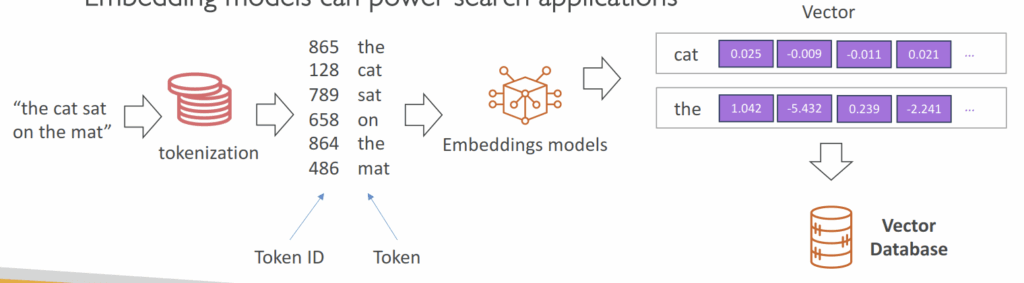
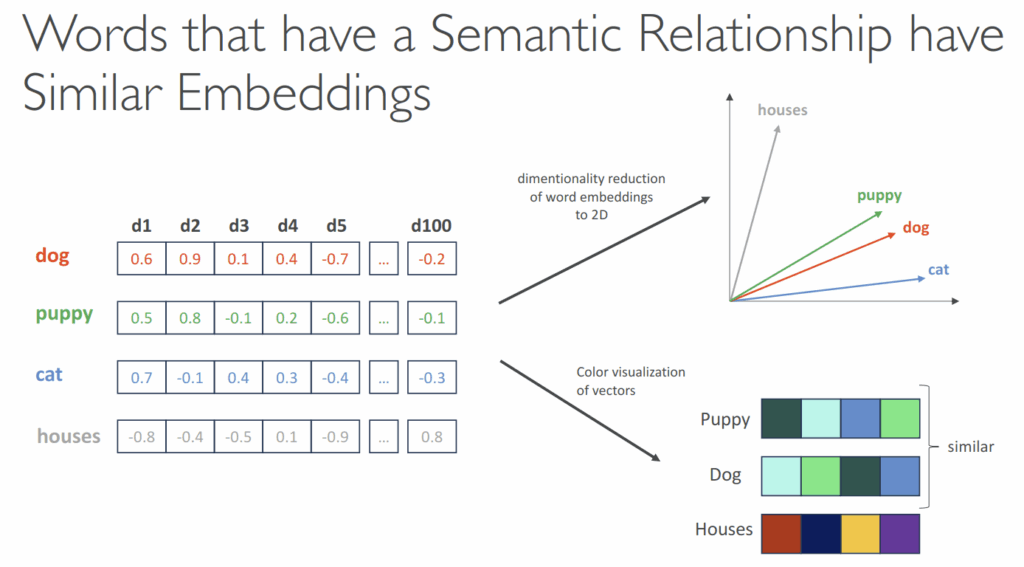
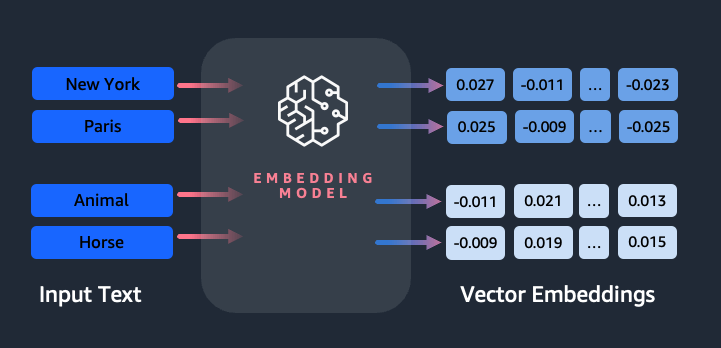
- Create vectors (array of numerical values) out of text, images or audio
- Vectors have a high dimensionality to capture many features for one input token, such as semantic meaning, syntactic role, sentiment
- Embedding models can power search applications
AWS Bedrock
- Build Generative AI (Gen-AI) applications on AWS
- Fully-managed service
- Pay-per-use pricing model
- Unified APIs
- bedrock: Manage, deploy, train models
- bedrock-runtime: Perform inference (execute prompts, generate embeddings) against these models
- Converse, ConverseStream, InvokeModel, InvokeModelWithResponseStream
- bedrock-agent: Manage, deploy, train LLM agents and knowledge bases
- bedrock-agent-runtime: Perform inference against agents and knowledge bases
- InvokeAgent, Retrieve, RetrieveAndGenerate
- IAM permissions
- Must use with an IAM user (not root)
- User must have relevant Bedrock permissions
- AmazonBedrockFullAccess
- AmazonBedrockReadOnly
- Amazon Bedrock makes a copy of the FM, available only to you, which you can fur ther fine-tune with your own data
- None of your data is used to train the FM
- Fine-Tuning a Model
- Adapt a copy of a foundation model with your own data
- Fine-tuning will change the weights of the base foundation model
- Training data must:
- Adhere to a specific format
- Be stored in Amazon S3
- You must use “Provisioned Throughput” to use a fine-tuned model
- Instruction-based
- Improves the performance of a pre-trained FM on domain-specific tasks
- = further trained on a particular field or area of knowledge
- Instruction-based fine-tuning uses labeled examples that are prompt-response pairs
- Single-Turn Messaging
- system (optional) : context for the conversation.
- messages : An array of message objects, each
containing:- role : Either “user” or “assistant”
- content : The text content of the message
- Multi-Turn Messaging
- To provide instruction-based fine tuning for a conversation (vs Single-Turn Messaging)
- Chatbots = multi-turn environment
- You must alternate between “user” and “assistant” roles
- Fine-tuning resolves comprehension and accuracy issues that occur when a general-purpose model struggles to interpret specialized or informal language. By providing labeled examples that include the target audience’s unique phrasing, abbreviations, and tone, the model’s internal parameters are adjusted to better predict and understand similar text patterns in future inputs. This results in more accurate and contextually relevant responses that align with the organization’s specific domain or communication style. The approach is particularly effective when an organization’s data contains patterns not typically found in public datasets used for foundation model pre-training.
- Continued Pre-training
- Also called domain-adaptation fine-tuning, to make a model expert in a specific domain
- Provide unlabeled data to continue the training of an FM
- Good to feed industry-specific terminology into a model (acronyms, etc…)
- Can continue to train the model as more data becomes available
- Low-Rank Adaptation (LoRA)
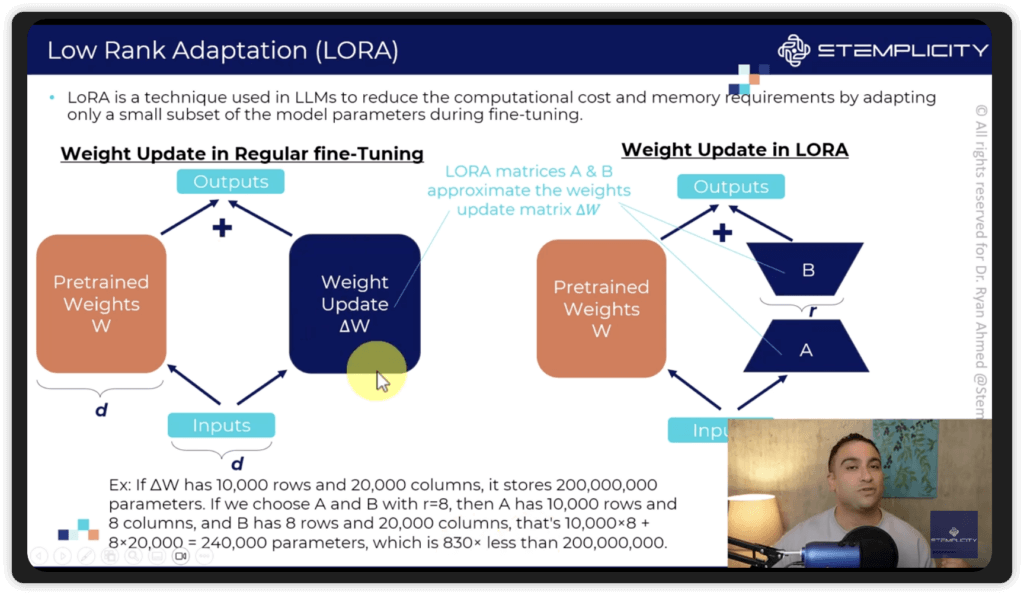
- We don’t update the entire model, just slap on some “low-rank matrices” to the attention weights (usually), and train those.
- “Low-rank” refers to the complexity of the underlying matrices in the model
- At inference, these fine-tuned weights get added into the base model
- Base model remains unchanged
- Very efficient for storage, training, and inference
- This is different from an “adapter layer”
- Working Method
- Freezes Base Model: Keeps the original massive model weights untouched.
- Injects Adapters: Adds tiny, low-rank matrices (A and B) alongside key layers (often in attention mechanisms).
- Low-Rank Decomposition.
- Trains Only Adapters.
- Merges Weights (Optional): For inference, these adapter weights can be merged back into the base model to eliminate extra latency.
- We don’t update the entire model, just slap on some “low-rank matrices” to the attention weights (usually), and train those.
- Automatic Evaluation
- Evaluate a model for quality control
- Built-in task types:
- Text summarization
- question and answer
- text classification
- open-ended text generation…
- Bring your own prompt dataset or use built-in curated prompt datasets as “Benchmark Datasets”
- Curated collections of data designed specifically at evaluating the performance of language models
- Wide range of topics, complexities, linguistic phenomena
- Helpful to measure: accuracy, speed and efficiency, scalability
- Some benchmarks datasets allow you to very quickly detect any kind of bias and potential
discrimination against a group of people
- Scores are calculated automatically
- Model scores are calculated using various statistical methods (e.g. BERTScore, F1…)
- Human Evaluation
- Choose from Built-in task types (same as Automatic) or add a custom task
- Automated Metrics
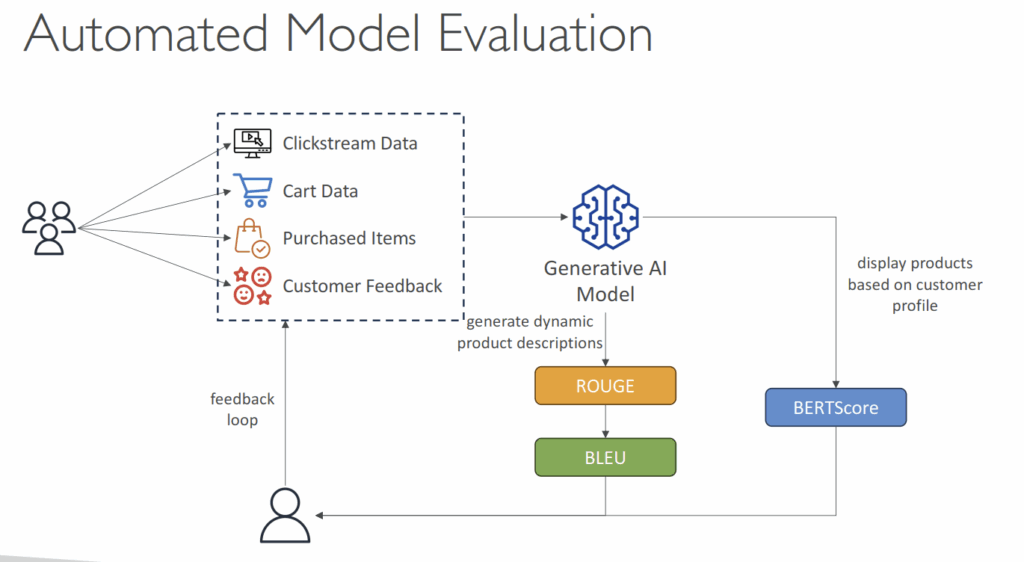
- ROUGE: Recall-Oriented Understudy for Gisting Evaluation
- Evaluating automatic summarization and machine translation systems
- ROUGE focuses on recall: how much the words (and/or n-grams) in the human references appear in the candidate model outputs.
- ROUGE uses the F1-score as its default metric because it balances the trade-off between recall and precision. This is especially useful in summarization tasks, where capturing all key points (recall) and avoiding verbosity or irrelevant details (precision) are equally important.
- ROUGE-N – measure the number of matching n-grams between reference and generated text
- ROUGE-L – longest common subsequence between reference and generated text
- BLEU: Bilingual Evaluation Understudy
- Evaluate the quality of generated text, especially for translations
- BLEU focuses on precision: how much the words (and/or n-grams) in the candidate model outputs appear in the human reference.
- Considers both precision and penalizes too much brevity
- Looks at a combination of n-grams (1, 2, 3, 4)
- BERTScore
- Semantic similarity between generated text
- Uses pre-trained BERT models (Bidirectional Encoder Representations from Transformers) to compare the contextualized embeddings of both texts and computes the cosine similarity between them.
- Capable of capturing more nuance between the texts
- Perplexity: how well the model predicts the next token (lower is better)
- ROUGE: Recall-Oriented Understudy for Gisting Evaluation
- Business Metrics
- User Satisfaction – gather users’ feedbacks and assess their satisfaction with the model responses
- Average Revenue Per User (ARPU) – average revenue per user attributed to the Gen-AI app
- Cross-Domain Performance – measure the model’s ability to perform cross different domains tasks
- Conversion Rate – generate recommended desired outcomes such as purchases
- Efficiency – evaluate the model’s efficiency in computation, resource utilization…
- Guardrails
- Control the interaction between users and Foundation Models (FMs)
- Filter undesirable and harmful content
- Remove Personally Identifiable Information (PII)
- Enhanced privacy
- Reduce hallucinations
- Ability to create multiple Guardrails and monitor and analyze user inputs that can violate the Guardrails
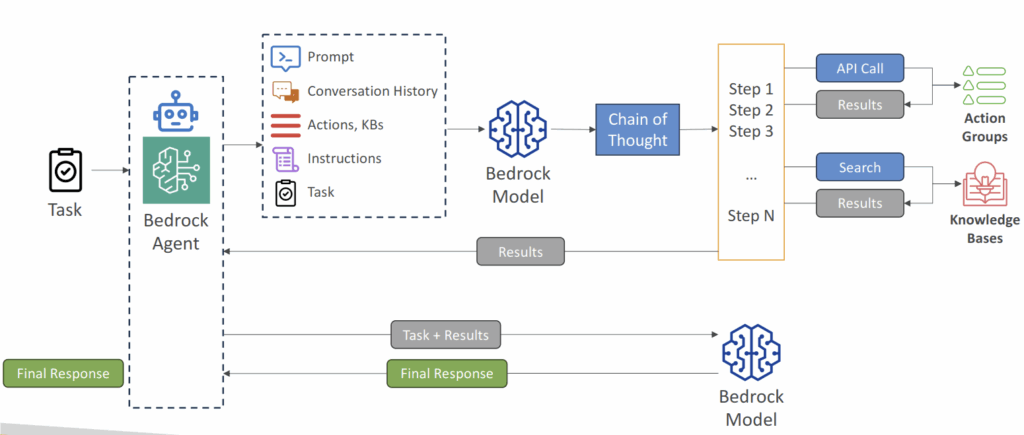
- Agents
- Manage and carry out various multi-step tasks related to infrastructure provisioning, application deployment, and operational activities
- Task coordination: perform tasks in the correct order and ensure information is passed correctly between tasks
- Agents are configured to perform specific pre-defined action groups
- Integrate with other systems, services, databases and API to exchange data or initiate actions
- Leverage RAG to retrieve information when necessary
- to tracking the action group invoked
- enable the trace, in the InvokeAgent response, each chunk in the stream is accompanied by a trace field that maps to a TracePart object. The tracePart object contains information about the agent and sessions, alongside the agent’s reasoning process and results from calling API functions.
- When
enableTraceis set totrue, the response includes atraceobject that captures each orchestration step, such as knowledge base lookups, action group invocations (including parameters), and rationale generation, allowing developers to debug and audit the agent’s behavior effectively.
- Bedrock & CloudWatch
- Model Invocation Logging
- Send logs of all invocations (request, response, and metadata) to Amazon CloudWatch and S3
- Can include text, images and embeddings
- Analyze further and build alerting thanks to CloudWatch Logs Insights
- S3 destination
- S3 handles large binary outputs like images
- Gzipped JSON files, each containing a batch of invocation log records, are delivered to the specified S3 bucket. Similar to a CloudWatch Logs event, each record will contain the invocation metadata, and input and output JSON bodies of up to 100 KB in size. Binary data or JSON bodies larger than 100 KB will be uploaded as individual objects in the specified Amazon S3 bucket under the data prefix. The data can be queried using Amazon Athena and can be catalogued for ETL using AWS Glue. The data can be loaded into the OpenSearch service or processed by any Amazon EventBridge targets.
- CloudWatch Logs destination
- enables real-time monitoring and query analytics
- JSON invocation log events are delivered to a specified log group in CloudWatch Logs. The log event contains the invocation metadata, and input and output JSON bodies of up to 100 KB in size. If an Amazon S3 location for large data delivery is provided, binary data or JSON bodies larger than 100 KB will be uploaded to the Amazon S3 bucket under the data prefix instead. Data can be queried using CloudWatch Logs Insights and can be further streamed to various services in real-time using CloudWatch Logs.
- S3 destination
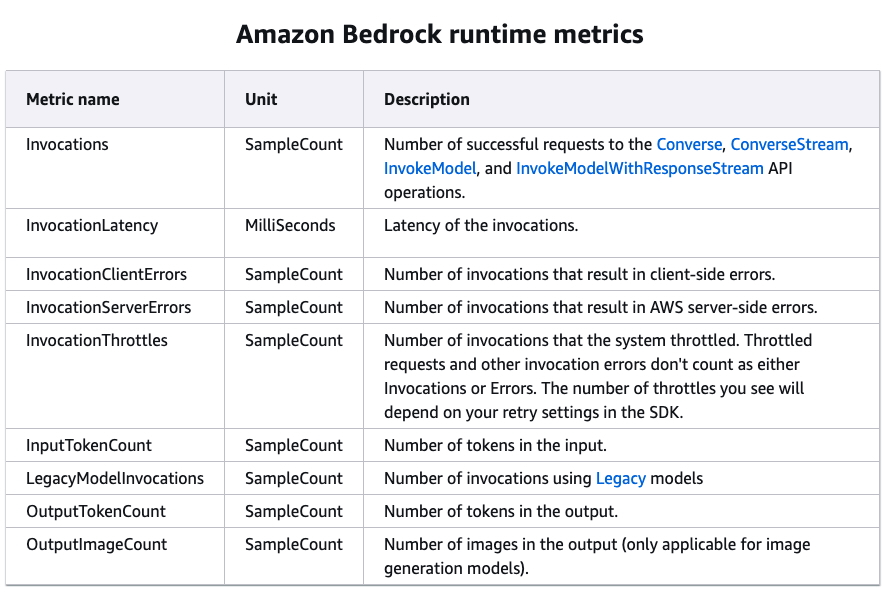
- CloudWatch Metrics
- Published metrics from Bedrock to CloudWatch
- Including ContentFilteredCount, which helps to see if Guardrails are functioning
- Can build CloudWatch Alarms on top of Metrics
- Model Invocation Logging
- Pricing
- On-Demand
- Pay-as-you-go (no commitment)
- Text Models – charged for every input/output token processed
- Embedding Models – charged for every input token processed
- Image Models – charged for every image generated
- Works with Base Models only
- Batch:
- Multiple predictions at a time (output is a single file in Amazon S3)
- Can provide discounts of up to 50%
- Provisioned Throughput
- Purchase Model units for a certain time (1 month, 6 months…)
- Throughput – max. number of input/output tokens processed per minute
- Works with Base, Fine-tuned, and Custom Models
- On-Demand
- Model Improvement Techniques Cost Order
- Prompt Engineering
- No model training needed (no additional computation or fine-tuning)
- Retrieval Augmented Generation (RAG)
- Uses external knowledge (FM doesn’t need to ”know everything”, less complex)
- No FM changes (no additional computation or fine-tuning)
- Instruction-based Fine-tuning
- FM is fine-tuned with specific instructions (requires additional computation)
- Domain Adaptation Fine-tuning
- Model is trained on a domain-specific dataset (requires intensive computation)
- Prompt Engineering
- Cost savings
- On-Demand – great for unpredictable workloads, no long-term commitment
- Batch – provides up to 50% discounts
- Provisioned Throughput – (usually) not a cost-saving measure, great to “reserve”
capacity - Temperature, Top K, Top P – no impact on pricing
- Model size – usually a smaller model will be cheaper (varies based on providers)
- Number of Input and Output Tokens – main driver of cost
Retrieval Augmented Generation (RAG)
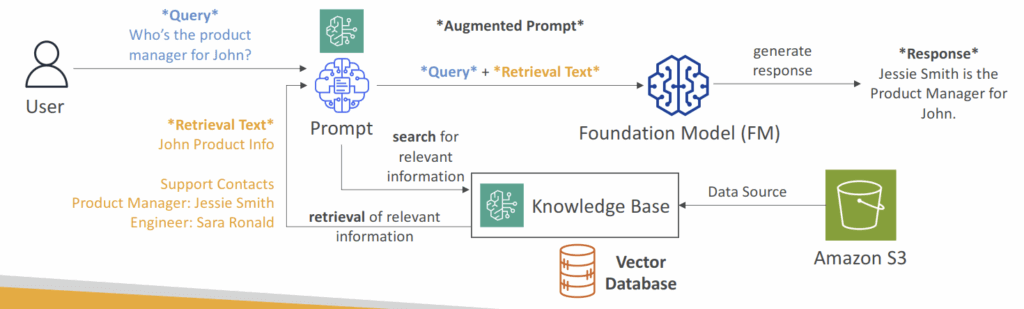
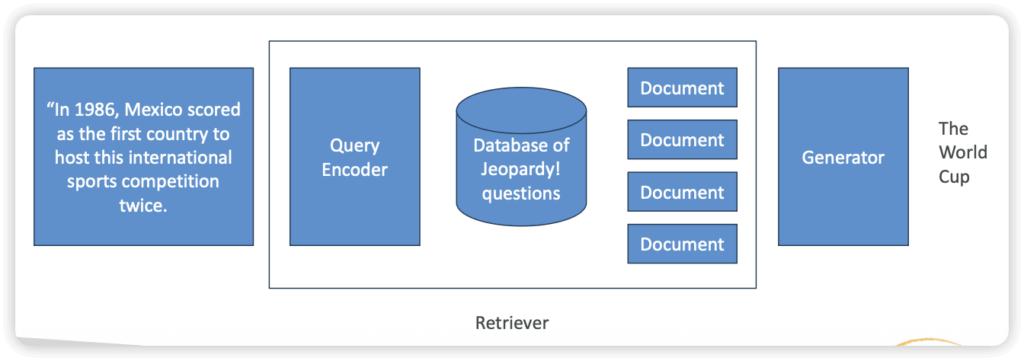
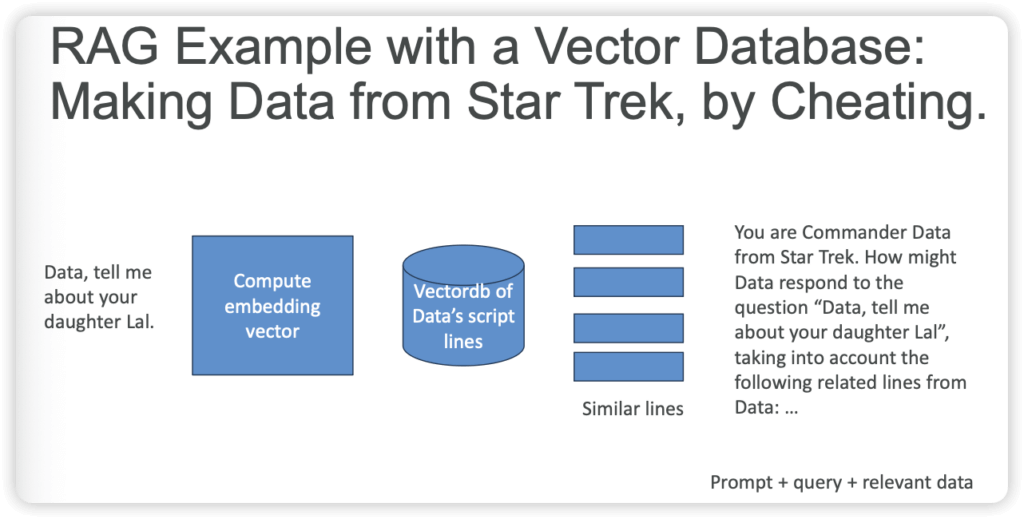
- Allows a Foundation Model to reference a data source outside of its training data
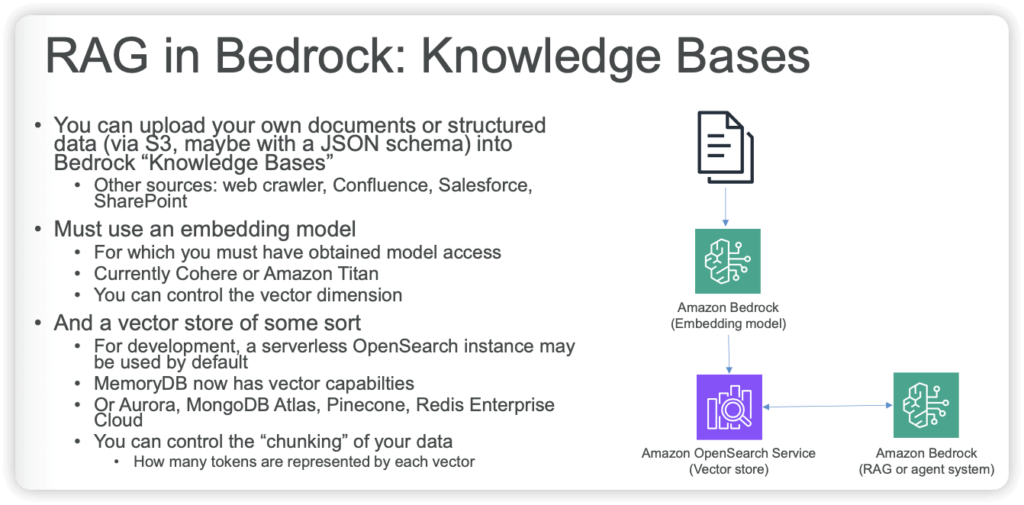
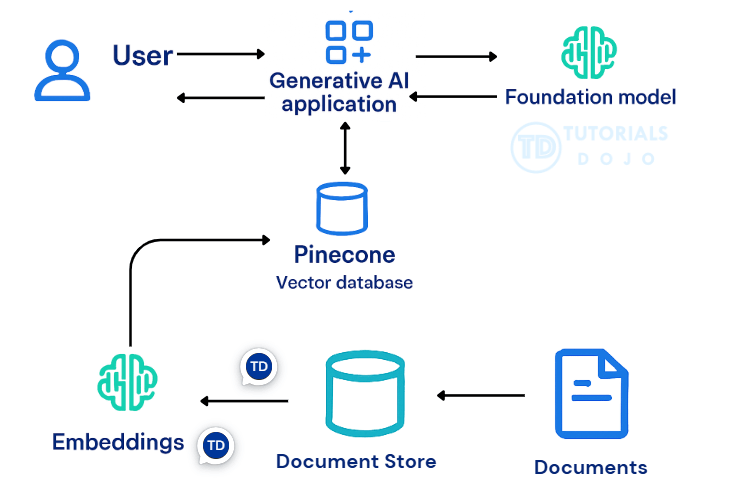
- Bedrock takes care of creating Vector Embeddings in the database of your choice based on your data
- Use where real-time data is needed to be fed into the Foundation Model
- PROs
- Faster & cheaper way to incorporate new or proprietary information into “GenAI” vs. fine-tuning
- Updating info is just a matter of updating a database
- Can leverage “semantic search” via vector stores
- Can prevent “hallucinations” when you ask the model about something it wasn’t trained on
- If your boss wants “AI search”, this is an easy way to deliver it.
- Technically you aren’t “training” a model with this data
- Cons
- You have made the world’s most overcomplicated search engine
- Very sensitive to the prompt templates you use to incorporate your data
- Non-deterministic
- It can still hallucinate
- Very sensitive to the relevancy of the information you retrieve
- RAG Knowledge Base Data Store
- Vector Databases
- Amazon Aurora PostgreSQL – relational database, proprietary on AWS
- Amazon S3 Vectors – cost-effective and durable storage with sub-second query performance
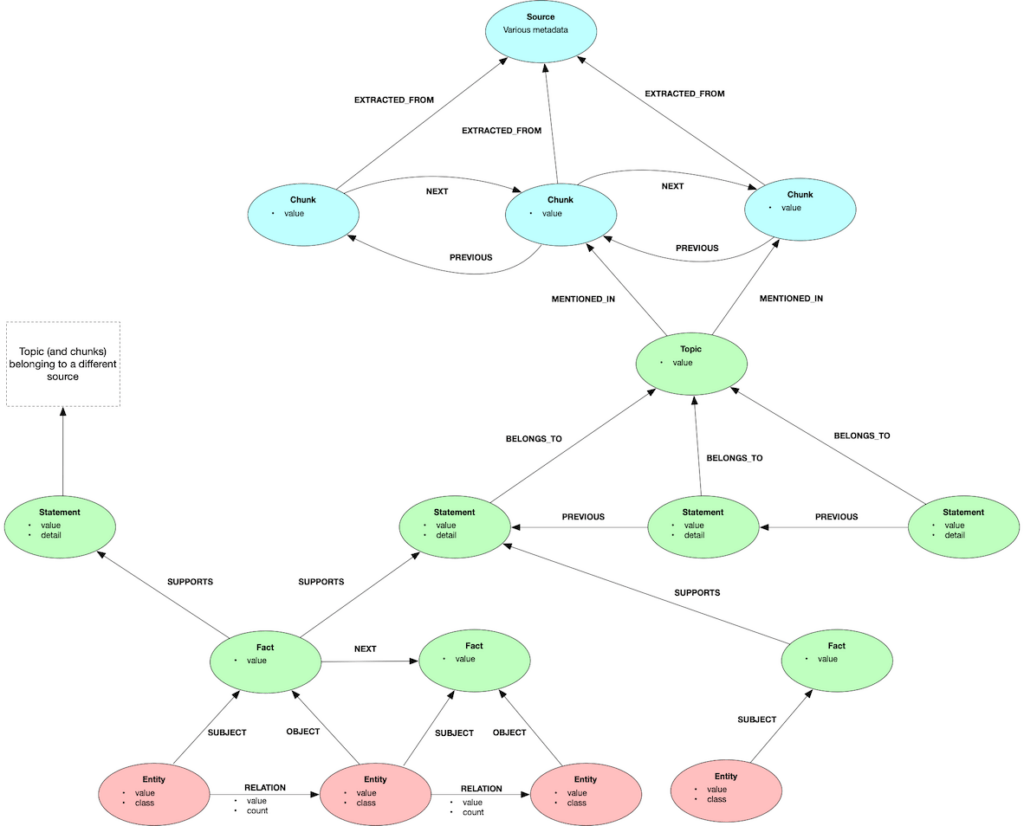
- Graph database, as Neo4j & Amazone Neptune Analytics
- Amazon Neptune Analytics – graph database that enables high performance graph analytics and graph-based RAG (GraphRAG) solutions
- Opensearch for traditional text search (TF/IDF)
- Amazon OpenSearch Service (Serverless & Managed Cluster) – search & analytics database real time similarity queries, store millions of vector embeddings scalable index management, and fast nearest-neighbor (kNN) search capability
- Elasticsearch/Opensearch can function as a vectorDB
- Vector Databases
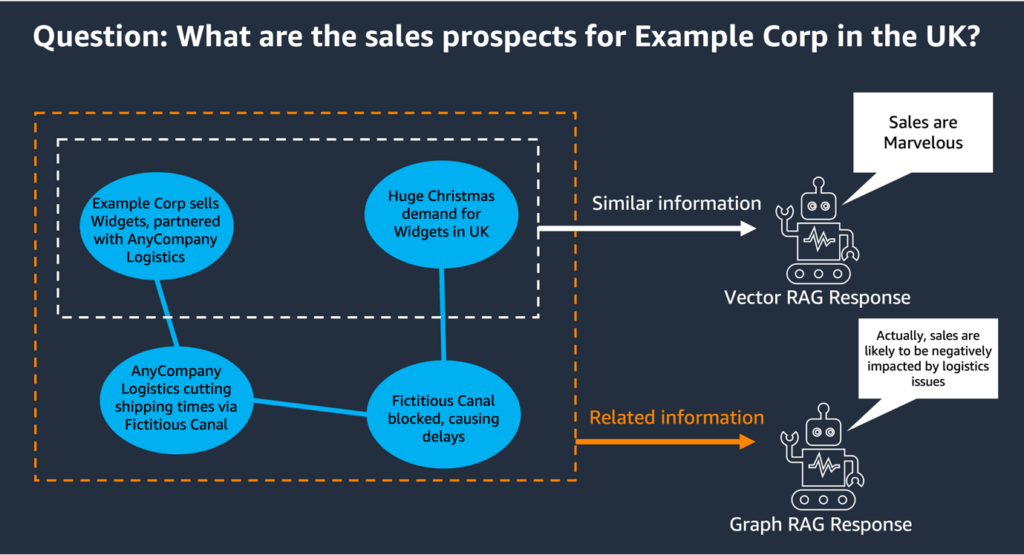
| Feature | Conventional (Vector) RAG | Knowledge Graph (KG) RAG |
|---|---|---|
| Core Concept | Retrieves text based on mathematical similarity. | Traverses explicit relationships and networks. |
| Data Structure | Unstructured text broken into flat chunks in a vector index. | Interconnected data mapped as entities (nodes) and their links (edges). |
| Best For | Document Q&A, FAQ bots, summarizing isolated passages. | Multi-hop reasoning, supply chain tracking, holistic data analysis. |
| Setup & Cost | Fast and easy to deploy from existing text sources. | Requires significant upfront effort to define schemas and extract entities. |
| Failure Mode | Can over-retrieve, hallucinate on missing context, or match words instead of meaning. | Graph can go stale if not maintained or updated continuously. |
| Use Case | Ideal for unstructured text corpora (e.g., policy manuals, company wikis) where you simply need the AI to find specific documents and summarize them | Ideal for data with heavy dependencies and audit requirements (e.g., financial networks, healthcare patient histories, supply chains). It excels when asked questions like, “Trace the entire supply chain starting from Supplier A” |
Hybrid Approach: Many enterprise architects combine the two. Vector search finds the relevant “entry points” in a document, and graph traversal maps the connections between those entities.
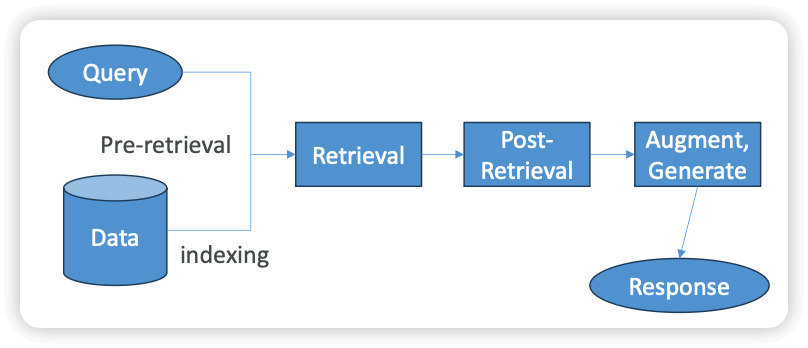
- R in RAG
- Pre-Retrieval
- Indexing
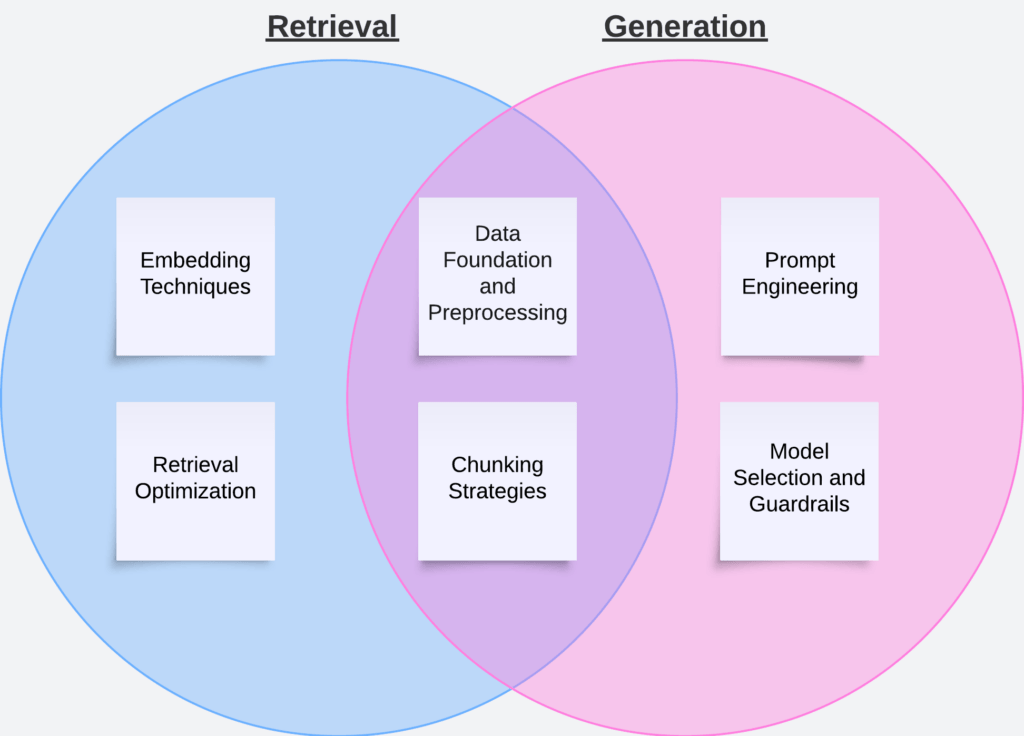
- Granularity / chunking (the process of splitting up data prior to storage)
- Semantic Chunking
- Ensure each chunk contains semantically independent information
- Embedding-based (LlamaIndex / Langchain)
- Model-based (BERT)
- LLM-based (Basically tell it to do semantic chunking)
- Amazon S3 Vectors complements semantic chunking by efficiently storing the resulting vector embeddings. Embeddings created from semantically chunked content can be retrieved quickly and cost-effectively, supporting high-volume RAG-based queries without storing redundant information. Amazon SageMaker AI and Amazon Textract further enhance this workflow by preprocessing scanned or image-based documents. Textract extracts text and structured data, while SageMaker generates high-quality embeddings, ensuring that even non-text-native content is represented accurately for retrieval. Together, semantic chunking, optimized token parameters, and vector storage in S3 enable enterprises to build efficient, scalable, and cost-effective RAG-based chatbots that provide coherent and contextually complete responses.
- Standard chunking is the most straightforward approach, splitting documents into fixed-size segments based purely on token count.
- Hierarchical chunking introduces a two-level structure in which large parent chunks are split into smaller child chunks.
- improves context compared to standard chunking, it can still return child chunks that are semantically incomplete or parent chunks containing irrelevant information. As a result, retrieval costs can remain high, and the system may still deliver fragmented answers if chunks do not align with natural content boundaries.
- Semantic Chunking
- Data extraction
- Granularity / chunking (the process of splitting up data prior to storage)
- Query Rewriting
- Indexing
- Retrieval
- Post-Retrieval
- Pre-Retrieval
- [ 🧐QUESTION🧐 ] Create RAG with LLM
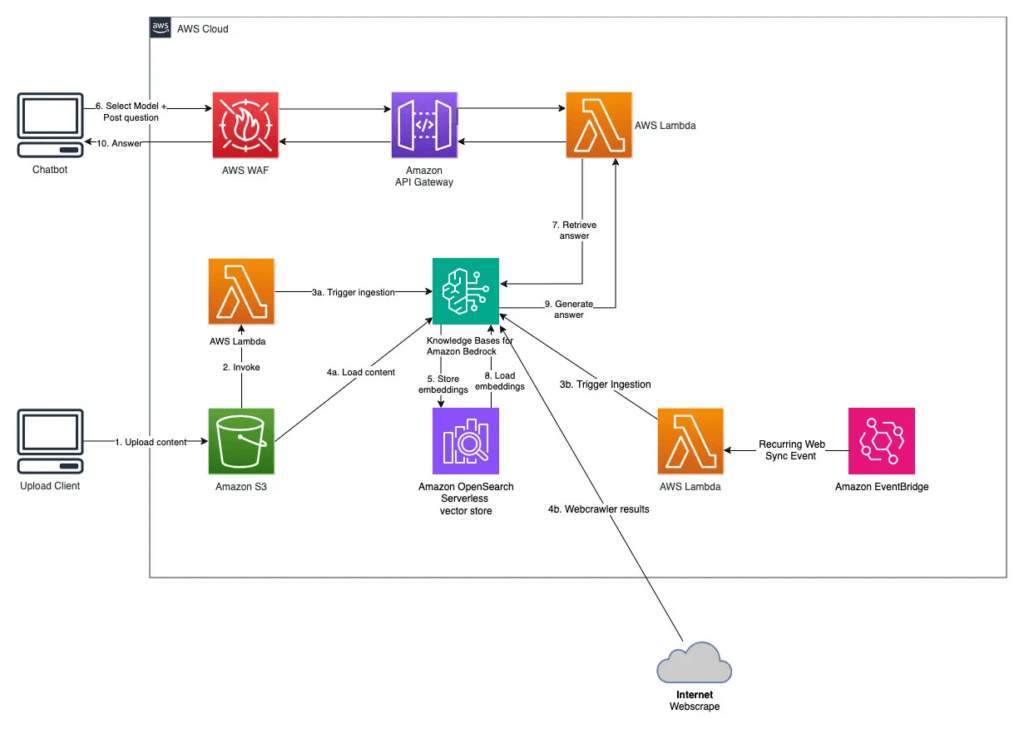
- A knowledge base in Amazon Bedrock serves as a managed data retrieval layer for RAG workflows.
- Bedrock automatically performs data ingestion, document parsing, text chunking, and embedding generation using an integrated vector store. The service manages the synchronization of the data source and ensures that newly uploaded or modified documents in S3 are continually available for retrieval.
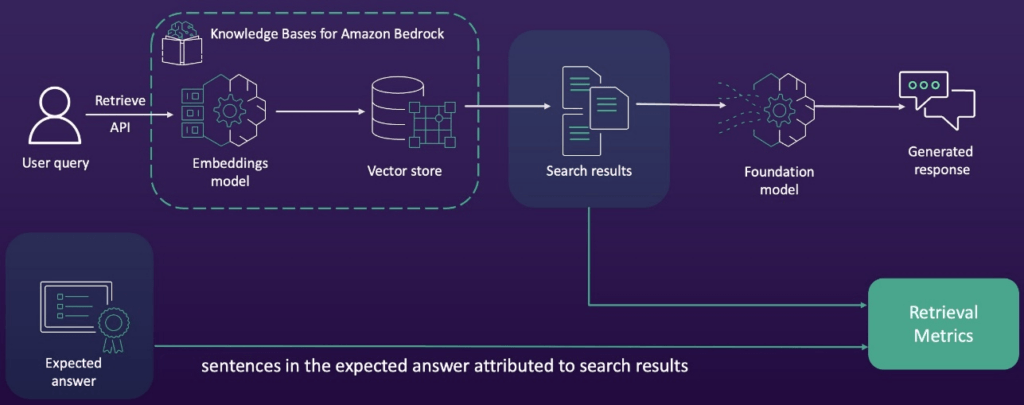
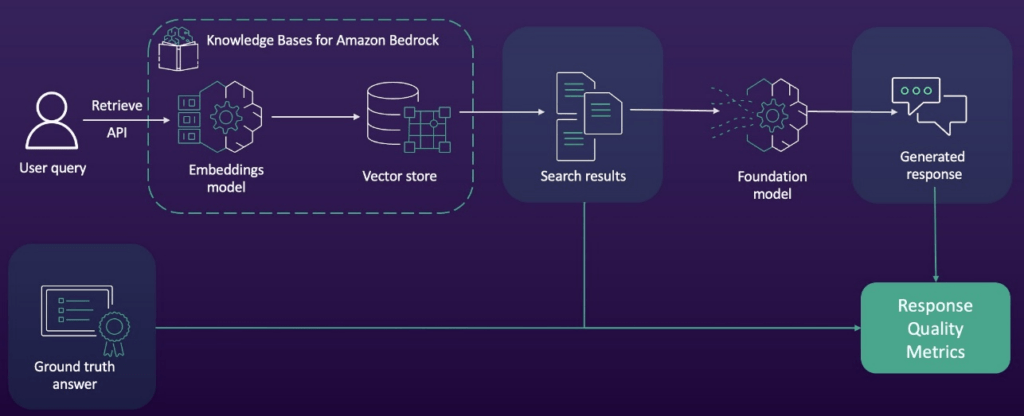
- When a user submits a query through the Amazon Bedrock API, the service retrieves the most semantically relevant document fragments from the knowledge base and injects them into the LLM’s prompt context.
- Why AWS Kendra is not a good choice?? While Amazon Kendra can index and semantically search the S3 documents, it is only a retrieval service; to connect LLM there would be more extra steps needed
- Compare to Fine-tune
- Fine-tuning is typically used to adjust a model’s tone, structure, or task-specific behavior, not to embed continuously changing enterprise knowledge.
- Fine-tuning permanently modifies model parameters and would require repeated retraining whenever new policies or regulations are added.
- This method would be costly, time-consuming, and not suitable for regulatory data that must remain up-to-date.
- In contrast, RAG allows models to dynamically reference the latest proprietary documents without altering the base model, which is far more efficient and maintainable.
- To integrate data stored in an Amazon S3 bucket, you can configure the Amazon Bedrock knowledge base to reference the S3 bucket as a data source. This integration automatically handles the ingestion, transformation, and indexing of the documents, converting them into embeddings for efficient retrieval. The Bedrock API is then used to execute RAG queries, allowing the LLM to pull relevant information from the knowledge base during the inference process. This approach significantly reduces the complexity of manually managing data pipelines or embedding storage systems.
- [🧐QUESTION🧐 ] to implement the RAG solution
- Step 1: Set up a data ingestion pipeline to process, clean, enrich, and update product documentation for retrieval indexing.
- Step 2: Create initial embeddings for all documents and configure automated embedding generation for new or updated content.
- Step 3: Implement vector search in OpenSearch Service with hybrid search capabilities to combine semantic matching and keyword matching.
- Step 4: Deploy an FM in Bedrock and develop a prompt template for retrieval-augmented generation.
- [🧐QUESTION🧐 ] to implement the RAG pipeline with agents
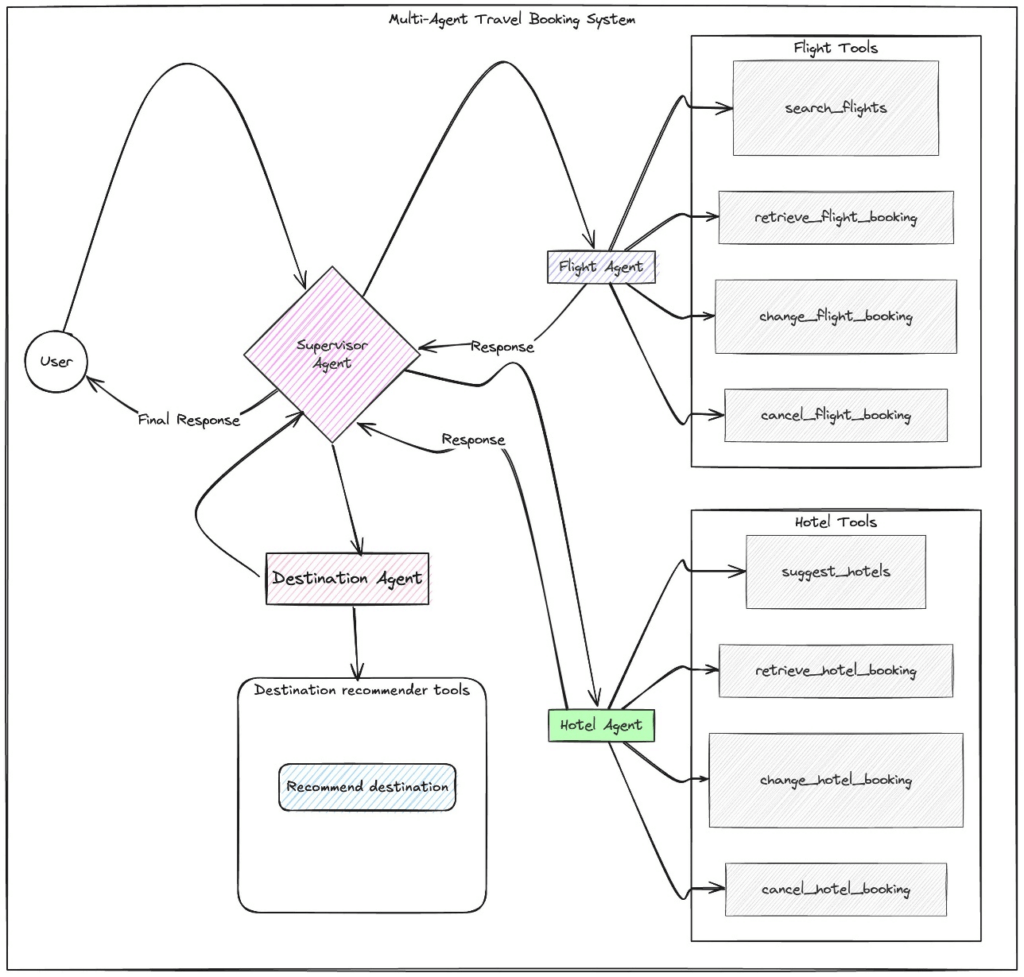
- Together, Amazon Bedrock, LangChain, and LangGraph form an integrated architecture where Bedrock serves as the inference and embedding backbone, LangChain structures the RAG pipeline around Bedrock model calls, and LangGraph governs the stateful agent workflow, memory persistence, versioning, and compliance-ready execution. This combination matches all the scenario requirements: ingestion, embedding standardization, retrieval, agent memory, reproducibility, and cross-service integration with SageMaker AI and SageMaker Feature Store.
- LangChain directly extends Amazon Bedrock by offering native Bedrock wrappers, prompt templates, embedding interfaces, and model abstractions. These tools make Bedrock models usable as first-class components inside every stage of the retrieval-augmented generation lifecycle. LangChain pipelines can call Bedrock to transform documents from Amazon S3, generate embeddings for storage in a vector database or SageMaker Feature Store, produce chain-of-thought reasoning, or synthesize financial advisory responses based on retrieved context. LangChain coordinates the ingestion and embedding flow, ensuring that Bedrock models provide the semantic backbone for both the document preparation phase and the inference phase.
- LangGraph deepens this integration by enabling graph-structured execution for agents powered by Bedrock. Each node in a LangGraph workflow can invoke a Bedrock model for reasoning, memory lookup, or RAG-based generation. LangGraph adds persistent state, checkpointing, memory replay, and controlled transitions between Bedrock-powered reasoning steps. This is important for regulated environments because each Bedrock response, memory update, tool call, and reasoning step can be captured as part of the agent’s traceable execution graph. LangGraph ensures that when Bedrock models are used for advisory tasks, every decision path can be reviewed, repeated, audited, or rolled back while preserving client-specific long-term memory stored across sessions.
- [🧐QUESTION🧐 ] validate each generated response against trusted enterprise sources while maintaining consistent governance
- Implement an accuracy-verification workflow that uses a retrieval-augmented grounding system backed by Amazon Bedrock Knowledge Bases.
- Knowledge Bases establish an accuracy verification workflow by grounding model responses in authoritative enterprise information. During inference, the system retrieves supporting documents and provides them as context to the foundation model. This retrieval step functions as the fact checking layer because generated outputs must align with the retrieved context to remain accurate. Grounding ensures that the foundation model produces evidence-supported content rather than relying solely on internal model parameters. This significantly reduces hallucinations and improves the reliability of generative outputs, particularly in domains where correctness and traceability are essential. The ability to associate responses with retrieved documents also helps organizations implement validation, auditing, and governance requirements.
- [ NOT ] Use Amazon Comprehend custom classification to categorize generated responses based on financial topics and route low-confidence classifications to a SageMaker endpoint for evaluation
- Amazon Comprehend provides text classification and entity extraction, which primarily identify categories or linguistic patterns in documents rather than performing document-grounded fact verification.
- Comprehend models do not retrieve authoritative context or validate the correctness of generated claims, and therefore cannot ensure alignment between model outputs and trusted enterprise sources.
- [ 🧐QUESTION🧐 ] a consistent access layer for all content, minimal manual maintenance, and the ability for the AI assistant to reference the most current information at all times
- Unify access to all repositories using Amazon Bedrock Knowledge Bases. Configure data source connectors for each knowledge base and compliance wiki, and enable automated synchronization so content remains updated
- [ NOT ] AWS DataSync to periodically transfer document sets <- batched
- [ NOT ] multi-source data integration approach using Amazon AppFlow, AWS Transfer Family <- too complicated
- [ NOT ] Amzone Neptune <– suitable for graphic
- [ 🧐QUESTION🧐 ] integrate retrieval, personalization, and generative content generation
- With hybrid search enabled, Knowledge Bases combine vector similarity search with traditional keyword-based search, improving overall retrieval relevance—especially in environments with mixed structured and unstructured content. This is critical for customer support systems that handle both explicit keyword-driven troubleshooting and implicit semantic questions that require contextual understanding.
- By enriching knowledge base entries with metadata from Amazon Kendra, the system gains deeper enterprise search capabilities such as document-level relevance ranking, intent-based retrieval, and field-level filtering. Kendra’s high-accuracy semantic search complements Bedrock’s native embedding-based search, giving the hybrid engine more relevant candidates to feed into the generative model. This makes it easier for the assistant to identify the best manuals, help articles, or technical notes to support a user query.
- Amazon Personalize adds a personalization layer by generating user-specific article recommendations based on past interactions, support history, or browsing patterns. By feeding personalized outputs into the Knowledge Base retrieval logic, the assistant can present content that is not only relevant to the query but also tailored to the customer’s behavior. When combined, Kendra metadata enrichment and Personalize ranking create a more adaptive retrieval pipeline that improves both accuracy and user satisfaction.
- [ NOT ] Preprocess documents using Amazon Bedrock Model Customizations
- only prepares embeddings and prompt templates without unifying retrieval, personalization, and RAG capabilities
- [ NOT ] Ingest and transform support content continuously with Amazon Bedrock Data Automation
- Using Bedrock Data Automation for ongoing ingestion improves data freshness, but it primarily solves ETL, not retrieval relevance
- [ NOT ] Orchestrate generative models with Amazon Bedrock Prompt Flows
- Bedrock Prompt Flows simply manages workflow logic and does not provide an integrated hybrid search or retrieval engine
Amazon Bedrock Guardrails
- Content filtering for prompts and responses
- Works with text foundation models
- Word filtering
- Topic filtering
- Profanities
- PII removal (or masking)
- Contextual Grounding Check
- Helps prevent hallucination
- Measures “grounding” (how similar the response is to the contextual data received)
- And relevance (of response to the query)
- Safeguards/Policies
- Content Filters: These detect and filter harmful text or image content in input prompts or model responses. Filtering is based on certain predefined harmful content categories, including Hate, Insults, Sexual content, Violence, Misconduct, and Prompt Attack. You can also adjust the filter strength for each of these categories.
- Denied Topics: You can define a list of undesirable topics for your application. The filter will block these topics if they are detected in user queries or model responses.
- Word Filters: Configure filters to block undesirable words, phrases, and profanity (exact matches). This can include offensive terms, competitor names, etc.
- Sensitive Information Filters: Set up filters to block or mask sensitive information, such as personally identifiable information (PII) or custom regular expressions (regex) in user inputs and model responses. Blocking or masking is done based on probabilistic detection of standard formats for sensitive entities, such as Social Security Numbers (SSNs), Dates of Birth, addresses, etc. This feature also allows for regular expression-based detection of patterns used for identifiers.
- Contextual Grounding Checks: These help detect and filter inaccuracies or hallucinations in model responses by verifying their grounding in a source and relevance to the user query.
- Automated Reasoning Checks: These can validate the accuracy of foundation model responses against a set of logical rules. Automated Reasoning checks can help identify hallucinations, suggest corrections, and highlight unstated assumptions in model responses.
- Implement on
- Model inference – Apply a guardrail to submitted prompts and generated responses when running inference on a model.
- Agents – Associate a guardrail with an agent to apply it to prompts sent to the agent and responses returned from it.
- Knowledge base – Apply a guardrail when querying a knowledge base and generating responses from it.
- Flow – Add a guardrail to a prompt node or knowledge base node in a flow to apply it to inputs and outputs of these nodes.
- Can be incorporated into agents and knowledge bases
- May configure the “blocked message” response
- Automated Reasoning Checks
- Useful for enforcing complex policies (mortgage approval, medical info, stuff like that.)
- Can help detect hallucinations in complex scenarios
- You provide your policy as a clear, well organized policy document (PDF)
- Use the CreateAutomatedReasoningPolicy API
- Bedrock tries to break out your policy into structured rules and logic that can be applied
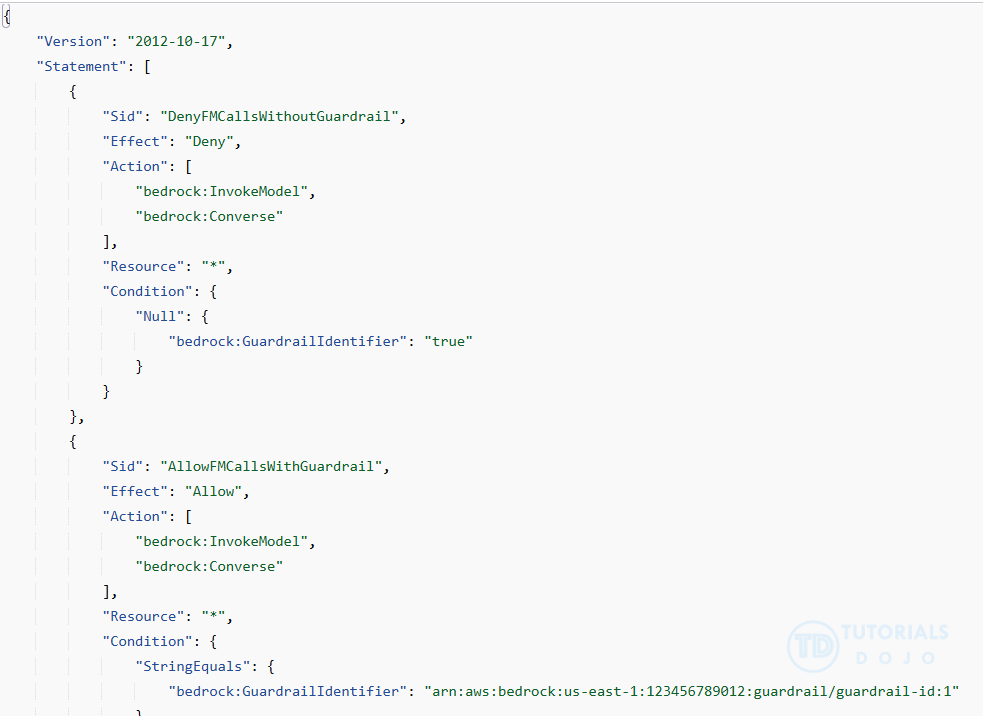
- [🧐QUESTION🧐 ] enforces guardrail usage for all FM interactions
- By default, users and roles do not have permission to create or modify Amazon Bedrock resources. To enable users to perform the necessary actions on these resources, an IAM administrator can create IAM policies.
- Enforce the use of a specific guardrail for model inference by including the
bedrock:GuardrailIdentifiercondition key in your IAM policy. This allows you to deny any inference API request that doesn’t include the guardrail configured in your IAM policy. - Apply this enforcement for the following inference APIs:
- Converse
- ConverseStream
- InvokeModel
- InvokeModelWithResponseStream
- Amazon Bedrock (service prefix:
bedrock) provides the following service-specific resources, actions, and condition context keys for use in IAM permission policies. - IAM condition keys are evaluated before the request is authorized by Amazon Bedrock. By requiring
bedrock:GuardrailIdentifieron bothInvokeModelandConverseactions, every request must explicitly attach a guardrail, or it is denied. This guarantees guardrail enforcement for all FM interactions, applies uniformly to both APIs, prevents bypass, and does so with the least operational overhead by relying solely on native IAM controls. - [ NOT ] forcing all traffic through a prompt router introduces unnecessary architectural complexity and operational overhead. Guardrail enforcement does not require a routing layer when IAM can already mandate the presence of a guardrail identifier directly on the Bedrock API calls.
- [ NOT ] Deploy an API Gateway and AWS Lambda proxy that injects guardrails into all
InvokeModelandConverseAPI requests before forwarding them to Bedrock is incorrect because it typically requires building and maintaining custom infrastructure (API Gateway and Lambda). This adds significant operational overhead compared to IAM-based enforcement, and still leaves room for misconfiguration or bypass if applications call Bedrock directly.
Token-Level Redaction
- Guardrails may not be enough
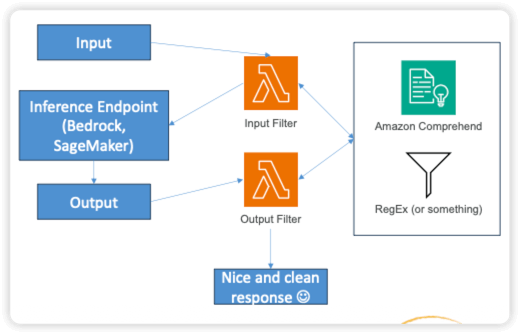
- Token-Level Redaction may be built around your system to:
- Filter sensitive tokens before the request even hits your model
- Filter sensitive tokens on the output that may have slipped through
- We’re not really talking about internal tokens in the FM here (we don’t have access to that.)
- How?
- Custom pre or post-processing handlers around your inference endpoints
- Identify sensitive info with pattern matching
- Identify sensitive info with named entity recognition (NER)
- Amazon Comprehend could be used for this.
- Even better, do this as part of ingestion of data as well
Amazon Titan Image Generator
- create high-quality images from natural-language text prompts or reference visuals.
- capabilities
- inpainting (modifying specific image areas)
- outpainting (extending image borders)
- style transfer
- and background removal
- Amazon S3 complements Titan Image Generator by providing secure, durable, and scalable object storage for generated images, metadata, and reference files.
Amazon Titan Multimodal Embeddings
- typically used to represent text and images as numerical vectors for tasks like semantic search, clustering, and content retrieval, not for creating new images.
- While embeddings can help organize and find similar assets, they do not directly generate visuals.
Amazon Titan Text Embeddings
- specializes in converting text into high-dimensional numerical vectors that capture the semantic meaning and relationships within data.
- This embedding capability allows applications to understand context, perform semantic search, and power retrieval-augmented generation (RAG) workflows where relevant information is retrieved and used to generate more accurate, context-aware responses.
- [ 🧐QUESTION🧐 ] a mechanism that can represent both user queries and document content as semantic embeddings that capture contextual relationships between concepts and terms, also able to integrate easily with existing AWS services to support downstream retrieval-augmented generation (RAG) workflows
- By combining Amazon Titan Text Embeddings for contextual understanding with Amazon OpenSearch Service for vector-based similarity search, organizations can empower AI agents in Amazon Bedrock to retrieve relevant information and reason over data with deeper semantic awareness.
- Titan Text Embeddings, which specializes in converting text into high-dimensional numerical vectors that capture the semantic meaning and relationships within data. This embedding capability allows applications to understand context, perform semantic search, and power retrieval-augmented generation (RAG) workflows where relevant information is retrieved and used to generate more accurate, context-aware responses.
- To make these embeddings useful for retrieval and reasoning tasks, Amazon OpenSearch Service provides a natural complement through its vector search functionality.
Re-ranker Models in Amazon Bedrock
- Attempts to improve relevance of retrieved results for RAG from your KB
- Calculates relevance of chunks to the query, orders results accordingly
- There is a Rerank operation in the API you can use to rank whatever documents you want relative to a query
- Or you can specify a reranker model when hitting your Knowledge Base
- Currently you can choose from Amazon or Cohere models
- These rerankers perform a second layer of scoring on the retrieved chunks by analyzing the semantic relationship between the query and the candidate pieces of text. This deeper semantic evaluation helps correct cases where vector similarity alone returns results that are technically related but still misaligned with the user’s intent. Reranking strengthens contextual grounding without requiring retraining of embedding models or modification of the underlying chunking process.
- when dealing with scenarios where the embedding model and chunking strategy are functioning correctly, but the final results still lack contextual relevance. Reranking introduces a more nuanced decision layer that distinguishes between superficially similar data and the data that is truly most relevant to the case at hand. Because the reranking stage operates on the top-k results returned by the vector index, it improves the quality of the final context without increasing infrastructure complexity or altering the data pipeline.
- When Amazon Bedrock Knowledge Bases and reranking models are combined, organizations gain a more precise and contextually aware retrieval process. These capabilities improve the grounding context for any generative model hosted on Amazon Bedrock and lead to higher-quality summaries, responses, and insights. This approach resolves the issue described in the scenario by improving retrieval relevance without requiring any retraining of large language models.
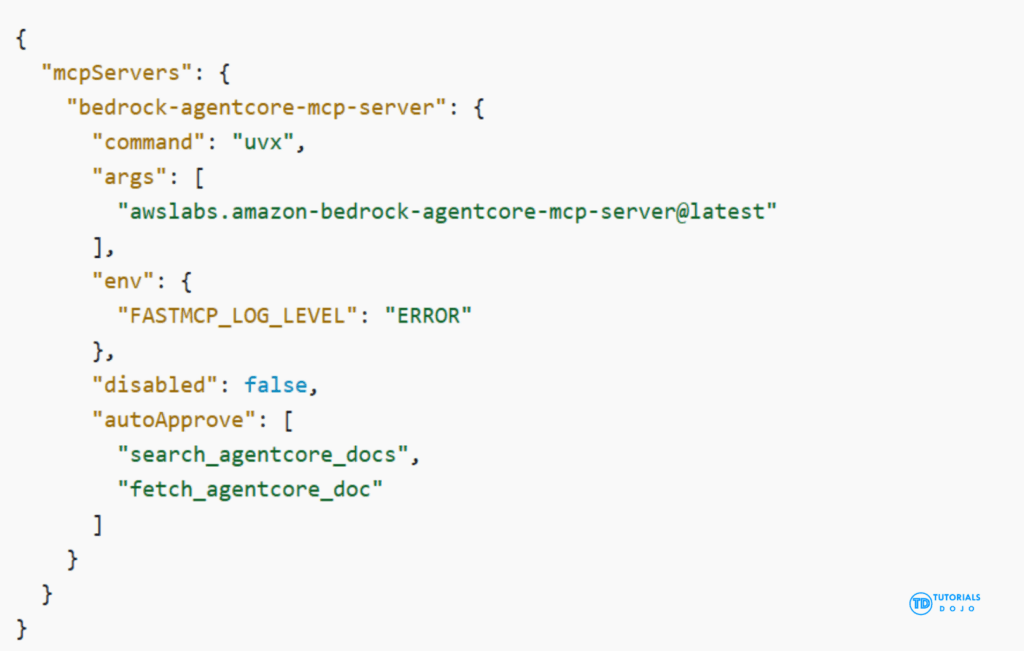
AWS Bedrock with MCP
- implement a single intermediate service that acts as a centralized tool layer using the Model Context Protocol (MCP). MCP allows the model to invoke external tools through a standardized interface rather than embedding raw queries or credentials into prompts. Each data source—Redshift, Kinesis, CloudWatch, or SageMaker JumpStart embeddings—can be wrapped as a callable tool with strict authentication and authorization controls. This approach ensures that the foundation model can dynamically request real-time or historical data, perform vector searches, or gather operational insights without exposing sensitive access patterns or internal APIs.
- Centralizing these capabilities in one MCP-based service significantly strengthens the organization’s security posture. Instead of distributing credentials or APIs across prompts, the intermediate service uses AWS IAM, temporary credentials, and auditable access patterns to control which operations the model may perform. This prevents accidental credential leakage, eliminates the risk of prompt injection inserting unauthorized API calls, and aligns with enterprise governance requirements for regulated financial workloads.
- Finally, this architecture is also extensible. As new data systems or analysis tools are added, such as Amazon OpenSearch Serverless, Amazon Athena, or additional SageMaker inference endpoints, they can simply be exposed as new MCP tools. This avoids the need to redesign prompts or modify model behavior. The combination of Bedrock, SageMaker JumpStart embeddings, and an MCP-based intermediate layer provides a scalable, secure, and flexible design that meets the needs of complex financial AI applications.
- Embedding could addresses semantic search, but cannot support dynamic, secure querying.
Transfer Learning – the broader concept of re-using a pre-trained model to adapt it to a new
related task
- Widely used for image classification
- And for NLP (models like BERT and GPT)
Amazon Nova Canvas
- primarily intended for real-time, human-in-the-loop creative processes, such as brainstorming or refining visuals in a shared workspace.