AWS Lambda
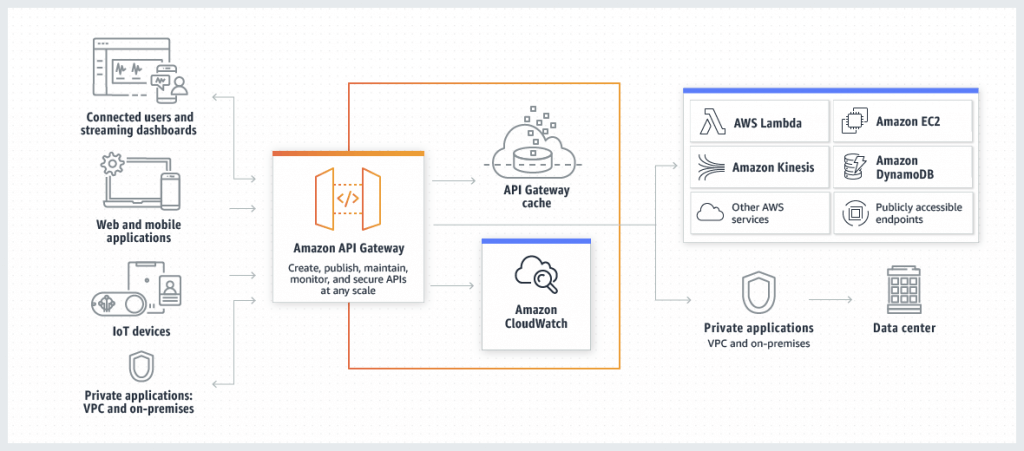
Amazon API Gateway
- Support for the WebSocket Protocol
- Handle API versioning (v1, v2…)
- Generate SDK and API specifications
- Endpoints
- Edge-Optimized (default):
- For global clients, the requests are routed through the CloudFront Edge locations (improves latency)
- The API Gateway still lives in only one region
- Regional:
- For clients within the same region
- Could manually combine with CloudFront (more control over the caching
strategies and the distribution)
- Private:
- Can only be accessed from your VPC using an interface VPC endpoint (ENI)
- Use a resource policy to define access
- Edge-Optimized (default):
- Security
- IAM Role – Authentication; IAM Policy & Resources Policy – Authorization
- Attaching a resource policy to the API that grants permission to the specified IAM role to invoke the execute-api:Invoke action allows the specified IAM role to make authorized requests to the API while denying access to any other unauthorized users or roles.
- Cognito User Pool – Authentication; API Gateway Methods – Authorization, or Custom Authorizer
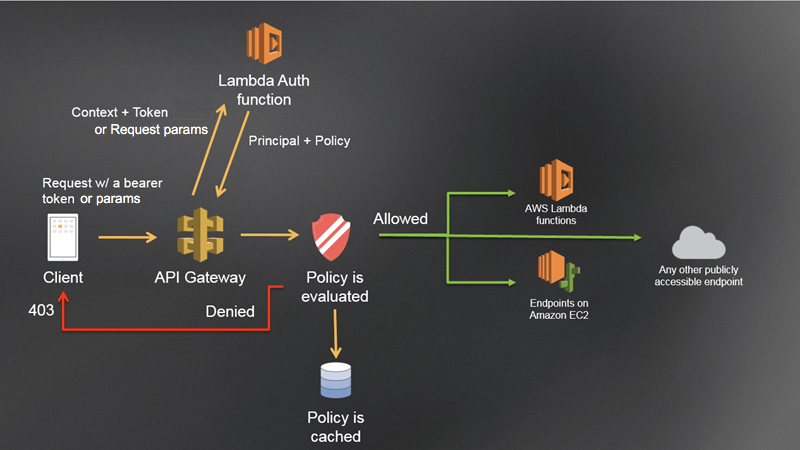
- Custom Authorizer / Lambda Authorizer (External)
- A token-based Lambda authorizer (also called a TOKEN authorizer) receives the caller’s identity in a bearer token, such as a JSON Web Token (JWT) or an OAuth token. <- most aligned with OAuth/SAML.
- A request parameter-based Lambda authorizer (also called a REQUEST authorizer) receives the caller’s identity in a combination of headers, query string parameters, stageVariables, and $context variables.
- Custom Domain Name HTTPS security through integration with AWS Certificate Manager (ACM)
- for Edge-Optimized endpoint, then the certificate must be in us-east-1
- for Regional endpoint, the certificate must be in the API Gateway region
- Must setup CNAME or A-alias record in Route 53
- IAM Role – Authentication; IAM Policy & Resources Policy – Authorization
- Deployment Stages/Environments
- Making changes in the API Gateway does not mean they’re effective
- You need to make a “deployment” for them to be in effect
- Changes are deployed to “Stages” (as many as you want)
- Use the naming you like for stages (dev, test, prod)
- Each stage has its own configuration parameters
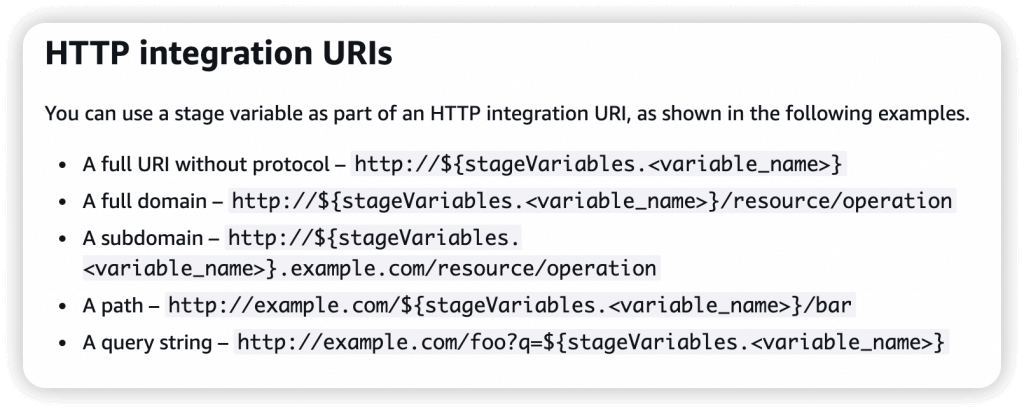
- Stage variables are (like environment variables) for API Gateway, passed to the ”context” object in AWS Lambda, with Format: ${stageVariables.variableName}
- Used in
- Lambda function ARN
- HTTP Endpoint
- Parameter mapping templates
- Used in
- Stage variables are (like environment variables) for API Gateway, passed to the ”context” object in AWS Lambda, with Format: ${stageVariables.variableName}
- Stages can be rolled back as a history of deployments is kept
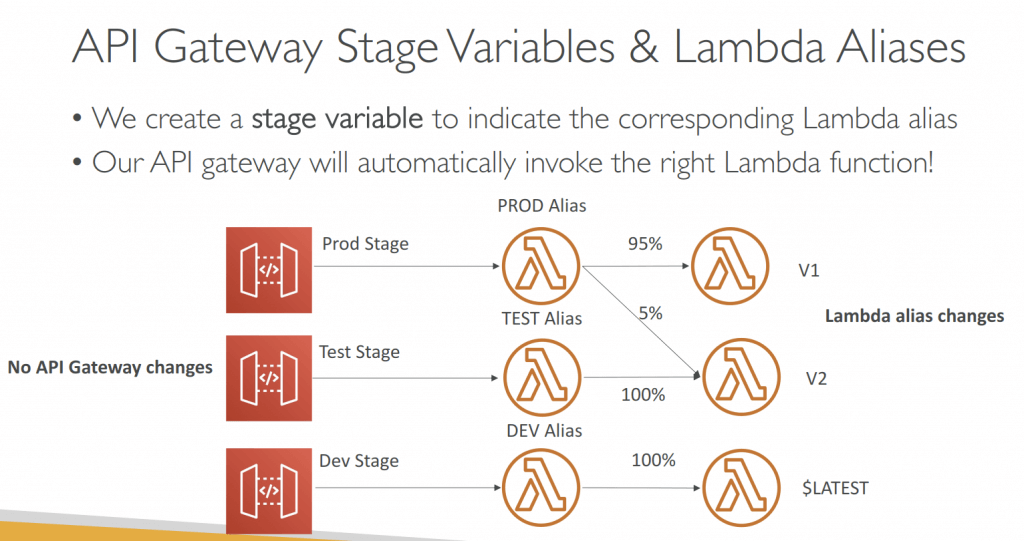
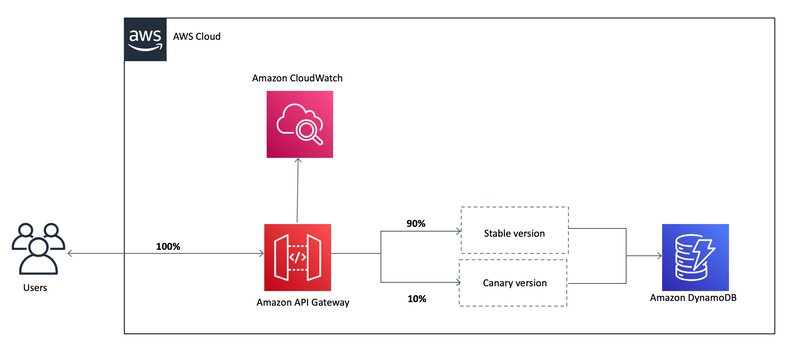
- Canary deployments, choose the % of traffic the canary channel, as Green/Blue Deployment for Lambda & API Gateway
- implementing canary deployments of Lambda functions has become effortless. The weightings of additional version can be adjusted on an alias to route invocation traffic to new function versions based on the weight specified.
- In API Gateway, a canary release deployment uses the deployment stage for the production release of the base version of an API, and attaches to the stage a canary release for the new versions, relative to the base version, of the API. The stage is associated with the initial deployment and the canary with subsequent deployments.
- Integration Types
- MOCK: API Gateway returns a response directly
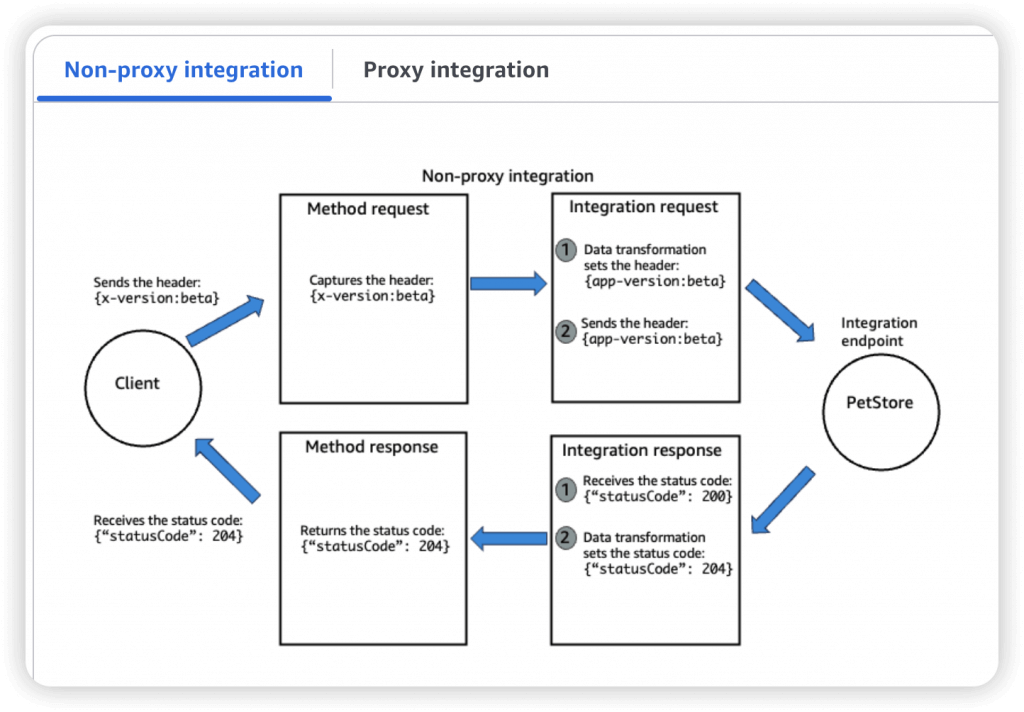
- HTTP / AWS (Lambda & AWS Services): for example, call SQS. Setup data mapping (tranform) using mapping templates for the request & response
- Mapping templates can be used to modify request / responses
- Rename / Modify query string parameters
- Modify body content
- Add headers
- Uses Velocity Template Language (VTL): for loop, if etc…
- Filter output results (remove unnecessary data)
- Content-Type can be set to application/json or application/xml
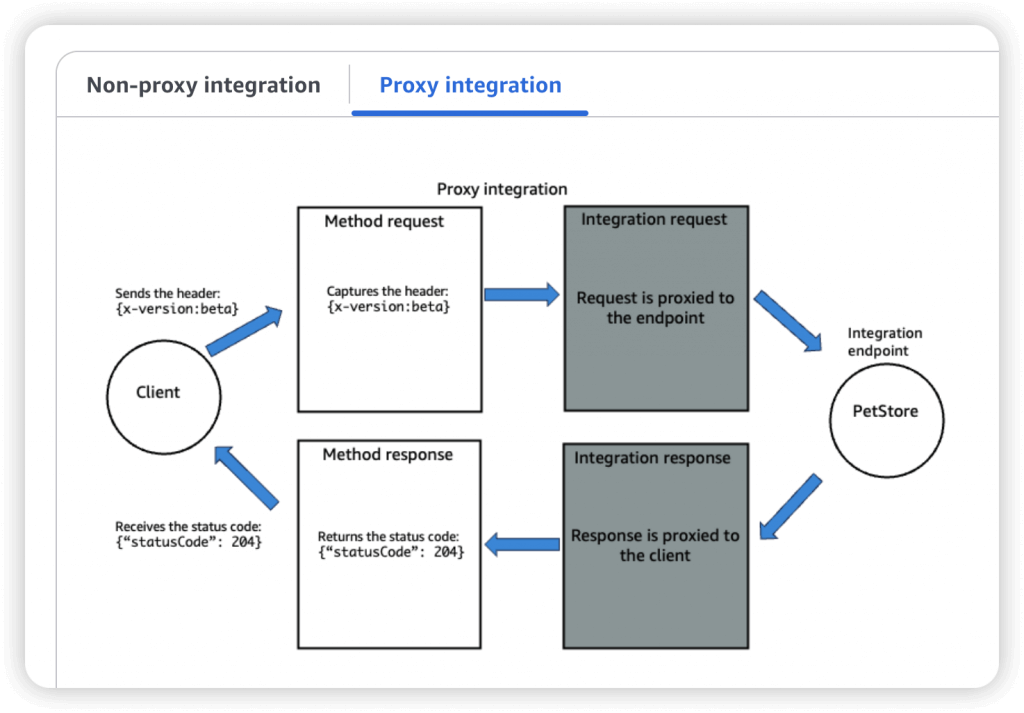
- AWS_PROXY (Lambda Proxy)
- incoming request from the client is the input to Lambda
- No mapping template; headers, query string parameters… are passed as arguments
- HTTP_PROXY
- No mapping template
- Possibility to add HTTP Headers if need be (ex: API key)
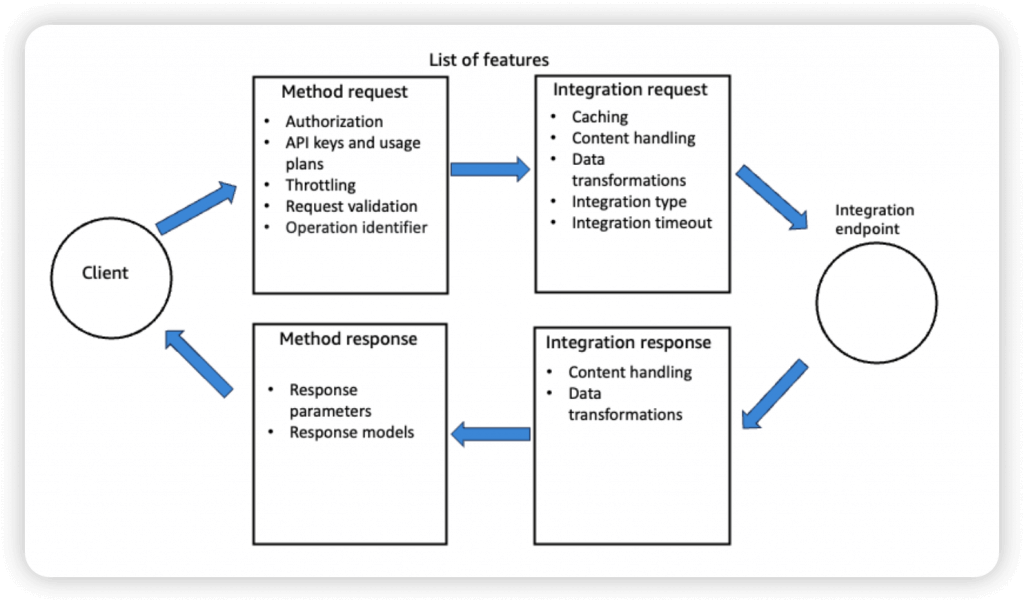
- So enforce the request formats (like necessary fields/parameters), please set the checks on Method Request
- A Method is an incoming request submitted by the client and can contain the following request parameters: a path parameter, a header, or a query string parameter (, or a body via POST/PUT)
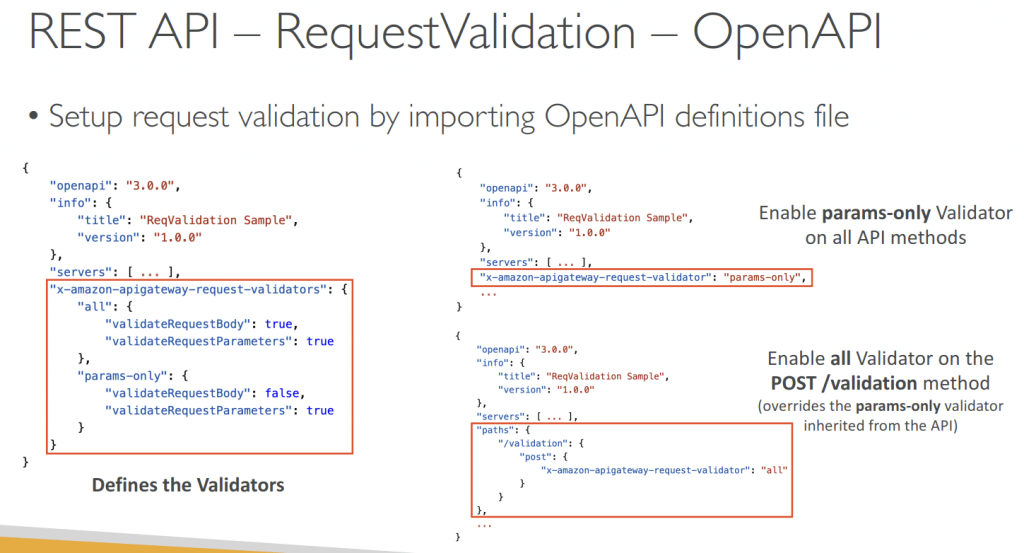
- Swagger / Open API import to quickly define APIs
- OpenAI spec as defining REST APIs, using API definition as code
- OpenAPI specs can be written in YAML or JSON
- Using OpenAPI we can generate SDK for our applications
- Request Validation
- Returns a 400-error response to the caller if validation failed
- reduces unnecessary calls to the backend
- Checks:
- The required request parameters in the URI, query string, and headers of an incoming request are included and non-blank
- The applicable request payload adheres to the configured JSON Schema request model of the method
- Throttling limits
- Account Limit, at 10000 rps across all API
- Also can set Stage limit, Method limits, or define Usage Plans to throttle per customer
- like Lambda Concurrency, one API that is overloaded, if not limited, can cause the other APIs to be throttled
- Cache API responses
- Default TTL (time to live) is 300 seconds, ranging from 0-3600s
- Caches are defined per stage, possible to override cache settings per method
- Cache encryption option
- Cache capacity between 0.5GB to 237GB
- Clients can invalidate the cache with header: Cache-Control: max-age=0
- Able to flush the entire cache (invalidate it) immediately
- If you don’t impose an InvalidateCache policy (or choose the Require authorization check box in the console), any client can invalidate the API cache
- Usage Plan, using API Keys to identify clients and meter access
- API Keys are alphanumeric string values
- Throttling limits
- Quotas limits is the overall number of maximum requests
- Callers must supply an assigned API key in the x-api-key header in requests
- API keys by themselves do not grant access to execute an API. They need to be associated with a usage plan, and that usage plan then determines which API stages and methods the API key can access.
- If the API key is not associated with a usage plan, it will not have permission to access any of the resources, which will result in a “403 Forbidden” error.
- after generating an API key, it must be added to a usage plan by calling the CreateUsagePlanKey method
- Logging & Tracing
- CloudWatch Logs
- Log contains information about request/response body
- Enable CloudWatch logging at the Stage level (with Log Level – ERROR, DEBUG, INFO)
- Can override settings on a per API basis
- X-Ray
- Enable tracing to get extra information about requests in API Gateway
- X-Ray API Gateway + AWS Lambda gives you the full picture
- CloudWatch Logs
- CloudWatch Metrics
- Metrics are by stage, Possibility to enable detailed metrics
- CacheHitCount & CacheMissCount – for cache capacities/efficiency
- Count: The total number API requests in a given period.
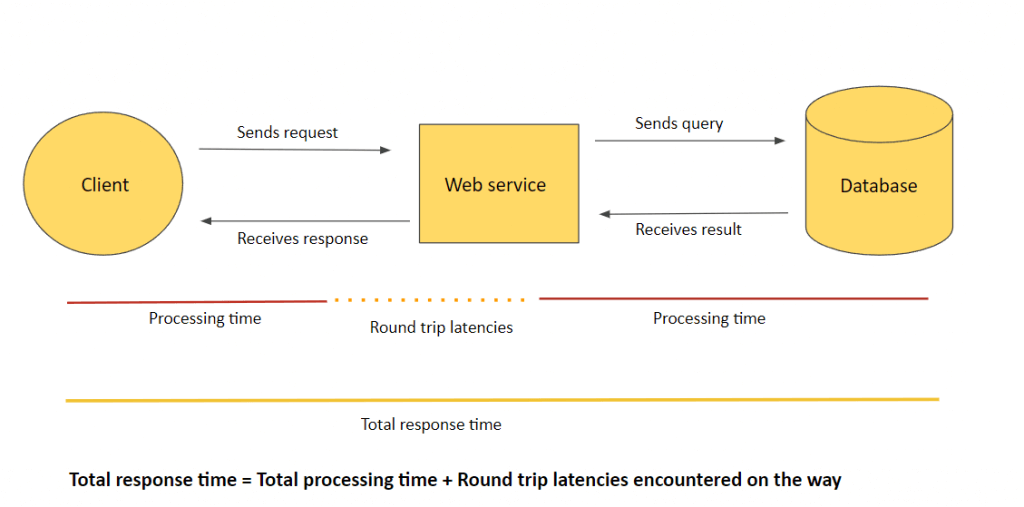
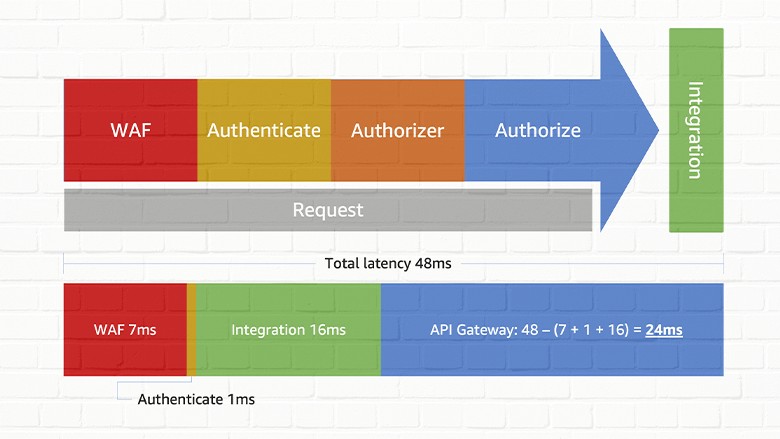
- IntegrationLatency – The time between when API Gateway relays a request to the backend and when it receives a response from the backend. (ie Backend service processing time)
- Latency – The time between when API Gateway receives a request from a client and when it returns a response to the client. The latency includes the integration latency and other API Gateway overhead.
- Errors
- 4xx means Client errors
- 400: Bad Request
- 403: Access Denied, WAF filtered (Authorization Failure)
- 429: Quota exceeded, Throttle (Too Many Requests, aka retriable error)
- Can set Stage limit & Method limits to improve performance
- Or you can define Usage Plans to throttle per customer
- Just like Lambda Concurrency, one API that is overloaded, if not limited, can cause the other APIs to be throttled
- 5xx means Server errors
- 502: Bad Gateway Exception
- usually for an incompatible output returned from a Lambda proxy integration backend (for example, XML, not JSON format)
- or occasionally for out-of-order invocations due to heavy loads.
- 503: Service Unavailable Exception
- 504:
- Integration_Failure – The gateway response for an integration failed error.
- Integration_Timeout – ex Endpoint Request Timed-out Exception; API Gateway requests time out after 29 second maximum
- Connection refused, may be because “API Gateway expose HTTPS endpoints only”
- 502: Bad Gateway Exception
- 4xx means Client errors
- CORS must be enabled when you receive API calls from another domain.
- The OPTIONS pre-flight request must contain the following headers:
- Access-Control-Allow-Methods
- Access-Control-Allow-Headers
- Access-Control-Allow-Origin
- The OPTIONS pre-flight request must contain the following headers:
- REST (apigateway) vs HTTP (apigatewayv2)
- https://dev.to/tinystacks/api-gateway-rest-vs-http-api-what-are-the-differences-2nj
| Feature | HTTP API | REST API |
| Core Protocol | HTTP | HTTP + REST Principles |
| Features | Basic (e.g., limited authentication) | Rich (API keys, request validation, private endpoints) |
| Cost | Generally lower | Generally higher |
| Performance | Often faster | Can have slightly lower performance |
| Flexibility | Less flexible | Highly flexible and scalable |
| Architectural Style | Not strictly bound | Adheres to REST principles (statelessness, client-server) |
| Purpose | Simpler applications, internal use, rapid development | Public-facing APIs, microservices, complex integrations |
| Canary Deployments | Not supported | Supported |
| Programmatic Model | Simplified | Can be more complex |
| Endpoint Types | Limited (e.g., regional) | Supports various types |
| Security Options | Fewer options | More options (authentication, authorization, encryption) |
| Deployments | Automatic deployments | Manual or more involved |
| Authorizers | HTTP API | REST API |
| AWS Lambda | V | V |
| IAM | V | V |
| Resource Policies | V | |
| Amazon Cognito | V | V |
| Native OpenID Connect / OAuth 2.0 / JWT | V |
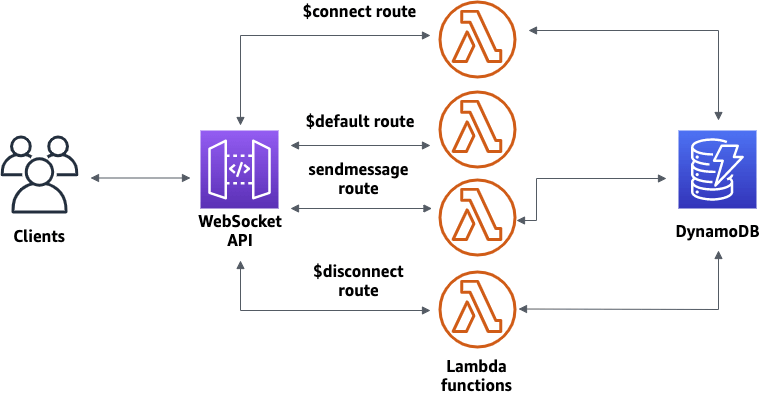
- WebSocket API
- Server can push information to the client (wss://abcdef.execute-api.us-west-1.amazonaws.com/dev/@connections/connectionId)
- POST: Server send message to the connected Client
- GET: get connection status
- DELETE: disconnect with Client
- This enables stateful application use cases
- WebSocket APIs are often used in real-time applications such as chat applications, collaboration platforms, multiplayer games, and financial trading platforms.
- Works with AWS Services (Lambda, DynamoDB) or HTTP endpoints
- Routing
- https://docs.aws.amazon.com/apigateway/latest/developerguide/websocket-api-develop-routes.html
- Incoming JSON messages are routed to different backend
- If no routes => sent to $default route
- You request a route selection expression to select the field on JSON to route from
- Sample expression: $request.body.action
- The result is evaluated against the route keys available in your API Gateway
- The route is then connected to the backend you’ve setup through API Gateway
- Server can push information to the client (wss://abcdef.execute-api.us-west-1.amazonaws.com/dev/@connections/connectionId)
AppConfig
- Configure, validate, and deploy dynamic configurations
- Deploy dynamic configuration changes to your applications independently of any code deployments
- You don’t need to restart the application
- Feature flags, application tuning, allow/block listing…
- Use with apps on EC2 instances, Lambda, ECS, EKS…
- Gradually deploy the configuration changes and rollback if issues occur
- Validate configuration changes before deployment using:
- JSON Schema (syntactic check) or
- Lambda Function – run code to perform validation (semantic check)
- Good for GenAI
- No code changes required to switch models
- Use feature flags and configuration profiles
- Configuration may be stored in S3
- AppConfig is integrated with S3
- Can be used as a tool for rolling out new models, A/B testing, rollbacks
- Of course SageMaker does all this too.
- Bedrock Evaluations and CloudWatch Evidently can also manage A/B tests
- AppConfig Agent Lambda
- allows Lambda functions to fetch configuration updates efficiently without adding custom polling logic
Step Functions
- Model your workflows as state machines (one per workflow)
- Workflow in JSON
- Step Functions are typically suited for orchestrating long-running or sequential workflows rather than handling continuous, low-latency streaming messages.
- Start with SDK, API Gateway call, or Event Bridge
- a 256KB limit between data passed between steps
- squirrel data away in DynamoDB or S3 if this is a problem
- Step Functions is integrated with Bedrock
- InvokeModel, CreateModelCustomizationJob both supported
- You can chain multiple FM calls together using Step Functions
- Note that InvokeModel can also include guardrails you specify
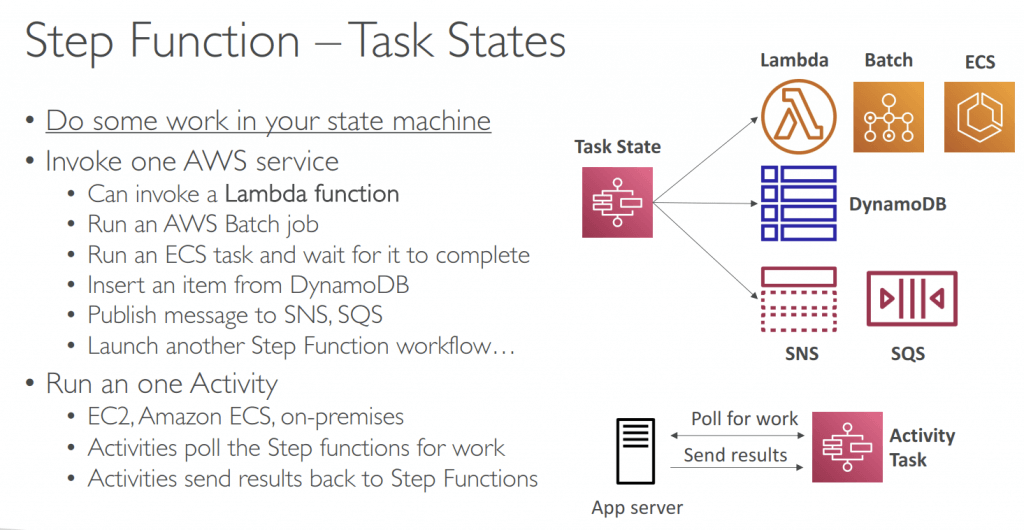
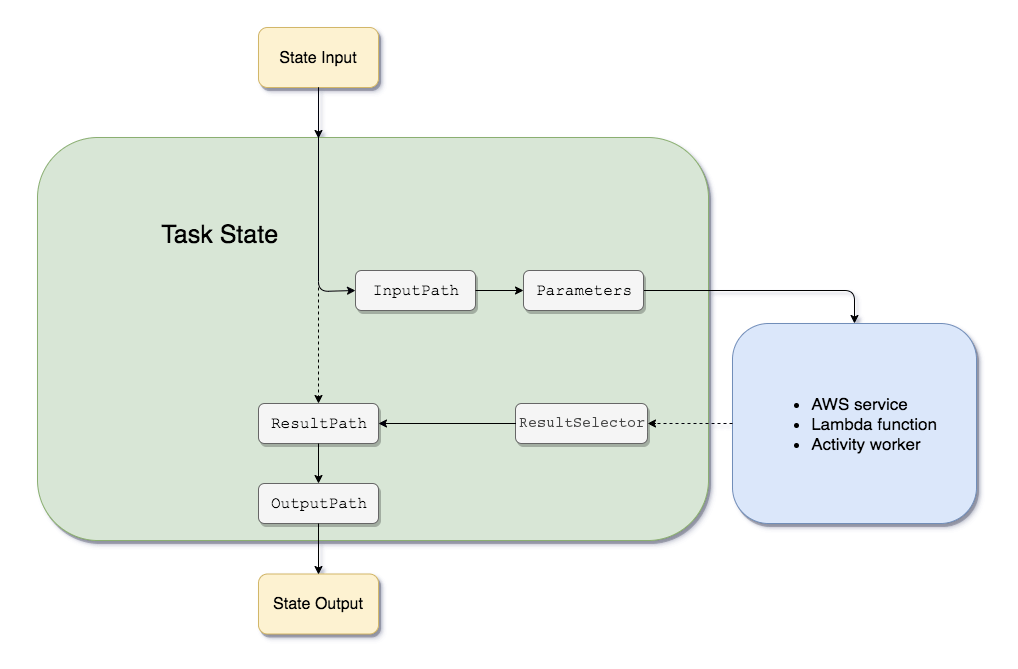
- Task State: Invoke 1 AWS service or Run 1 Activity
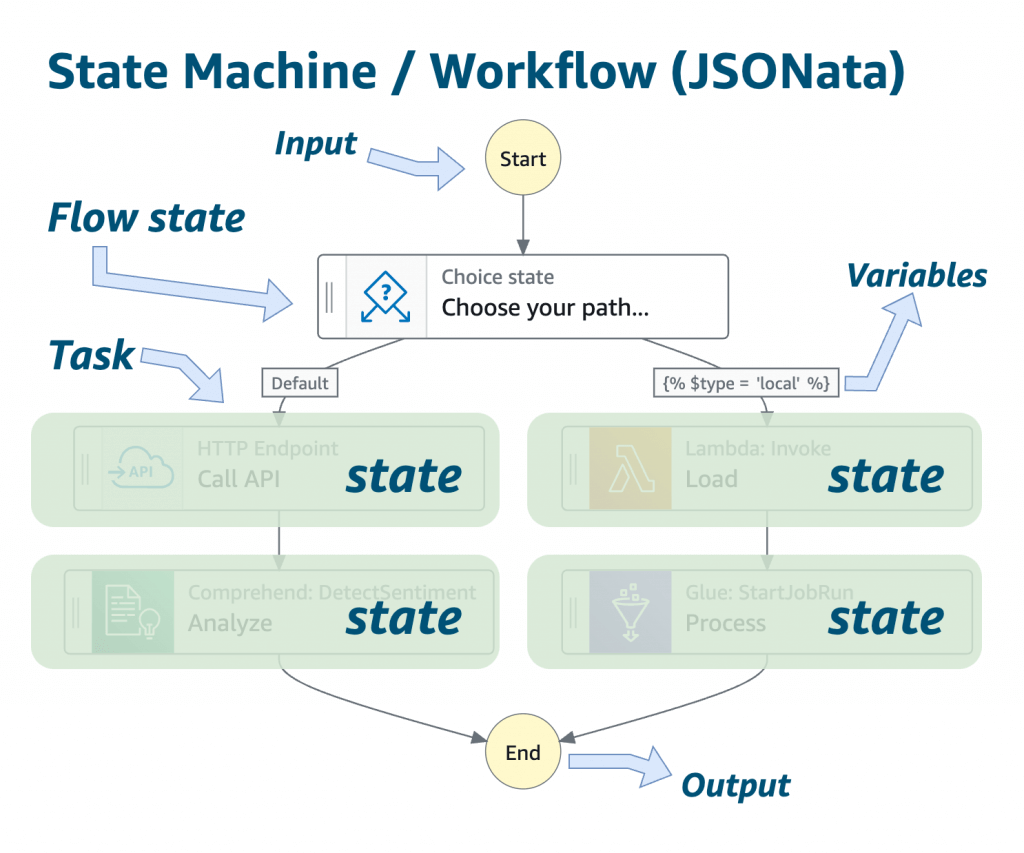
- Flow States:
- Choice State – Test for a condition to send to a branch (or default branch)
- Fail or Succeed State – Stop execution with failure or success
- Fail state could not trigger “Retry”
- Pass State – Simply pass its input to its output or inject some fixed data, without performing work.
- Wait State – Provide a delay for a certain amount of time or until a specified time/date.
- Map State – Dynamically iterate steps.
- Parallel State – Begin parallel branches of execution.
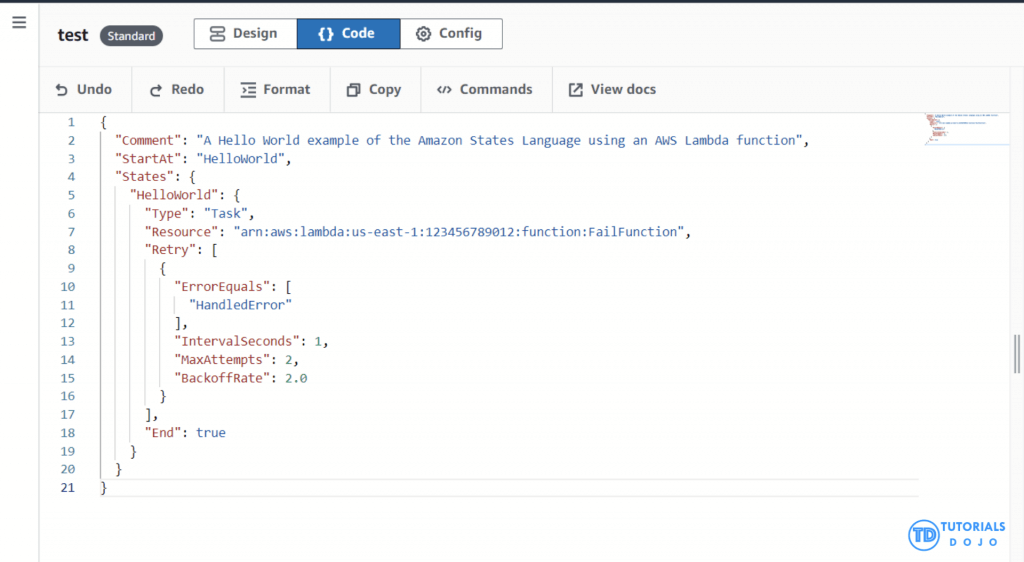
- Error Handling should be in Step Functions, not in Task; using Retry and Catch, running from top to bottom but not sequentially (ie “OR”)
- Task, Parallel, and Map states
- When a state has both Retry and Catch fields, Step Functions uses any appropriate retriers first. If the retry policy fails to resolve the error, Step Functions applies the matching catcher transition.
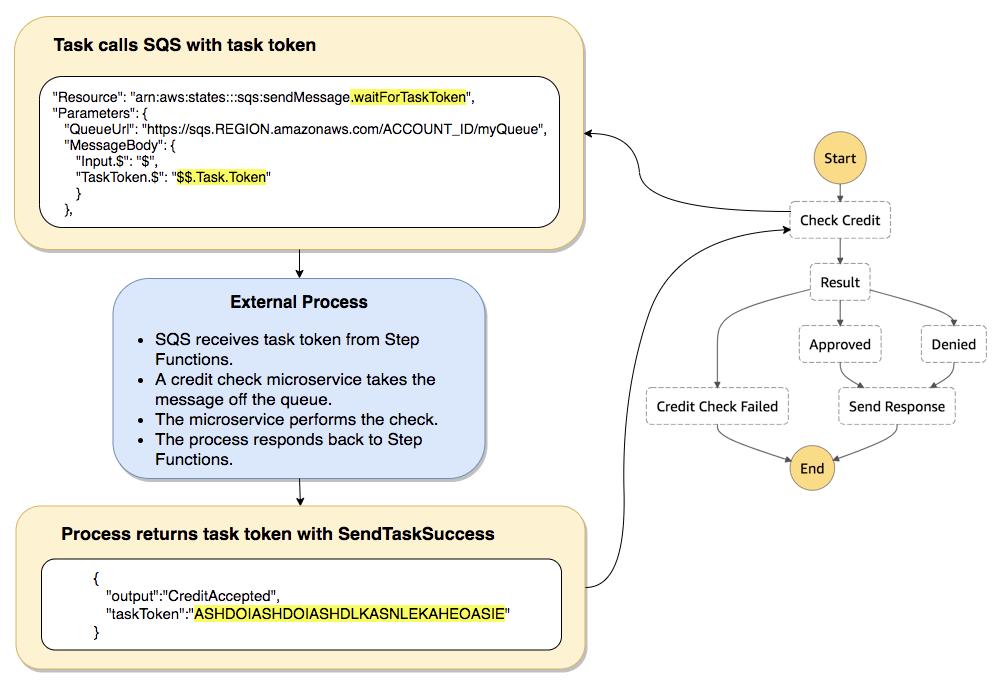
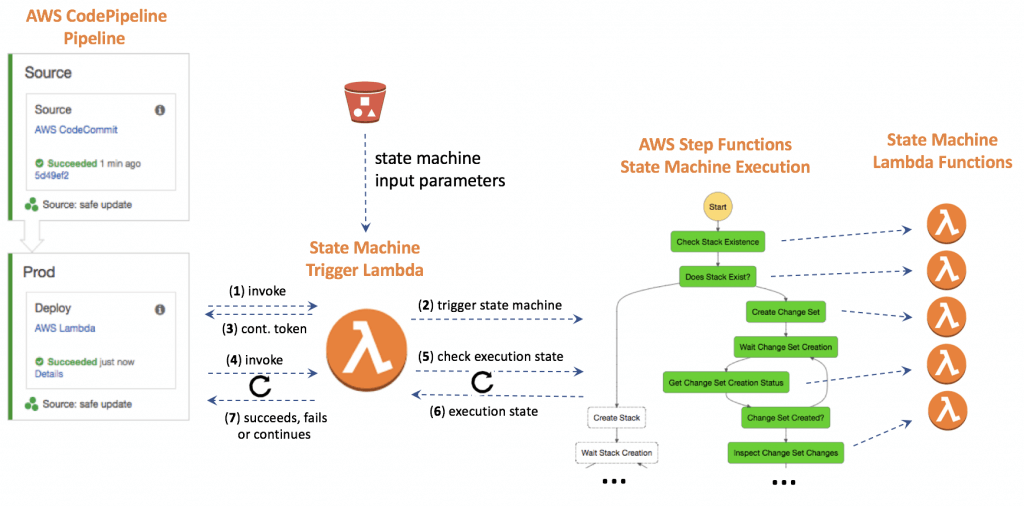
- Wait for Task token: append .waitForTaskToken in Resource, pause the running until receiving a SendTaskSuccess or SendTaskFailure API call. (PUSH mechanism)
- Activity Task: Activity Worker on EC2/Lambda/.., using GetTaskActivity API call for poll, sending response with SendTaskSuccess or SendTaskFailure API call (PULL mechanism), with SendTaskHeartBeat + HeartBeatSeconds
- Standard vs Express (asynchronous and synchronous)
- Developers can target specific errors, such as timeouts or exceptions thrown by AWS Lambda functions, by defining a Retry field in the state’s configuration. This ensures that transient issues or expected problems do not immediately cause the workflow to fail. Instead, the system can attempt to resolve the issue through retries based on the parameters provided. This mechanism is handy for handling spikes in data volume or temporary resource constraints, ensuring that workflows are designed to be robust and resilient under varying conditions.
- Amazon States Language filters/control the flow
- InputPath – filtering the JSON notation by using a path
- Parameters – can only be used on the input level of a state
- ResultPath – the only one that can control input values and its previous results to be passed to the state output
- OutputPath – filter out unwanted information and pass only the portion of JSON
- Lambda Extensions
- For example, use Lambda extensions to integrate functions with your preferred monitoring, observability, security, and governance tools.
- An external extension runs as an independent process in the execution environment and continues to run after the function invocation is fully processed.
- An internal extension runs as part of the runtime process. Your function accesses internal extensions by using wrapper scripts or in-process mechanisms
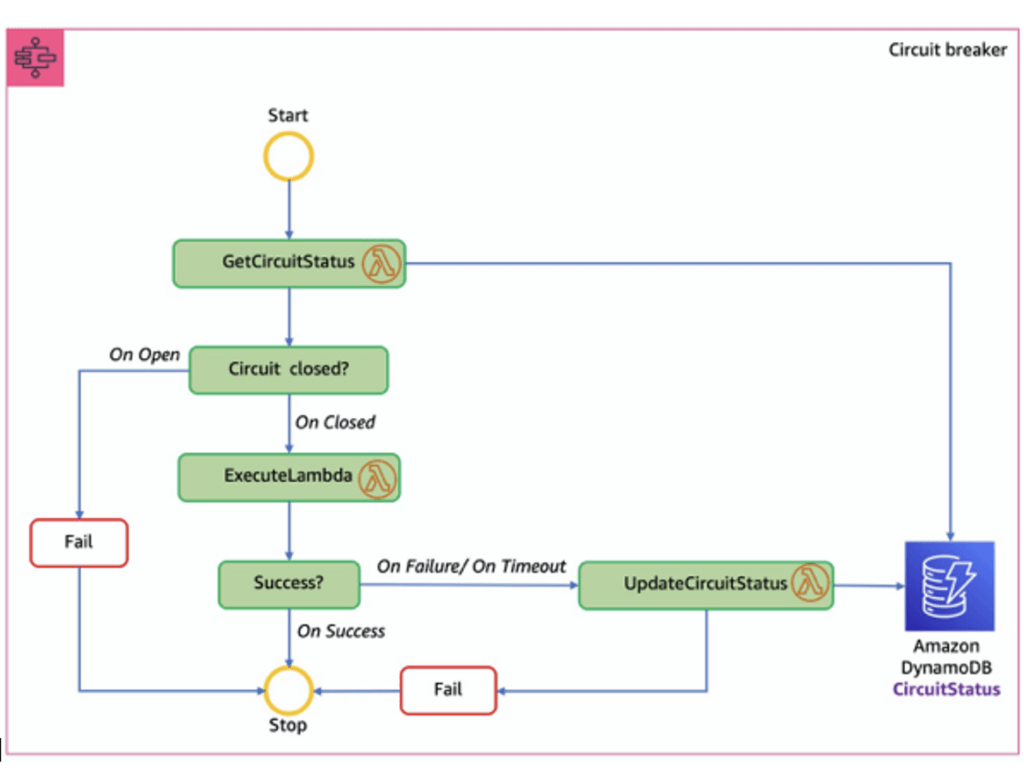
- Circuit Breakers
- Circuit Breaker is a pattern
- Prevents calling a service that is timing out and failing
- Detects when it’s functional again
- Can be implemented with Step Functions, Lambda, and DynamoDB
- used to safeguard your AI workflows
- Route requests to fallback models if your model is down
- Or enter a degraded service mode
- Circuit Breaker is a pattern
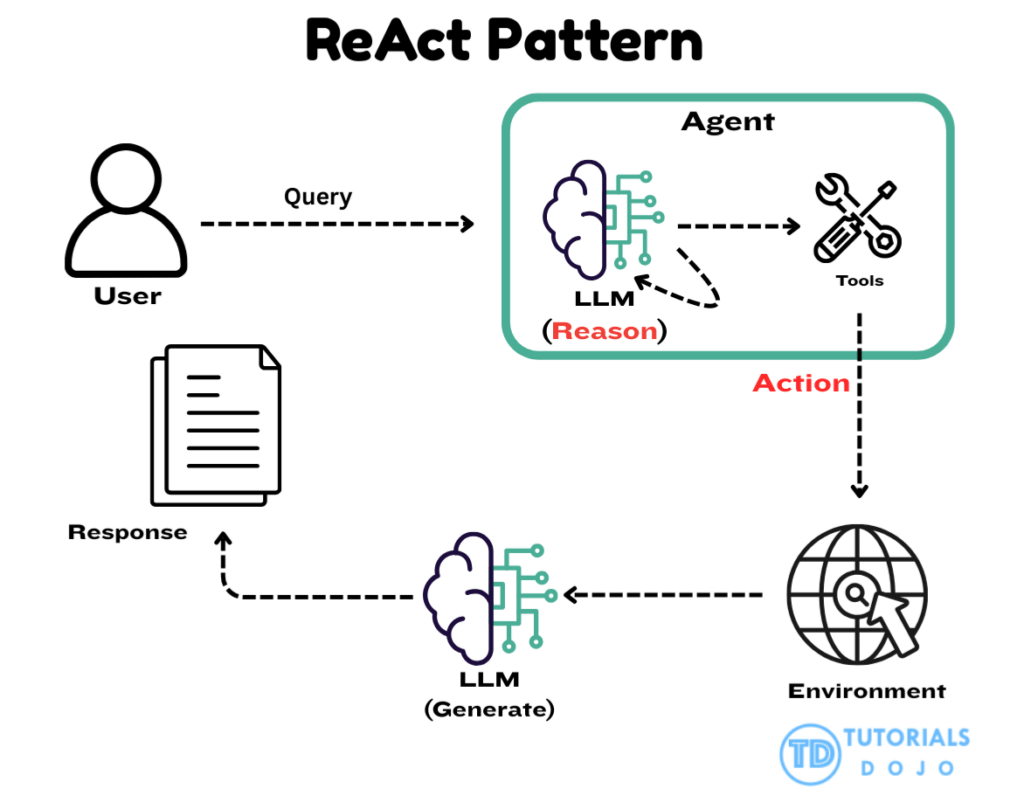
- ReAct patterns (Reasoning and Acting)
- Step functions orchestrate steps in a structured workflow
- with Tools
- Chain-of-Thought reasoning
- Dynamic routing to specialized FM’s
- The ReAct pattern (Reason + Act) is a prompting technique designed to break down complex reasoning into smaller, more manageable phases. Instead of sending one large, unstructured request to a model, the ReAct approach separates the process into explicit steps such as observation, reasoning, and action planning. The React pattern is characterized by a reasoning–action cycle that allows the model to gather information and refine its responses as it progresses.
- The pattern typically involves:
- Combining intermediate reasoning with action execution as the agent processes the user request.
- Using external tools or functions when the model determines that additional information or computation is needed.
- Incorporating returned information into the evolving context that informs the next reasoning step.
- Operating iteratively by repeating the reasoning and action cycle until sufficient context is gathered.
- Producing a final answer when the model concludes that no further actions are required.
- This pattern aligns naturally with how Step Functions structures logic through individual states. By assigning each ReAct stage to a dedicated Task state, developers can supply targeted prompts for each reasoning phase, control the execution order, and maintain clarity over how the FM progresses from one step to the next.
- This combined approach resolves the issue described in the scenario by ensuring that the FM follows a consistent and validated reasoning sequence. Step Functions provides deterministic transitions, automatic retries, and fault-tolerant behavior for each individual reasoning step, preventing failures in one stage from affecting the entire workflow. Using Step Functions to orchestrate the ReAct pattern allows the organization to maintain accuracy, reliability, and interpretability in the FM’s reasoning process, producing structured outputs that remain consistent even as workloads scale.
- Step functions orchestrate steps in a structured workflow
- Orchestrate model review and approval process
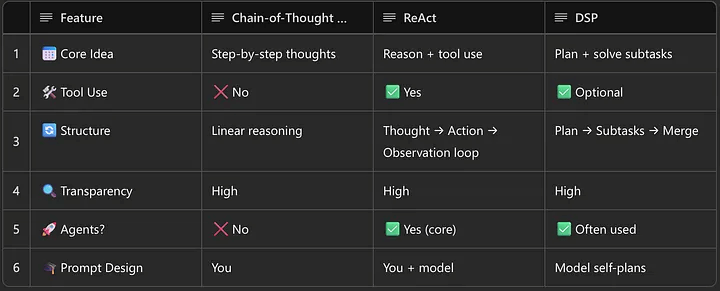
| Feature | Chain-of-Thought (CoT) | ReAct |
|---|---|---|
| Step-by-step logic | ✅ Yes | ✅ Yes |
| External tools | ❌ No | ✅ Yes (Actions + Observations) |
| Best suited for | Logic, math, internal tasks | Info-seeking, dynamic multi-step tasks |
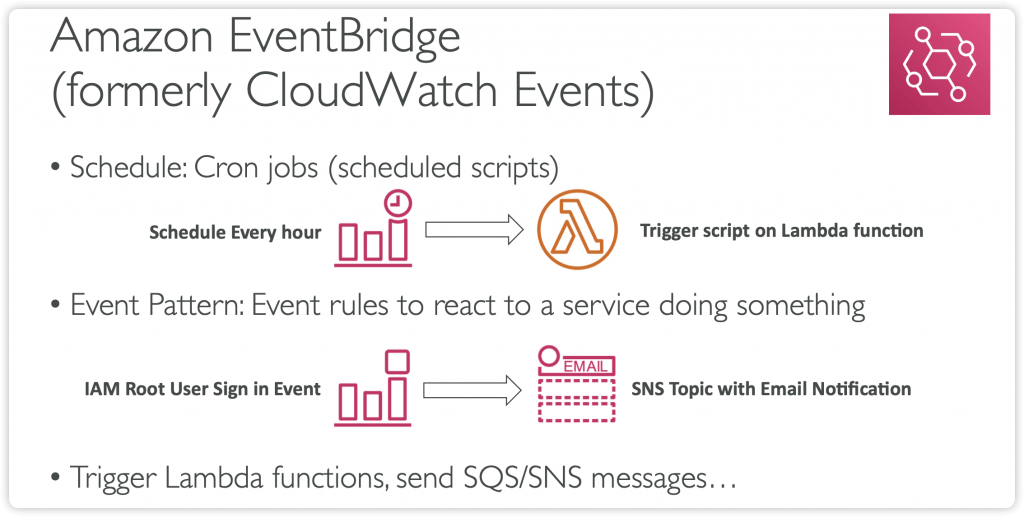
Amazon EventBridge
- previous CloudWatch Events
- Schedule: Cron jobs (scheduled scripts)
- Schedule Every hour Trigger script on Lambda funchon
- Event Pattern: Event rules to react to a service doing something
- IAM Root User Sign in Event SNS Topic with Email Nohficahon
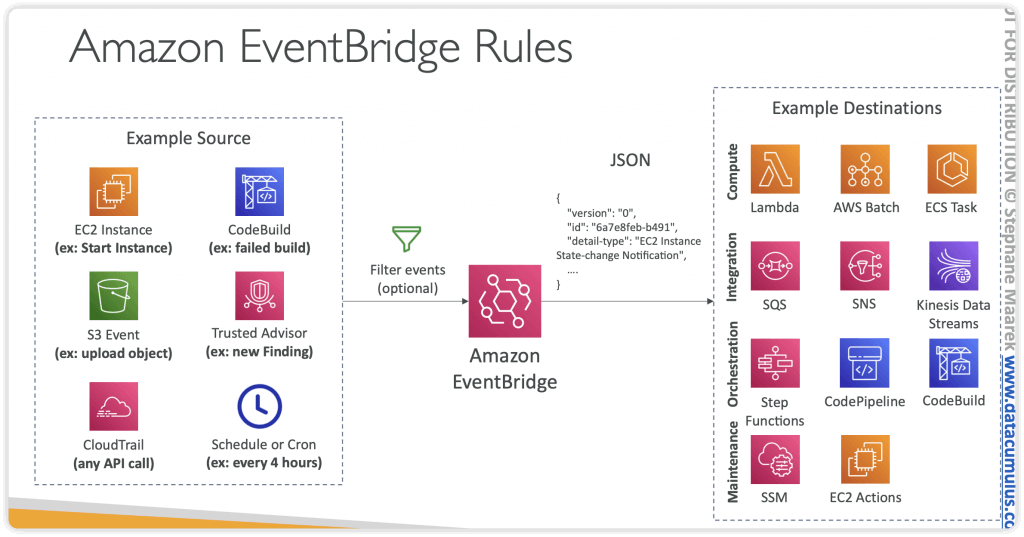
- Trigger Lambda functions, send SQS/SNS messages…
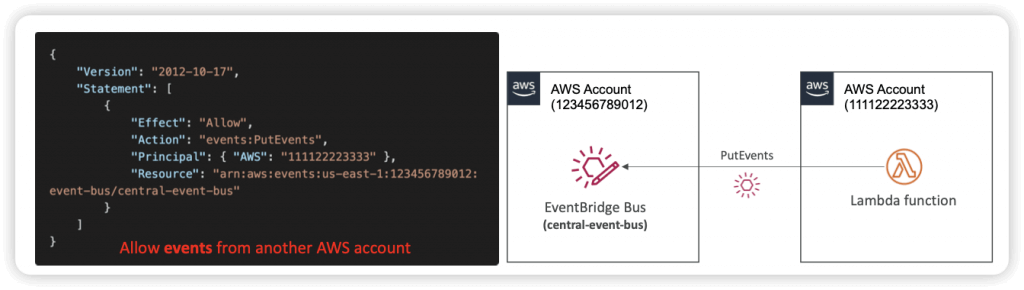
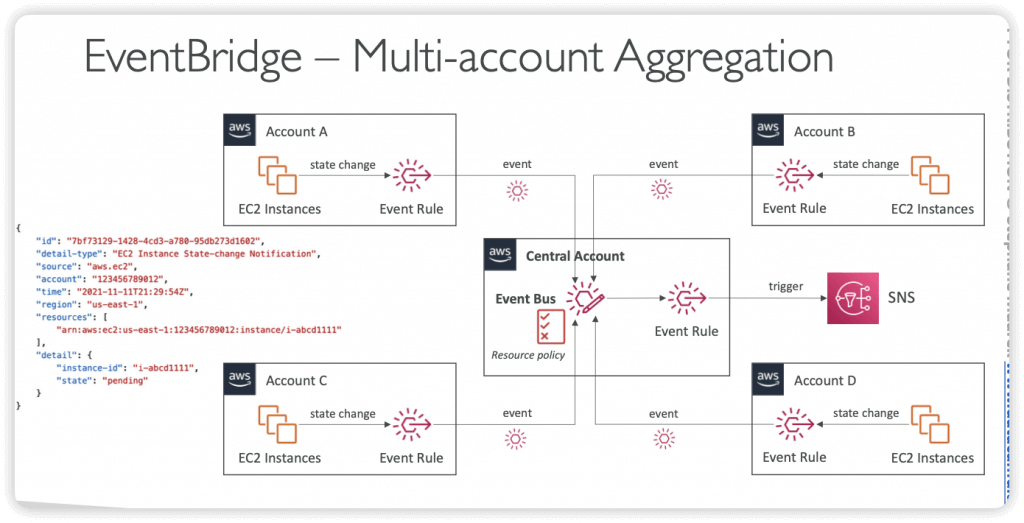
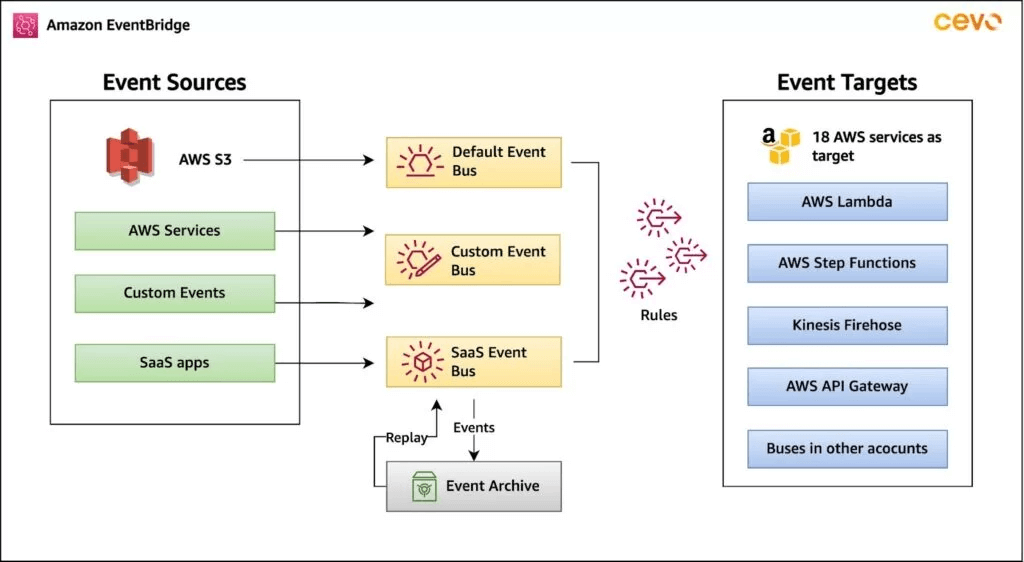
- Event buses can be accessed by other AWS accounts using Resource-based Policies
- You can archive events (all/filter) sent to an event bus (indefinitely or set period)
- Ability to replay archived events
- Schema Registry
- EventBridge can analyze the events in your bus and infer the schema
- The Schema Registry allows you to generate code for your application, that will know in advance how data is structured in the event bus
- Schema can be versioned
- Resource-based Policy
- Manage permissions for a specific Event Bus
- Example: allow/deny events from another AWS account or AWS region
- Use case: aggregate all events from your AWS Organization in a single AWS account or AWS region
- Manage permissions for a specific Event Bus
- Amazon EventBridge can be used for prefix-based routing of S3 events, enabling granular and flexible filtering to route events to different targets without writing intermediary code. This is achieved through advanced event patterns in EventBridge rules.
- enabling S3 events to be sent to EventBridge and creating rules with specific event patterns.
- Step 1: Enable EventBridge for your S3 bucket
- By default, S3 does not send events to EventBridge. You must enable this feature for the desired bucket.
- This will send all S3 events (like
Object CreatedorObject Deleted) to your account’s default event bus.
- Step 2: Create EventBridge rules with prefix filtering
- create rules on the default event bus to filter events based on the object’s key (path/prefix):
- In the event pattern, you can use a pattern like the following to match specific prefixes (e.g.,
applications/batch_load/orimages/): - Select one or more targets for the rule, such as AWS Lambda, Amazon SQS, or AWS Step Functions, to process the event.
- Benefits
- Decoupling: S3 acts as the event producer, and EventBridge routes events to various consumers without the need for the source to know about the destination.
- Advanced Filtering: You can filter on more than just prefixes and suffixes; the entire event payload, including object size or time range, can be used for sophisticated routing.
- Multiple Targets: A single S3 event can trigger multiple downstream services by defining separate rules.
- Reduced Code: Complex filtering logic is handled declaratively in EventBridge rules, reducing the need for intermediary Lambda functions.
DevOps: CodeBuild, CodeDeploy, CodePipeline
AppSync
AWS Outposts
AWS Wavelength
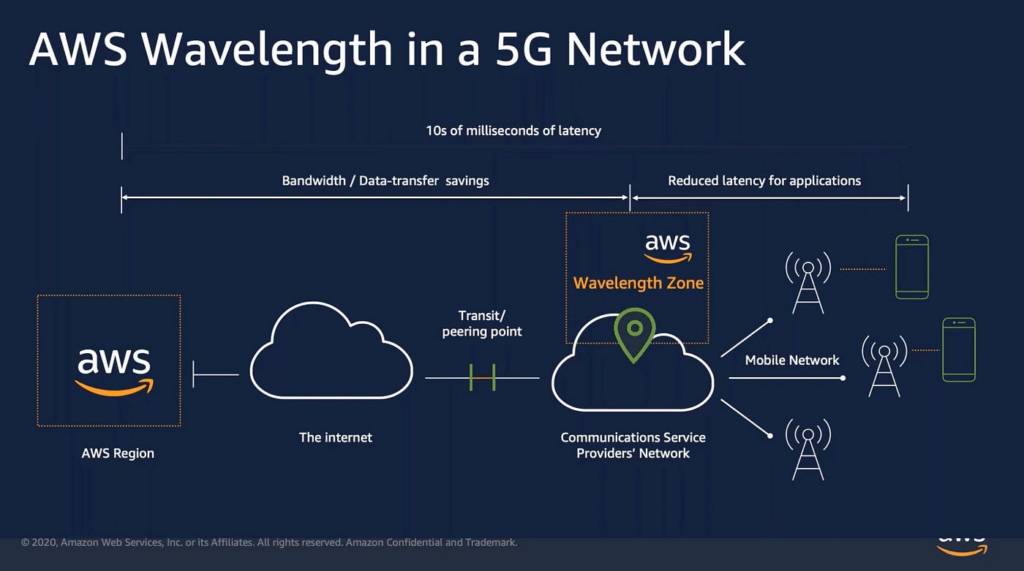
- infrastructure deployments embedded within the telecommunications providers’ datacenters at the edge of the 5G networks
- Brings AWS services to the edge of the 5G networks
- Example: EC2, EBS, VPC…
- Ultra-low latency applications through 5G networks
- Traffic doesn’t leave the Communication Service Provider’s (CSP) network
- High-bandwidth and secure connection to the parent AWS Region
- No additional charges or service agreements
- with GenAI
- Edge deployments
- Secure routing between cloud and on-prem
- Mobile foundation model apps
- Distribute traffic between Wavelength Zones and parent regions based on workload
- Low-latency, lighter work at the edge
- Heavier in the Region
SQS
Amplify
Amazon Augmented AI (A2I)
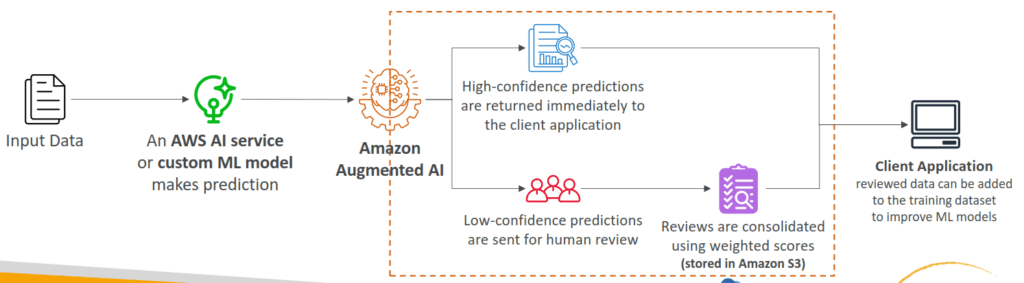
- Human oversight of Machine Learning predictions in production
- Can be your own employees, over 500,000 contractors from AWS, or AWS Mechanical Turk
- Some vendors are pre-screened for confidentiality requirements
- The ML model can be built on AWS or elsewhere (SageMaker, Rekognition…)
Amazon Kendra
- Fully managed document search service powered by Machine Learning
- Extract answers from within a document (text, pdf, HTML, PowerPoint, MS Word, FAQs…)
- Natural language search capabilities
- Learn from user interactions/feedback to promote preferred results (Incremental Learning)
- Ability to manually fine-tune search results (importance of data, freshness, custom, …)
- Amazon Kendra supports features like faceted search, filtering, and customizable ranking, further refining the search process to meet specific organizational needs.
- to enhance LLM with RAG, please refer to AWS Bedrock Knowledge Base.
- While Amazon Kendra can index and semantically search the S3 documents, it is only a retrieval service.
- Building a custom connection between Kendra and an LLM would require manual orchestration, data formatting, and prompt engineering.
- Good for traditional ML to setup RAG
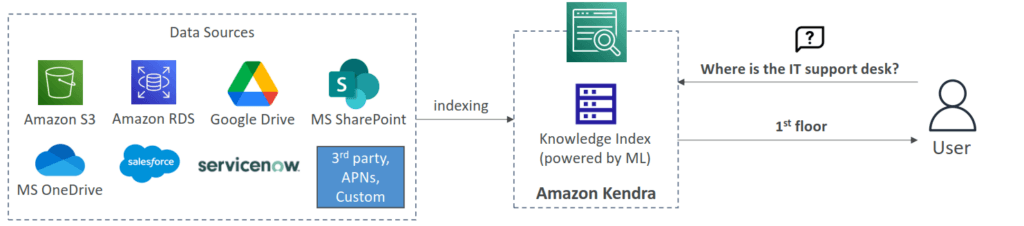
- [ 🧐QUESTION🧐 ] Integrate Kendra to Chatbot
- The integration of Amazon Kendra with the chatbot is powered by the Kendra Query API, a robust tool that enables the chatbot to dynamically query indexed documentation in real-time. By leveraging the Query API, the chatbot can efficiently process customer inquiries and retrieve the most relevant excerpts from the documentation, ensuring precise and accurate responses. This is particularly effective when the response requires short, contextually relevant information, such as extracting key details from product manuals, FAQs, or support articles.
Amazon Lex
- same technology that powers Alexa
- Automatic Speech Recognition (ASR) to convert speech to text
- Build chatbots quickly for your applications using voice and text
- Example: a chatbot that allows your customers to order pizzas or book a hotel
- Supports multiple languages
- Integration with AWS Lambda, Connect, Comprehend, Kendra
- The bot automatically understands the user intent to invoke the correct Lambda function to “fulfill the intent”
- The bot will ask for ”Slots” (input parameters) if necessary
- [ 🧐QUESTION🧐 ] Lex and Connect
- Amazon Connect
- Receive calls, create contact flows, cloud-based virtual contact center
- Can integrate with other CRM systems or AWS
- No upfront payments, 80% cheaper than traditional contact center solutions
- Amazon Connect

- [ 🧐QUESTION🧐 ] Enhance Lex for further inputs recognization
- Custom slot types define lists of acceptable input values for a particular slot, which represent variable information that users can provide during a conversation. Each slot type value can contain multiple synonyms, allowing Lex to recognize different user inputs that have the same meaning.
- Defining synonyms in a custom slot type allows developers to map multiple related phrases or words to a single, canonical value. For example, a slot type named
VacationThememight have a value of “adventure,” with synonyms such as “thrill-seeking,” “exploration,” or “outdoor fun.” When users enter these synonymous terms, Lex automatically resolves them to the main value “adventure,” ensuring consistent and accurate intent fulfillment. This approach leverages Lex’s built-in NLU capabilities to normalize user input before invoking downstream processes, such as an AWS Lambda function for database queries. - By adding synonyms to existing slot type values, the chatbot can recognize a wider range of user expressions without modifying the Lambda function or DynamoDB structure.
- [NOT] Intents in Amazon Lex represent distinct user goals, not variations of slot values.
- [NOT] Each enumeration value should represent a unique concept, and adding synonyms as new values could cause confusion during intent resolution. Lex documentation recommends using synonyms instead for consolidating related words under a single slot value.
- [NOT] runtime hints are primarily used to improve speech recognition for audio inputs.
Amazon Nova Canvas
- primarily intended for real-time, human-in-the-loop creative processes, such as brainstorming or refining visuals in a shared workspace.
- It is not optimized for automated, large-scale image generation pipelines that require consistent outputs and metadata management.
- Using Nova Canvas would just add an interactive layer that does not align with the studio’s need for systematic, scalable asset creation and storage.
- designed for businesses to generate, edit, and transform images from text prompts, enabling high-quality visuals for marketing, design, and e-commerce, offering features like text-to-image, inpainting, outpainting, color guidance, and virtual try-on for products like clothes and furniture, accessible via Amazon Bedrock.
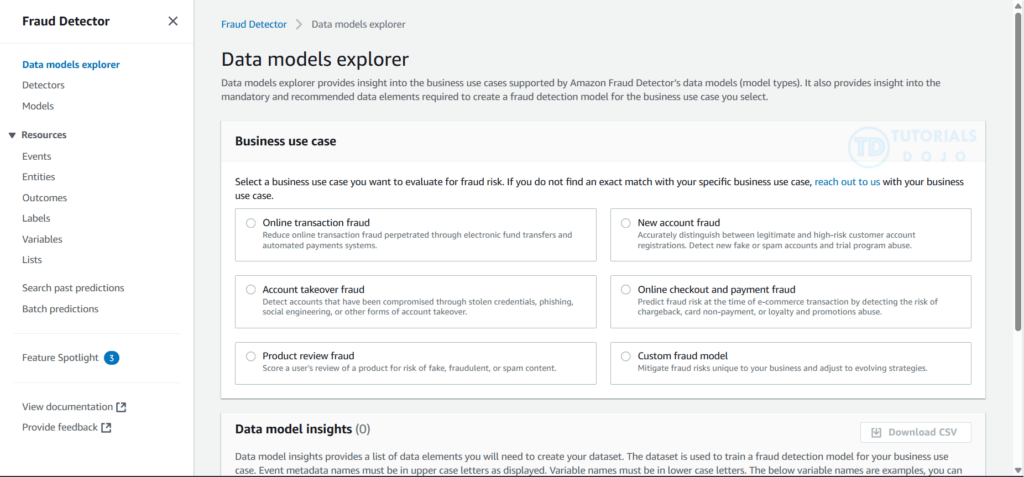
Amazon Fraud Detector
- a fully managed fraud detection service that automates detecting potentially fraudulent activities online.
- These activities include unauthorized transactions and the creation of fake accounts. Amazon Fraud Detector works by using machine learning to analyze your data.
- You can use Amazon Fraud Detector to build customized fraud-detection models, add decision logic to interpret the model’s fraud evaluations, and assign outcomes such as pass or send for review for each possible fraud evaluation.
Amazon Lookout for Vision
- typically built for visual anomaly detection in images, such as manufacturing defects, not for analyzing structured transaction data or behavioral patterns.
SageMaker Unified Studio
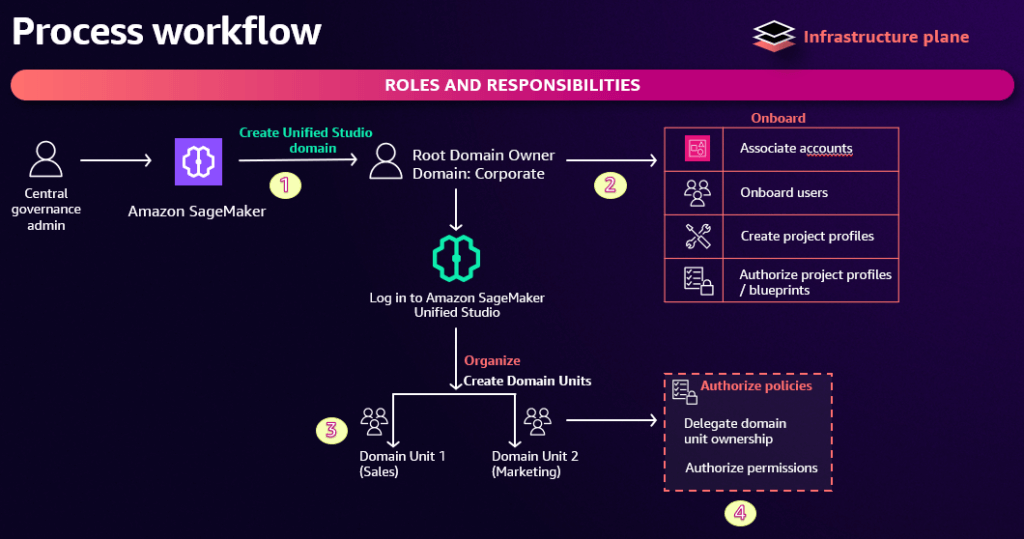
- Single interface for data, analytics, AI, and ML services
- This includes Bedrock, Q, and Quicksight
- Also notebooks, and all the stuff that was in the old SageMaker Studio
- Single interface for build / deploy / execute / monitor
- Built for teams
- Administrators manage users/groups and what they access
- A domain connects assets, users, and projects
- Can connect from Visual Studio Code
Amazon Quick Suite
- is a comprehensive business intelligence platform powered by generative AI. It simplifies data analysis, visualization creation, workflow automation, and collaboration within your organization. The platform merges traditional business intelligence capabilities with modern AI assistance, making it accessible even for those without machine learning expertise. You can connect to various data sources, create interactive dashboards, build intelligent automations, and gain immediate insights through natural language conversations with AI agents.
- integrated capabilities that collaborate seamlessly:
- Amazon Quick Sight for data visualization
- Amazon QuickFlows for workflow automation
- Amazon QuickAutomate for process optimization
- Amazon QuickIndex for data discovery
- Amazon QuickResearch for comprehensive analysis
In the context of object detection, SageMaker’s built-in algorithms are designed to both classify and localize multiple objects within an image by generating bounding boxes and corresponding class labels. This is particularly useful for computer vision applications such as wildlife monitoring, autonomous driving, and industrial inspection. The object detection algorithm in SageMaker AI can process large-scale image datasets stored in Amazon S3 and automatically distribute training across multiple compute instances for faster model convergence. Once trained, the model can be deployed to real-time or batch inference endpoints, providing scalable and low-latency predictions.
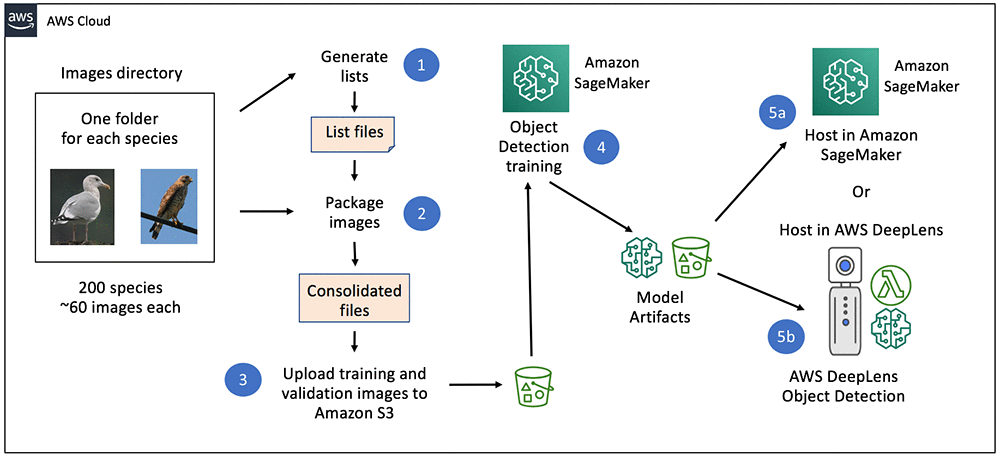
Amazon Rekognition plays a complementary role in this type of architecture. It is a fully managed computer vision service that can analyze images and videos to detect objects, faces, and activities without requiring custom model development. In many scenarios, Rekognition can serve as the first layer of filtering, automatically identifying whether an image contains relevant objects or scenes. This reduces the workload for downstream custom models built in SageMaker by ensuring that only meaningful data is processed further.
The integration between Amazon S3, Amazon Rekognition, and Amazon SageMaker AI forms a complete, automated computer vision pipeline. S3 serves as the scalable data repository for raw and processed images, Rekognition provides fast and cost-effective pre-filtering of data, and SageMaker trains high-accuracy custom models for fine-grained object detection and analysis. Together, these services enable organizations to develop advanced AI solutions that are scalable, explainable, and production-ready, supporting use cases from conservation research to industrial automation and public safety.