Analytics
Compute / Containers
AWS App Runner
- Fully managed service that makes it easy to deploy web applications and APIs at scale
- No infrastructure experience required
- Start with your source code or container image
- Automatically builds and deploy the web app
- Automatic scaling, highly available, load balancer, encryption
- VPC access support
- Connect to database, cache, and message queue services
Amazon EC2
- EC2 = Elastic Compute Cloud = Infrastructure as a Service
- It mainly consists in the capability of :
- Renting virtual machines (EC2)
- Storing data on virtual drives (EBS)
- Distributing load across machines (ELB)
- Scaling the services using an auto-scaling group (ASG)
Amazon Elastic Container Service (Amazon ECS)
- Amazon’s own container platform
Amazon Elastic Kubernetes Service (Amazon EKS)
- • Amazon’s managed Kubernetes (open source)
AWS Fargate
- Amazon’s own Serverless container platform
- Works with ECS and with EKS
Amazon ECR:
- Store container images
Customer Engagement
Amazon Lex & Connect
- same technology that powers Alexa
- Automatic Speech Recognition (ASR) to convert speech to text
- Natural Language Understanding to recognize the intent of text, callers
- Helps build chatbots, call center bots
Amazon Connect
- • Receive calls, create contact flows, cloud-based virtual contact center
- • Can integrate with other CRM systems or AWS
- • No upfront payments, 80% cheaper than traditional contact center solutions
Database
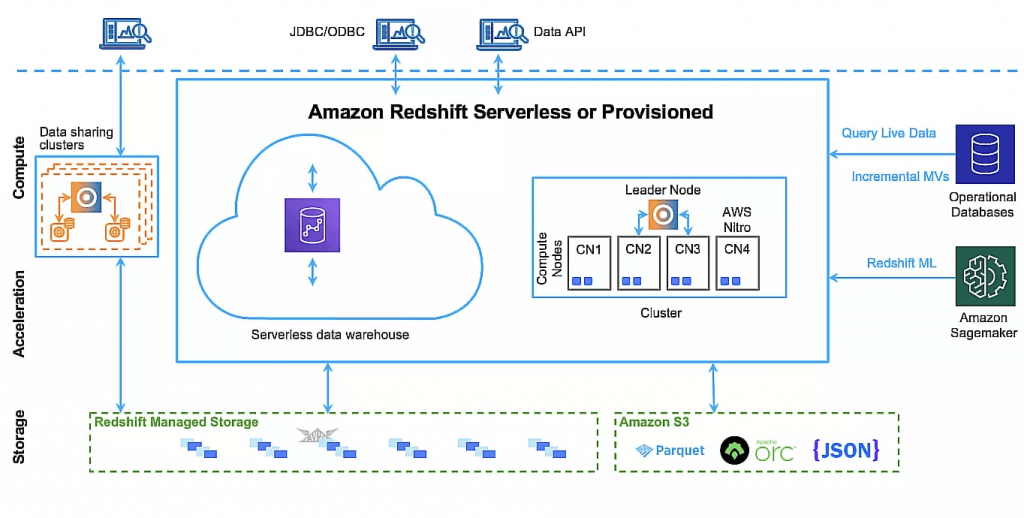
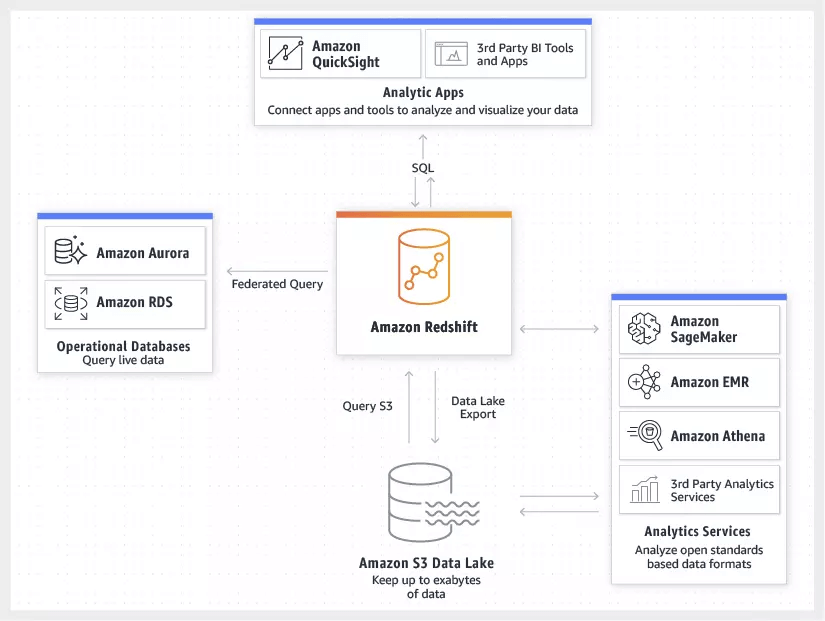
Amazon Redshift
- a fast, fully managed, petabyte-scale data warehouse service that makes it simple and cost-effective to efficiently analyze all your data
- uses Massively Parallel Processing (MPP) technology to process massive volumes of data at lightning speeds
Dev Tools
Machine Learning
Management and Governance
Migration and Data Transfer
AWS DataSync
- Move large amount of data to and from
- On-premises / other cloud to AWS (NFS, SMB, HDFS, S3 API…) – needs agent
- AWS to AWS (different storage services) – no agent needed
- Can synchronize to:
- Amazon S3 (any storage classes – including Glacier)
- Amazon EFS
- Amazon FSx (Windows, Lustre, NetApp, OpenZFS…)
- Replication tasks can be scheduled hourly, daily, weekly
- File permissions and metadata are preserved (NFS POSIX, SMB…)
- One agent task can use 10 Gbps, can setup a bandwidth limit
AWS Transfer Family
- Supported Protocols
- AWS Transfer for FTP (File Transfer Protocol (FTP))
- AWS Transfer for FTPS (File Transfer Protocol over SSL (FTPS))
- AWS Transfer for SFTP (Secure File Transfer Protocol (SFTP))
- Managed infrastructure, Scalable, Reliable, Highly Available (multi-AZ)
- Pay per provisioned endpoint per hour + data transfers in GB
- Store and manage users’ credentials within the service
Networking and Content Delivery
Amazon CloudFront
| Feature | S3 Transfer Acceleration | CloudFront |
|---|---|---|
| Primary Purpose | Accelerating uploads/downloads to S3 storage directly. | Global content delivery, caching, and website distribution. |
| Caching Mechanism | No caching. All requests hit the source S3 bucket. | Edge Caching. Repeated requests are served directly from the edge cache. |
| Best For | Large file uploads/downloads, or content that changes too frequently to cache. | Static web assets, videos, APIs, and globally accessed websites. |
| Uploads (PUT/POST) | Highly optimized. The definitive choice for maximizing upload throughput. | Good for smaller files (< 1GB), but not optimized for large batch uploads. |
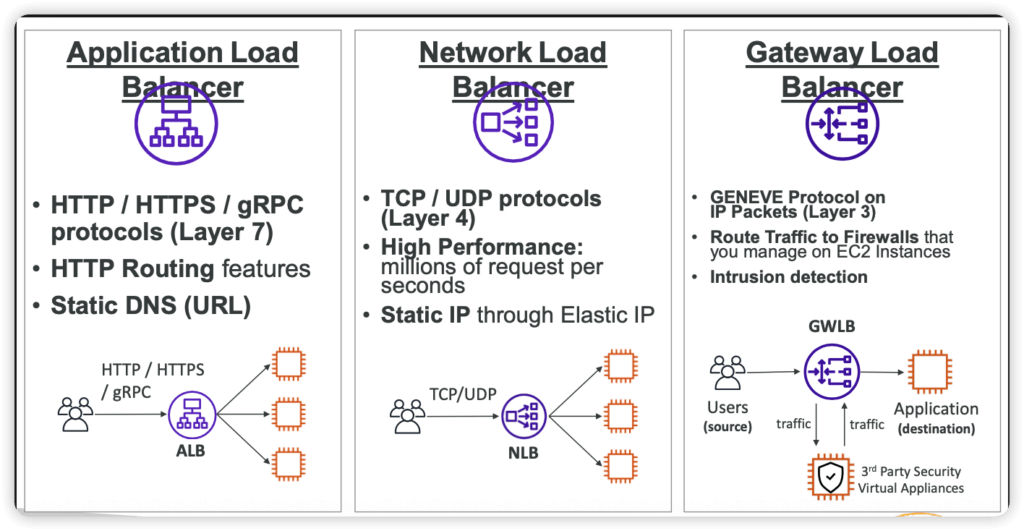
Elastic Load Balancer
- Spread load across multiple downstream instances
- Expose a single point of access (DNS) to your application
- Seamlessly handle failures of downstream instances
- Do regular health checks to your instances
- Provide SSL termination (HTTPS) for your websites
- High availability across zones
AWS Global Accelerator
- Leverage the AWS internal network to route to your application
- 2 Anycast IP are created for your application
- The Anycast IP send traffic directly to Edge Locations
- The Edge locations send the traffic to your application
- Security
- only 2 external IP need to be whitelisted
- DDoS protection thanks to AWS Shield
- Improves performance for a wide range of applications over TCP or UDP
- Proxying packets at the edge to applications running in one or more AWS Regions.
- Good fit for non-HTTP use cases, such as gaming (UDP), IoT (MQTT), or Voice over IP
- Good for HTTP use cases that require static IP addresses
- Good for HTTP use cases that required deterministic, fast regional failover
| Feature | Amazon CloudFront | AWS Global Accelerator |
|---|---|---|
| Primary Purpose | Content Delivery Network (CDN) designed to cache and serve HTTP/S content closer to users. | Network layer service optimized to route TCP/UDP traffic to the most performant endpoint. |
| Supported Protocols | Exclusively HTTP/S. | Any TCP or UDP traffic (e.g., Gaming, IoT/MQTT, VoIP). |
| Static IP Addresses | Provides a dynamic list of changing IP addresses mapped to a domain (CNAME). | Provides two static Anycast IP addresses that act as a fixed entry point for your applications. |
| Caching | Caches static and dynamic content at Edge Locations to drastically reduce origin load. | No caching; proxies packets all the way to your application backends. |
| Security | Direct integration with AWS Shield and AWS WAF (Web Application Firewall) and supports signed cookies/URLs. | Integrates with AWS Shield. WAF can only be used if traffic is routed to an Application Load Balancer. |
| Pricing | Based on outbound data transfer and number of HTTP requests. | Based on a fixed hourly rate plus data transfer premiums. |
Amazon Route 53
Storage
EBS (Elastic Block Store)
- Volume
- one instance (except multi-attach io1/io2)
- are locked at the Availability Zone (AZ) level
- migrate an EBS volume across AZ
- Take a snapshot
- Restore the snapshot to another AZ
- Delete on Termination attribute
- preserve root volume when instance is terminated
EFS (Elastic File System)
- NFS, Compatible with Linux based AMI (not Windows)
- works with EC2 instances in multi-AZ
- Storage Classes
Preparing textual data for machine learning involves preprocessing steps that transform raw text into a clean, structured format. Real-world data often contains inconsistencies such as mixed casing, redundant words, and noise that can hinder model performance. Standardizing and cleaning the text helps models capture meaningful semantic relationships, improving accuracy, interpretability, and consistency across NLP workflows.
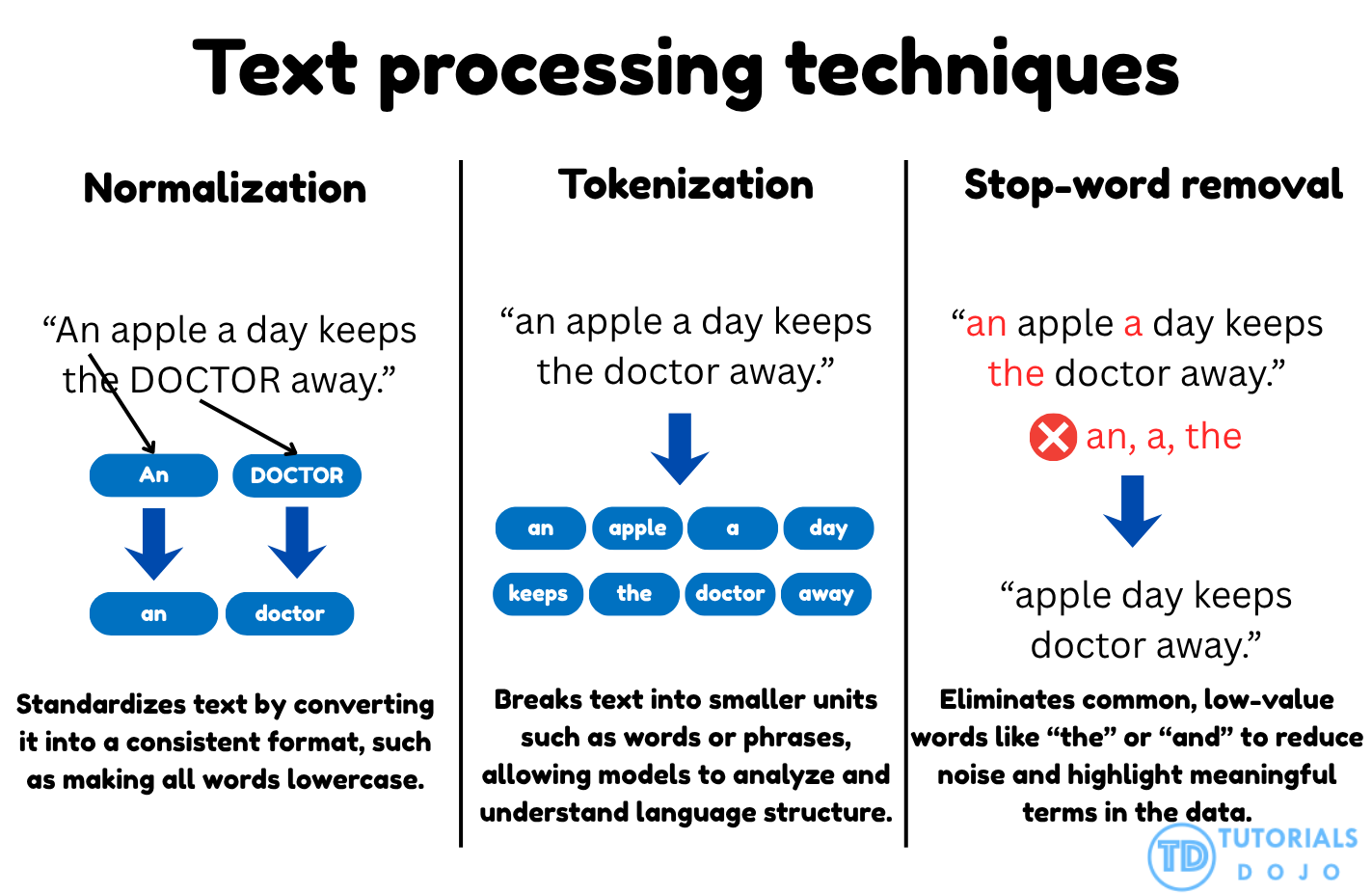
Text normalization and tokenization are two core preprocessing techniques that work together to structure textual data for natural language processing tasks. Normalization ensures uniformity by converting all text into a consistent format, typically by transforming every word to lowercase. This prevents words such as Apple, APPLE, and apple from being treated as separate tokens, which can fragment the vocabulary and distort semantic understanding. Once text is normalized, tokenization divides sentences into individual word units, enabling models to analyze relationships and co-occurrence patterns between words. In models like Word2Vec, this structured segmentation allows the algorithm to learn the contextual dependencies that define meaning. Together, these steps form the foundation for clean, consistent, and interpretable text data that supports high-quality embedding generation.
Stop-word removal is another essential preprocessing technique that filters out commonly used words that add little or no semantic value to a model’s understanding of language. Words like the, and, is, and of occur frequently across documents and can obscure meaningful patterns in the data. By eliminating these non-informative tokens using a stop-word dictionary, the dataset becomes more concise and focused on the content-bearing terms that drive model learning. This reduction in noise improves embedding clarity and computational efficiency during training.
When combined, these preprocessing techniques create a structured and optimized dataset that enhances the performance of NLP models. Text normalization ensures consistency, tokenization enables contextual learning, and stop-word removal refines the dataset by emphasizing meaningful terms. Together, they serve as the cornerstone of high-quality data preparation for embedding-based approaches, ensuring that models learn from the true linguistic and semantic essence of text data.
Choose Vector Store
- SharePoint / Confluence / document permissions / “must respect existing ACLs” → Kendra
- Graph relationships (“who knows who”, fraud rings, lineage, dependency graphs) → Neptune Analytics
- Already on Postgres + need joins/transactions + vector search → Aurora + pgvector
- Huge vector corpus + cost pressure + vectors mostly tied to S3 objects → S3 Vectors
- Need full search platform + lots of tuning control → OpenSearch managed
- Unpredictable traffic + “minimize ops” → OpenSearch Serverless
- Cost-first: S3 Vectors (massive corpora, infrequent queries)
- Permissions-first: Kendra
- Relationship-first: Neptune Analytics
- SQL-first: Aurora + pgvector
- Search-first: OpenSearch (managed/serverless)
| Service | Primary Use Case | Key Advantage |
|---|---|---|
| Amazon OpenSearch Service | Advanced search & high-throughput analytics | Recommended for Amazon Bedrock; scales horizontally with built-in k-NN. |
| Amazon S3 Vectors | Large-scale, cost-effective storage (New/2025) | Native vector support in S3 buckets; up to 90% cheaper than in-memory options for infrequent access. |
| Amazon Aurora (pgvector) | Relational data + vector search | Best for hybrid structured/unstructured data; uses existing PostgreSQL tools and SQL queries. |
| Amazon MemoryDB | Ultra-low latency | Fastest vector search performance on AWS with high recall for real-time applications. |
| Amazon Neptune Analytics | Graph-based vector search | Ideal for RAG applications involving complex relationship data. |
| Feature | OpenSearch Service (Managed) | OpenSearch Serverless |
|---|---|---|
| Management | Manual provisioning of nodes/clusters. | Automated provisioning; no clusters to manage. |
| Scaling | Manual or policy-based auto-scaling of instances. | Automatic scaling based on demand (OCUs). |
| Latency | Predictable | Variable |
| Cost Basis | Pay per instance, storage (EBS), and data transfer. | Pay per OpenSearch Capacity Unit (OCU) used. |
| Tuning | Full control (shards) | Limited |