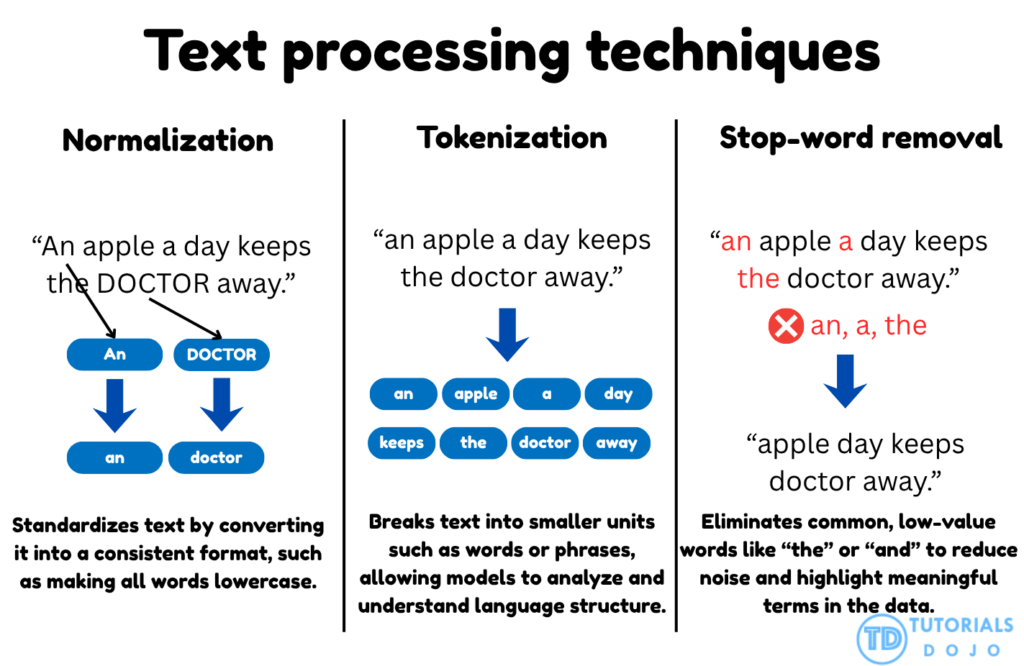
Text normalization and tokenization are two core preprocessing techniques that work together to structure textual data for natural language processing tasks. Normalization ensures uniformity by converting all text into a consistent format, typically by transforming every word to lowercase. This prevents words such as Apple, APPLE, and apple from being treated as separate tokens, which can fragment the vocabulary and distort semantic understanding. Once text is normalized, tokenization divides sentences into individual word units, enabling models to analyze relationships and co-occurrence patterns between words. In models like Word2Vec, this structured segmentation allows the algorithm to learn the contextual dependencies that define meaning. Together, these steps form the foundation for clean, consistent, and interpretable text data that supports high-quality embedding generation.
Stop-word removal is another essential preprocessing technique that filters out commonly used words that add little or no semantic value to a model’s understanding of language. Words like the, and, is, and of occur frequently across documents and can obscure meaningful patterns in the data. By eliminating these non-informative tokens using a stop-word dictionary, the dataset becomes more concise and focused on the content-bearing terms that drive model learning. This reduction in noise improves embedding clarity and computational efficiency during training.
Data Augmentation
- is a technique to artificially create new training data from existing training data. This is done by applying domain-specific techniques to examples from the training data that create new and different training examples.
- enhances model performance by synthetically increasing the diversity of the training dataset. Instead of collecting new samples, existing data is transformed through operations such as rotation, flipping, cropping, and scaling, helping models learn features that remain consistent across varying orientations and conditions. This approach improves the generalization capability of image classification models and reduces overfitting. In AWS workflows, services like Amazon Rekognition Custom Labels and Amazon SageMaker Training Jobs support data augmentation as part of their built-in training processes, allowing models to adapt to real-world variations in object appearance, lighting, and perspective.
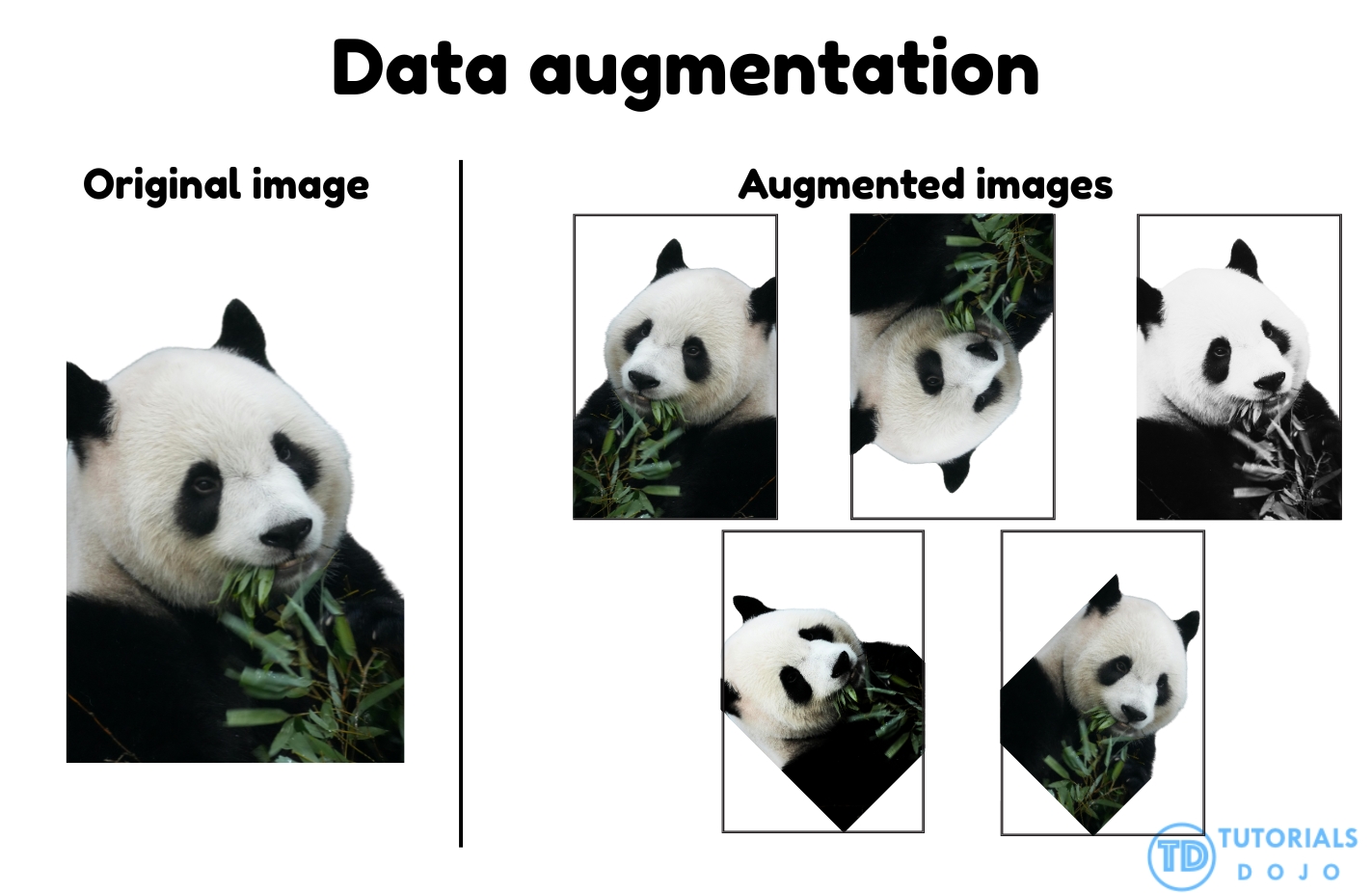
- By exposing the model to multiple transformed versions of the same object, data augmentation ensures it recognizes key features regardless of orientation or environmental differences. This leads to more accurate and reliable predictions when the model encounters unfamiliar or rotated inputs during inference. AWS documentation highlights that data augmentation is a best practice for improving computer vision model accuracy and robustness, as it helps reduce dataset bias and strengthens feature learning. Applying augmentation techniques such as rotation, flipping, and scaling during training directly addresses orientation-sensitive errors and ensures that the model performs consistently across diverse visual scenarios.
Bedrock Data Manipulation
- Structured Data: Bedrock API Requests
- Bedrock generally expects request payloads in JSON format
- Typically, this is the underlying native structure for the models you’re working with
- Structured Data for SageMaker AI Endpoints
- Models deployed via SageMaker will expect a certain input and output format
- Typically this is JSON for LLM’s
- But for classical ML, it might be csv or something else
- SageMaker will not format your input for you; your app and endpoint is responsible for this.
- Dealing with Unstructured Text
- Raw text can lose its structure. GenAI likes structure.
- Headings, sections, metadata, tables get lost in the sea of text
- One technique is to convert your unstructured text to HTML (or something) that can preserve that structure
- Then your models can understand the structure and organization of the data better.
- Useful for OCR or PDF text, for example.
- Tools like pandoc, Amazon Textract and Amazon Comprehend can help extract structure from raw text or images.
- An ingestion pipeline performing this conversion might run on top of AWS Glue, or with Bedrock Data Automation (BDA)
Bedrock Data Automation (BDA)
- Extracts structured data from pretty much anything
- Multi-modal
- Documents, images, videos, audio
- Useful for:
- Preparing data for vector stores / KB’s (RAG)
- Intelligent Document Processing (IDP)
- Analyzing video
- Scene summaries
- ID explicit content
- Extract text in video
- Find ads
- Concepts
- Standard Output
- If you just throw a file at it, it will guess at what format you want the output
- For documents this is probably JSON. For audio it’s a transcript. Etc.
- Custom Output
- For documents, audio, or images, you can customize the output
- Specify exactly what you want to extract
- A Blueprint specified the fields you want
- BDA blueprints work best when each content category has one clear, unambiguous blueprint.
- Having multiple blueprints for the same type of content creates unnecessary overlap, leading to inconsistent or incorrect classification when BDA tries to determine the best match.
- Standardizing blueprint names and pruning duplicates ensures that BDA performs clean category matching for each page.
- There are standard blueprints (like US Driver License) or you can define your own.
- You can store your output configurations in a Project.
- Kicking off BDA through the API requires calling InvokeDataAutomationAsync with your project.
- A project may include many Blueprints for different document types.
- Standard Output
- Document Processing
- Accepts PDF, TIFF, JPEG, PNG, DOCX
- Outputs JSON or JSON+files
- Files might include CSV for tables, overall text extraction, markdown
- HTML and CSV structured output is also possible
- Remember this came up earlier in the context of structuring unstructured data for better chunking – this is an easier way to do this
- You can select the granularity of responses
- Page-level, element-level (default), word-level
- Enabling PDF page splitting ensures that each page is processed independently, allowing BDA to apply the correct blueprint per page.
- Bounding boxes and generative summaries can be enabled per level
- Page-level, element-level (default), word-level
- Image Processing
- Accepts JPEG, PNG
- Generates:
- Image summary / caption
- IAB Taxonomy (Interactive Advertising Bureau)
- Logos found
- Text in images
- Content moderation
- …all in JSON
- Video Processing
- Accepts MP4, MOV, AVI, MKV, WEBM
- Extracts:
- Full video summary
- Chapter summaries
- This implies it can break the video down too!
- IAB Taxonomy
- Transcript
- Text in video
- Logos found
- Content Moderation
- …all in JSON
- Audio Processing
- Accepts AMR, FLAC, M4A, MP3, Ogg, WAV
- …and a variety of languages
- Extracts:
- Summary of the file
- Full transcript
- Speaker and Channel labeling in transcript
- Breaking up into Topics
- Content moderation
- …all in JSON
- Accepts AMR, FLAC, M4A, MP3, Ogg, WAV
- Blueprints for Custom Output
- Basic fields
- Explicit or implicit (transformed)
- Table fields
- Groups (for organizing fields)
- Custom types
- Example: “address” consisting of city, street, zip, etc.
- You can create Blueprints just from a prompt as well!
- Again there are many pre-existing blueprints you can use for common document types.
- Uses
- Classification
- The document class and description can be used to automatically classify documents that match this blueprint
- Extraction
- Allows you extract specific fields, even if it’s from tabular data
- Normalization
- Key Normalization can deal with different names for the same data
- Value Normalization can ensure data is extracted in a consistent format and in consistent data types
- Transformation
- You can split and restructure data fields
- Validation
- Ensure the accuracy of data. Is it within specified ranges? Have the expected size? Etc.
- Classification
- Basic fields
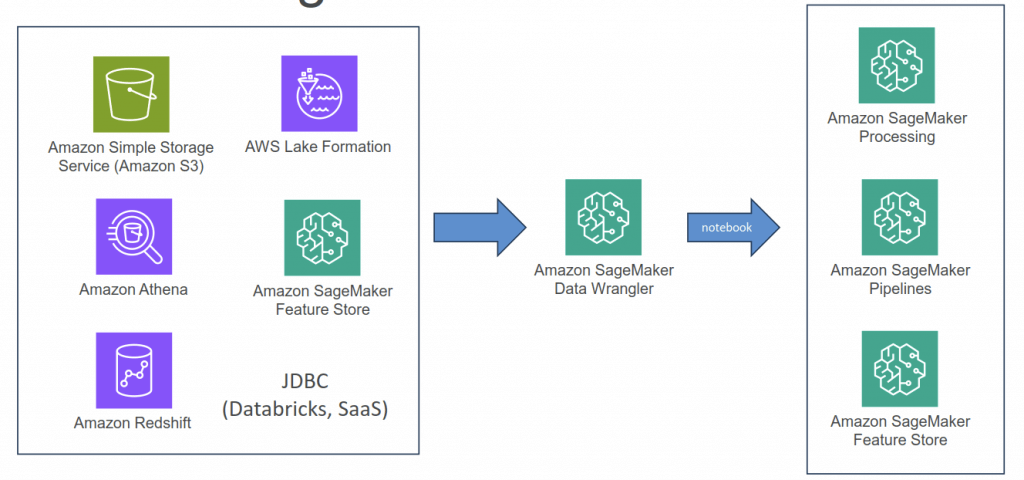
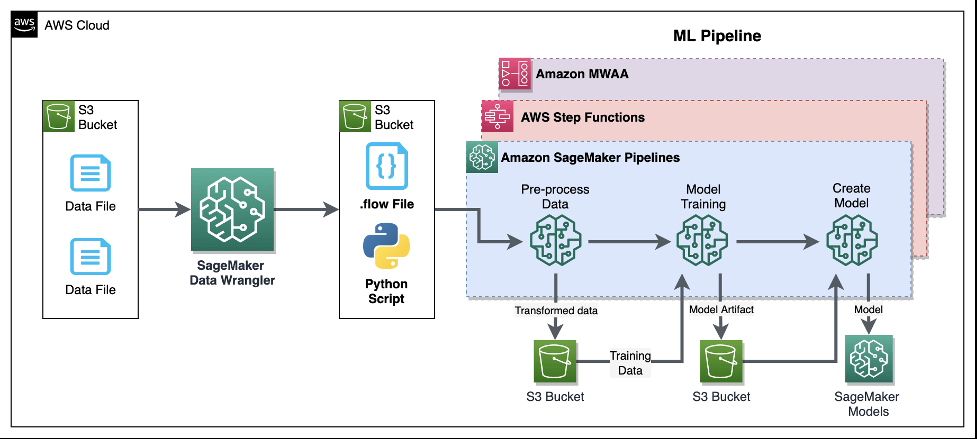
SageMaker Data Wrangler
- Visual interface (in SageMaker Studio) to prepare data for machine learning
- Import data
- Visualize data (Explore and Analysis)
- A histogram visualization is especially effective for exploring numerical features by showing how data points are distributed across defined value ranges. This makes it easy to identify outliers, data skew, or unusual clustering patterns that could influence model training.
- a box plot provides a summary of data spread and outliers but does not reveal the full frequency distribution
- Transform data (300+ transformations to choose from)
- Or integrate your own custom xforms with pandas, PySpark, PySpark SQL
- Balance Data – create better models for binary classification; for example, detects fraudulent
- Random oversampling
- Random undersampling
- Synthetic Minority Oversampling Technique (SMOTE)
- creates synthetic fraudulent cases and can help address the low number of fraudulent transactions
- Oversampling by using bootstrapping (useless)
- create additional samples by resampling with replacements from the existing minority class
- does not add new data points; ie does not provide enrichment
- Undersampling (not recommended)
- reduce the number of examples from the majority class to the dataset
- drops some data points; ie you risk the loss of potentially valuable information from the majority class.
- Reduce Dimensionality within a Dataset
- Principal Component Analysis (PCA)
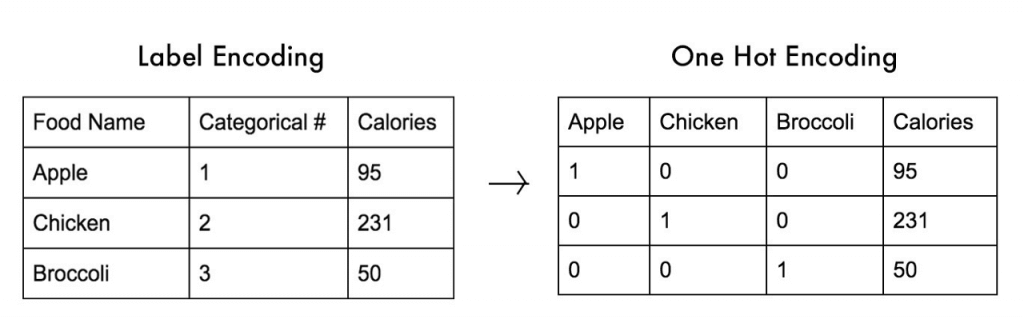
- Encode Categorical – encode categorical data that is in string format into arrays of integers
- Ordinal Encode
- One-Hot Encode
- Featurize Text ??
- Character statistics
- Vectorize
- Handle Outliers
- Robust Standard Deviation Numeric Outliers – (Q1/Q3 + n x Standard Deviation)
- Standard Deviation Numeric Outliers – only n x Standard Deviation
- Quantile Numeric Outliers – only Q1/Q3
- Min-Max Numeric Outliers – set upper and lower threshold
- Replace Rare – set a single threshold
- Handle Missing Values
- Fill missing (predefined value)
- Impute missing (mean or median, or most frequent value for categorical data)
- Drop missing (row)
- Process Numeric
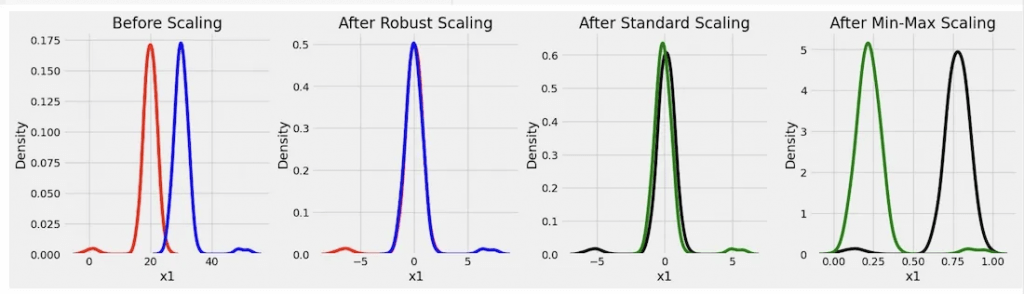
- Standard Scaler
- Robust Scaler
- removes the median and scales the data using the interquartile range (IQR), making it less vulnerable to outliers than the Standard Scaler or Min-Max Scaler
- Min Max Scaler
- Max Absolute Scaler
- L2 Normalization
- Z-Score Normalization
- Split Data
- Randomized
- Ordered: best for time-sensitive data, like sorted by date
- Stratified: ensure that each split represents the overall dataset proportionally across a specified key, such as class labels in classification tasks, ie, “all categories of data are represented in each set”.
- Key-Based
| Aspect | StandardScaler | Normalizer |
|---|---|---|
| Operation Basis | Feature-wise (across columns) | Sample-wise (across rows) |
| Purpose | Standardizes features to zero mean and unit variance | Scales samples to unit norm (L2 by default) |
| Impact on Data | Alters the mean and variance of each feature | Adjusts the magnitude of each sample vector |
| Common Use Cases | Regression, PCA, algorithms sensitive to variance | Text classification, k-NN, direction-focused tasks |
- preprocessing large text datasets (super on NLP tasks)
- handle various data formats
- supports common NLP preprocessing techniques
- tokenization
- stemming
- stop word removal
- “Quick Model” to train your model with your data and measure its results
- Troubleshooting
- Make sure your Studio user has appropriate IAM roles
- Make sure permissions on your data sources allow Data Wrangler access
- Add AmazonSageMakerFullAccess policy
- EC2 instance limit
- If you get “The following instance type is not available…” errors
- May need to request a quota increase
- Service Quotas / Amazon SageMaker / Studio KernelGateway Apps running on ml.m5.4xlarge instance
Amazon Textract
- Automatically extracts text, handwriting, and data from any scanned documents using AI and ML
- Extract data from forms and tables
- Read and process any type of document (PDFs, images, …)
- Use cases:
- Financial Services (e.g., invoices, financial reports)
- Healthcare (e.g., medical records, insurance claims)
- Public Sector (e.g., tax forms, ID documents, passports)
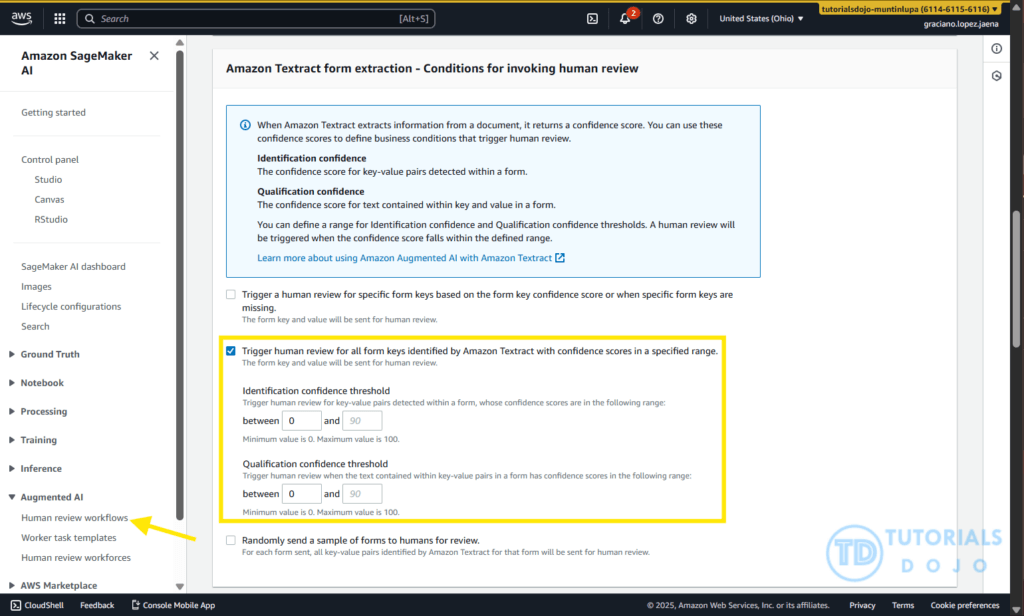
- [ 🧐QUESTION🧐 ] with A2I
- When integrated with Amazon Augmented AI (A2I), Textract can automatically trigger human review for fields or documents where the confidence score falls below a specified threshold. This integration allows the document processing pipeline to maintain high accuracy while minimizing unnecessary manual intervention.
- Amazon Augmented AI (A2I) provides a managed framework for incorporating human review into machine learning workflows. It allows developers to define conditions under which human validation is initiated, typically based on the confidence levels returned by automated systems such as Textract. A2I offers built-in integration with Textract, making it easy to configure review workflows without the need to build a custom interface or process. When low-confidence predictions are detected, A2I automatically routes those specific fields to a human reviewer who can validate or correct the information. This approach ensures that human expertise complements automated extraction, maintaining high data quality without requiring all documents to be manually reviewed.
- Together, Amazon Textract and Amazon A2I enable a hybrid document-processing solution that combines automation with selective human oversight. Textract handles large-scale extraction of textual and structured data, while A2I ensures that human validation is reserved only for uncertain outputs. This cooperative mechanism enhances operational efficiency, reduces processing costs, and maintains high accuracy for business-critical data. By allowing machines to process the majority of documents and humans to focus only on low-confidence cases, the combined solution delivers a robust, scalable approach to intelligent document processing suitable for compliance-intensive industries.
Amazon Transcribe
- Automatically convert speech to text
- Uses a deep learning process called automatic speech recognition (ASR) to convert speech to text quickly and accurately
- Automatically remove Personally Identifiable Information (PII) using Redaction
- Supports Automatic Language Identification for multi-lingual audio
- Use cases:
- transcribe customer service calls
- automate closed captioning and subtitling
- generate metadata for media assets to create a fully searchable archive
- Allows Transcribe to capture domain-specific or non-standard terms (e.g., technical words, acronyms, jargon…)
- Custom Vocabularies (for words)
- Add specific words, phrases, domain-specific terms
- Good for brand names, acronyms…
- Increase recognition of a new word by providing hints (such as pronunciation..)
- Custom Language Models (for context)
- Train Transcribe model on your own domain-specific text data
- Good for transcribing large volumes of domain-specific speech
- Learn the context associated with a given word
- [!!] While Amazon Transcribe does support custom language models for domain-specific speech, it introduces unnecessary complexity for many use cases where custom vocabularies would be a simpler and more efficient solution. Custom language models are designed for large-scale domain adaptation and require training, tuning data, and specific language support, which makes them overkill for scenarios where specialized terminology can be handled with custom vocabularies.
- Note: use both for the highest transcription accuracy
- Toxicity Detection
- ML-powered, voice-based toxicity detection capability
- Leverages speech cues: tone and pitch, and text-based cues
- Toxicity categories: sexual harassment, hate speech, threat, abuse, profanity, insult, and graphic …
Amazon Comprehend
- For Natural Language Processing – NLP
- Fully managed and serverless service
- Uses machine learning to find insights and relationships in text
- Language of the text
- Extracts key phrases, places, people, brands, or events
- Understands how positive or negative the text is
- Analyzes text using tokenization and parts of speech
- Automatically organizes a collection of text files by topic
- Sample use cases:
- analyze customer interactions (emails) to find what leads to a positive or negative experience
- Create and groups articles by topics that Comprehend will uncover
- Custom Classification
- Organize documents into categories (classes) that you define
- Example: categorize customer emails so that you can provide guidance based on the type of the customer request
- Supports different document types (text, PDF, Word, images…)
- Real-time Analysis – single document, synchronous
- Async Analysis – multiple documents (batch), Asynchronous
- Also support to execute as “(inference) query classifications”!
- Organize documents into categories (classes) that you define
- Named Entity Recognition (NER)
- Extracts predefined, general-purpose entities like people, places, organizations, dates, and other standard categories, from text
- Custom Entity Recognition (CER)
- Analyze text for specific terms and noun-based phrases
- Extract terms like policy numbers, or phrases that imply a customer escalation, anything specific to your business
- Train the model with custom data such as a list of the entities and documents that contain them
- Real-time or Async analysis
- used to identify and label domain-specific terms or entities within text. It does not modify or retrain a foundation model’s understanding of language, meaning it cannot improve how the model interprets or generates text. CER is useful for text analytics but not for enhancing a generative model’s comprehension capabilities.
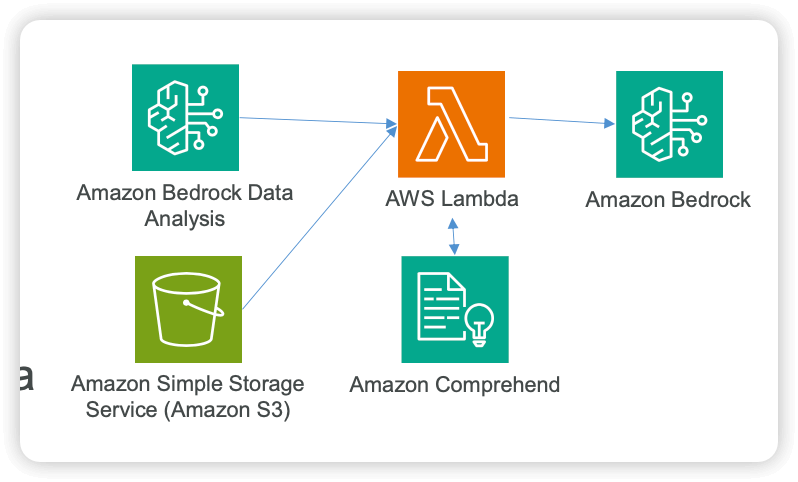
- Using Comprehend and Lambda for Data Quality
- A Lambda function can call Amazon Comprehend before data hits Bedrock to…
- Redact PII
- Extract entities
- Detect language
- Classify the data
- Example applications
- Clean up transcripts before going into a Knowledge Base
- Pre-screen user-generated content before feeding it to an agent
- A Lambda function can call Amazon Comprehend before data hits Bedrock to…
- Compose
- Entities: Noun with Category, Confidence
- Key phrases: Noun
- Language
- Sentiment: Neutral, Positive, Negative, Mixed
- Syntax: Noun, Verb, Adposition, Adjustive, …
- employs a learning model based on Latent Dirichlet Allocation (LDA) to identify topics within a document set.
- It examines each document to understand the context and meaning of words.
- A topic is formed by the set of words that frequently appear together in a similar context across the entire collection of documents.
- Topic modeling is an asynchronous process.
- To get started, you submit your list of documents to Amazon Comprehend from an Amazon S3 bucket using the
StartTopicsDetectionJoboperation. - The results are sent to a specified Amazon S3 bucket.
- You can configure both the input and output buckets as needed.
- To view the topic modeling jobs you have submitted, use the
ListTopicsDetectionJobsoperation. - For more detailed information about a specific job, you can use the
DescribeTopicsDetectionJoboperation.
- To get started, you submit your list of documents to Amazon Comprehend from an Amazon S3 bucket using the
- Toxicity Detection
- Detect content that may be harmful, offensive, or inappropriate. Examples include hate speech, threats, or abuse.
- To detect toxic content in text, use the synchronous DetectToxicContent operation. This operation performs analysis on a list of text strings that you provide as input.
- GRAPHIC, HARASSMENT_OR_ABUSE, HATE_SPEECH, INSULT, PROFANITY, SEXUAL, VIOLENCE_OR_THREAT, TOXICITY
- Intent classification
- Detect content that has explicit or implicit malicious intent. Examples include discriminatory or illegal content, or content that expresses or requests advice on medical, legal, political, controversial, personal or financial subjects.
- Privacy protection – PII Identification & Redaction
- The API operation
DetectPiiEntitiesinspects a provided text input for entities that match a taxonomy of sensitive information types (such as names, addresses, credit card numbers, phone numbers, driver’s license numbers) and returns metadata including the entity type, character offsets (begin and end), and a confidence score.- In addition, using Amazon Comprehend for the PII detection/redaction step addresses the “must not use any PII” constraint explicitly: by detecting and removing PII before training, the model is prevented from ingesting sensitive data. The cleaned dataset stored in S3 can then be accessed by SageMaker AI without needing complex file‑system mounts or auxiliary services, reducing architectural complexity and operational overhead. This solution aligns with AWS best practices for building ML workflows: using managed services specialized for their tasks (Comprehend for PII, S3 for storage, SageMaker for training) ensures scalability, reliability, and maintainability.
- The API operation
- Sentiment Analysis
- Prompt safety classification
- Amazon Comprehend provides a pre-trained binary classifier to classify plain text input prompts for large language models (LLM) or other generative AI models.
- The prompt safety classifier analyses the input prompt and assigns a confidence score to whether the prompt is safe or unsafe.
- An unsafe prompt is an input prompt that express malicious intent such as requesting personal or private information, generating offensive or illegal content, or requesting advice on medical, legal, political, or financial subjects.
- [ 🧐QUESTION🧐 ] Comprehend analyse insights
- Entities – References to the names of people, places, items, and locations contained in a document.
- Key phrases – Phrases that appear in a document. For example, a document about a basketball game might return the names of the teams, the name of the venue, and the final score.
- Personally Identifiable Information (PII) – Personal data that can identify an individual, such as an address, bank account number, or phone number.
- Language – The dominant language of a document.
- Sentiment – The dominant sentiment of a document, which can be positive, neutral, negative, or mixed.
- Targeted sentiment – The sentiments associated with specific entities in a document. The sentiment for each entity occurrence can be positive, negative, neutral or mixed.
- Syntax – The parts of speech for each word in the document.
- [ 🧐QUESTION🧐 ] Intelligent Query Routing for Model Cascading
- For the 500 complex queries requiring consistent low-latency performance, Provisioned Throughput with 1 model unit ensures guaranteed capacity and eliminates throttling risks during peak periods. Amazon Comprehend custom classification provides intelligent routing by analyzing query characteristics and directing traffic to the appropriate endpoint, ensuring optimal resource utilization. This dual-endpoint approach also supports the performance efficiency pillar by preventing resource contention between high-volume simple tasks and complex analytical workloads.
- [ 🧐QUESTION🧐 ] Running PII detection but also keep where they are
- Utilize the Offsets analysis to return the precise start and end character positions in the extracted text.
- The Offsets analysis mode in Comprehend provides the exact character positions where each detected entity appears in the source text. This numerical metadata allows systems to map PII directly back to its location within emails, transcripts, or extracted documents. In workflows that involve redaction, regulatory review, or alignment with generative AI summarization tasks, offset data is essential because it provides precise boundaries for each entity and enables consistent post-processing.
- Utilize the Labels analysis to return classification-style entity names for downstream compliance processing.
- The Labels analysis mode supplements the offset data by assigning descriptive names to each detected entity type. These labels help classify PII into categories such as “Name,” “Email Address,” or “Bank Account Number,” making it easier to group, filter, or interpret the information during downstream processing. Paired with the outputs of Amazon Textract, which extracts text from scanned documents, and predictive insights from other AWS ML services, both analysis modes allow compliance teams to build rich workflows that combine AI-based entity detection, structured metadata, and automated reporting.
- [ NOT ] Syntax Analysis feature
- Syntax Analysis identifies parts of speech and the structural components of sentences. It primarily focuses on tokenization, dependencies, and grammatical structure.
- [ NOT ] Key Phrase Detection
- dentify meaningful terms and noun phrases in unstructured text. It simply highlights important concepts but does not return character offsets or provide structured PII categories. This feature typically aids in topic extraction or general text understanding
- [ NOT ] Sentiment Analysis
- evaluates the emotional tone expressed in a text sample, determining whether the content is predominantly positive, negative, neutral, or mixed. It only produces sentiment classifications and confidence scores. This feature typically supports customer feedback analysis or social media monitoring
- Utilize the Offsets analysis to return the precise start and end character positions in the extracted text.
Amazon Comprehend Medical
- extends the functionality of Comprehend by focusing specifically on the healthcare domain.
- It analyzes unstructured clinical text, such as physician notes, discharge summaries, and prescriptions.
- This service can identify protected health information (PHI) and extract medically relevant entities such as conditions, medications, dosage, and procedures.
- Comprehend Medical enables healthcare organizations to handle sensitive patient data securely by automatically detecting and redacting PHI while supporting use cases like clinical analytics, predictive modeling, and AI-driven healthcare applications.
Amazon Rekognition
- Find objects, people, text, scenes in images and videos using ML
- Facial analysis and facial search to do user verification, people counting
- Create a database of “familiar faces” or compare against celebrities
- Use cases:
- Labeling
- Content Moderation
- Text Detection
- Face Detection and Analysis (gender, age range, emotions…)
- Face Search and Verification
- Celebrity Recognition
- Pathing (ex: for sports game analysis)
- Custom Labels
- Examples: find your logo in social media posts, identify your products on stores shelves (National Football League – NFL – uses it to find their logo in pictures)
- Label your training images and upload them to Amazon Rekognition
- Only needs a few hundred images or less
- Amazon Rekognition creates a custom model on your images set
- New subsequent images will be categorized the custom way you have defined
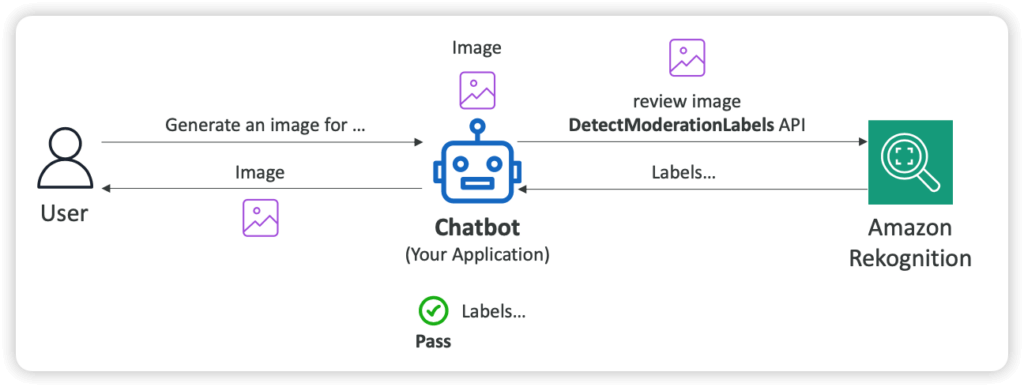
- Content Moderation
- Automatically detect inappropriate, unwanted, or offensive content
- Example: filter out harmful images in social media, broadcast media, advertising…
- Bring down human review to 1-5% of total content volume
- Integrated with Amazon Augmented AI (Amazon A2I) for human review training
- Custom Moderation Adaptors
- Extends Rekognition capabilities by providing your own labeled set of images
- Enhances the accuracy of Content
- Automatically detect inappropriate, unwanted, or offensive content
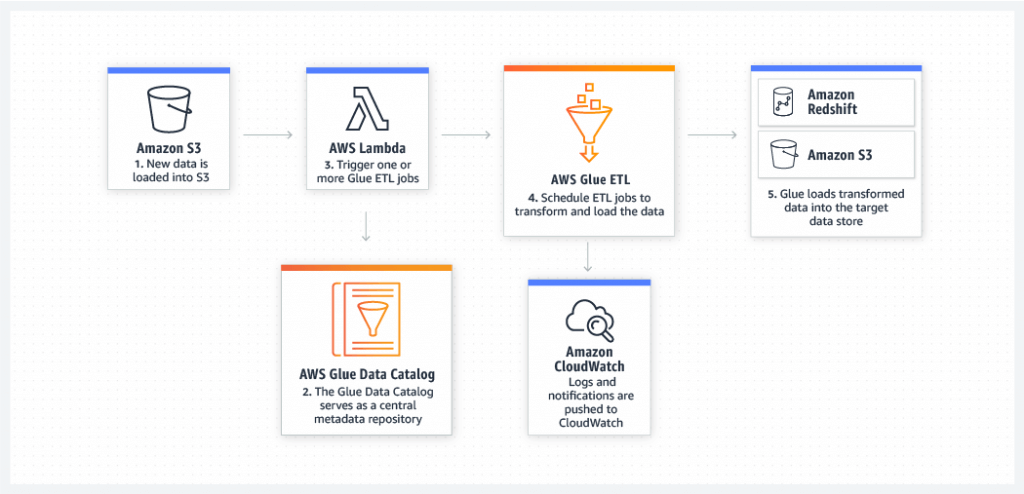
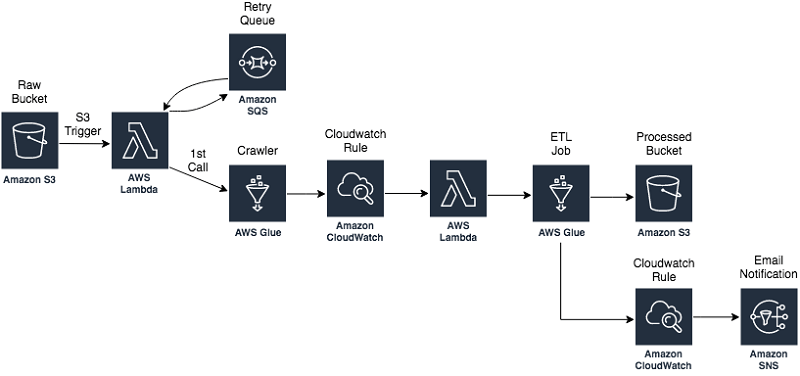
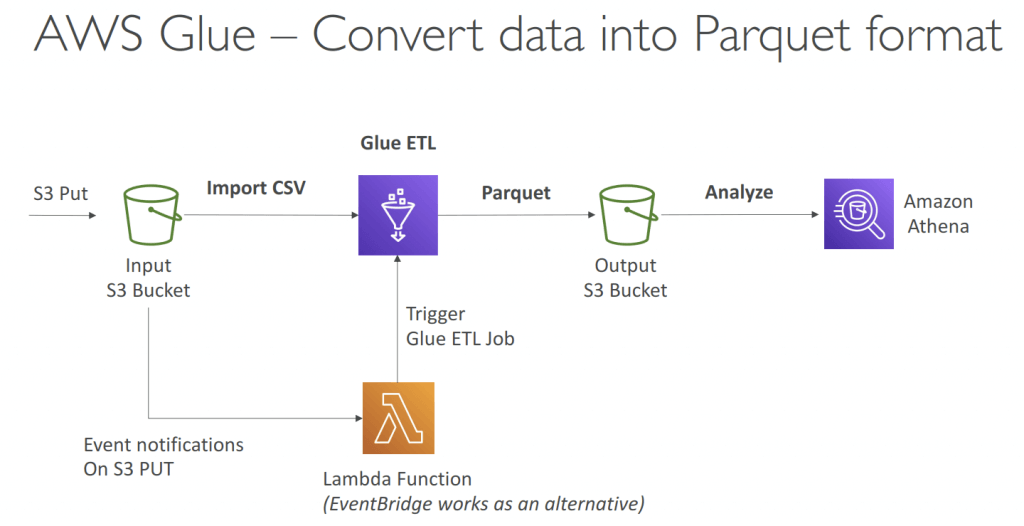
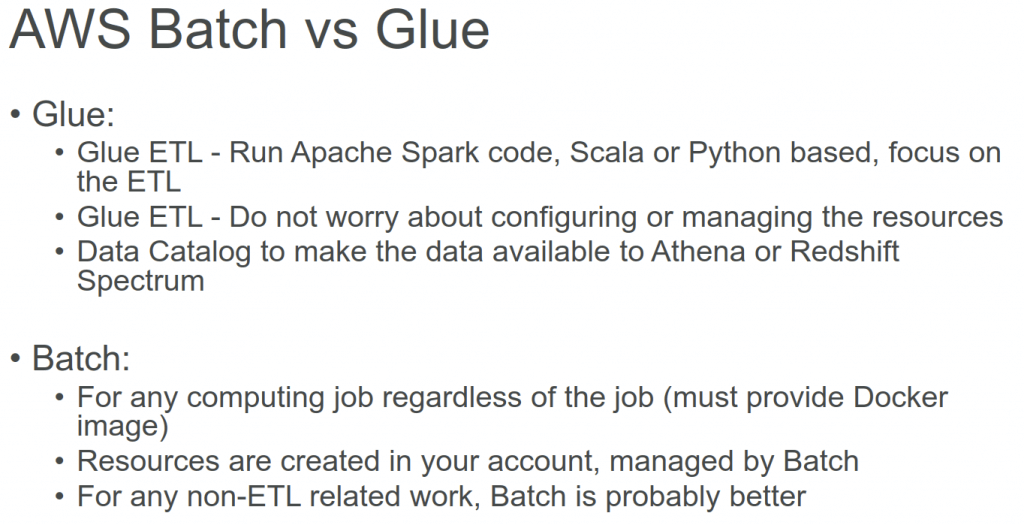
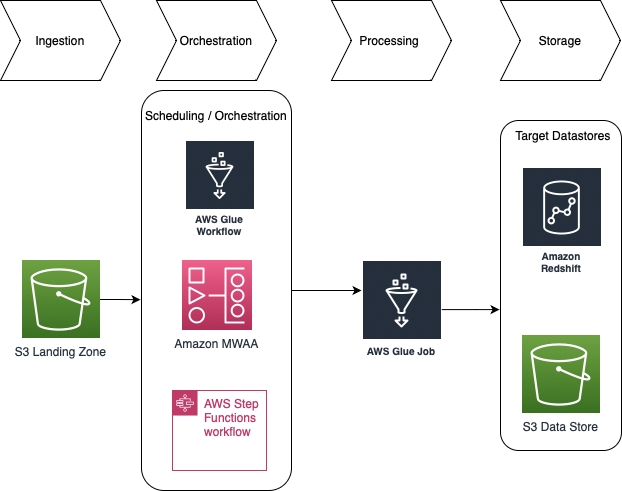
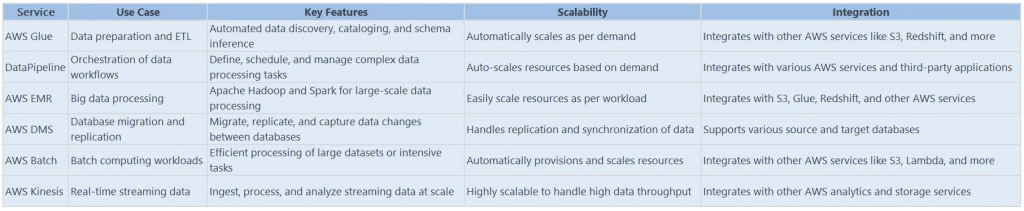
Glue ETL
- Extract, Transform, Load
- primarily used for batch data processing and not real-time data ingestion and processing
- Transform data, Clean Data, Enrich Data (before doing analysis)
- Bundled Transformations
- DropFields, DropNullFields – remove (null) fields
- Filter – specify a function to filter records
- Join – to enrich data
- Map – add fields, delete fields, perform external lookups
- Machine Learning Transformations
- FindMatches ML: identify duplicate or matching records in your dataset, even when the records do not have a common unique identifier and no fields match exactly.
- Apache Spark transformations (example: K-Means)
- The Detect PII transform in AWS Glue is designed to identify Personally Identifiable Information (PII) within your data source. You can specify which PII entities you want to detect, how you would like the data to be scanned, and the actions to take on the identified PII entities.
- Bundled Transformations
- Jobs are run on a serverless Spark platform
- Glue Scheduler to schedule the jobs
- Glue Triggers to automate job runs based on “events”
| Format | Definition | Property | Usage |
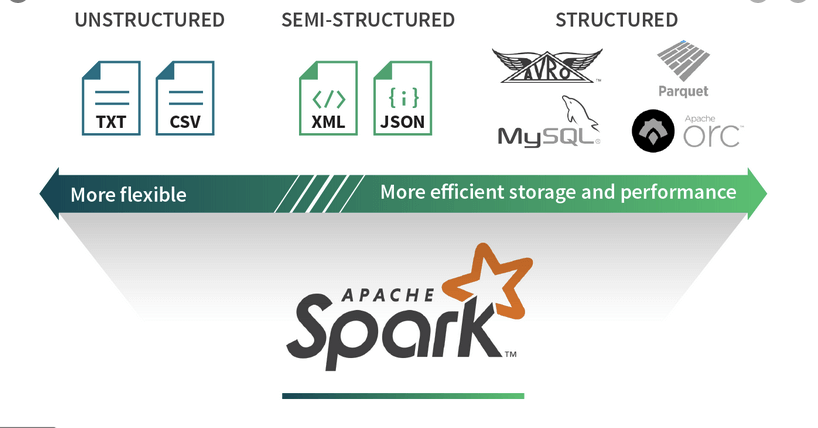
| CSV | Unstructured | minimal, row-based | no good for large-scale data |
| XML | Semi-structured | not row- nor column-based | no good for large-scale data |
| JSON | Semi-structured | not row- nor column-based | |
| JSON Lines (JSONL) | Structured | performance-oriented, row-based | large datasets (streaming, event data) |
| Parquet | Structured (columnar) | performance-oriented, column-based | large datasets (analytical queries), with data compression and encoding algorithms |
| Avro-RecordIO | Structured | performance-oriented, row-based | large datasets (streaming, event data) |
| grokLog | Structured | ||
| Ion | Structured | ||
| ORC | Structured | performance-oriented, column-based |
| Feature | Avro | Parquet |
| Storage Format | Row-based (stores entire records sequentially) | Columnar-based (stores data by columns) |
| Best For | Streaming, event data, schema evolution | Analytical queries, big data analytics |
| Read Performance | Slower for analytics since entire rows must be read | Faster for analytics as only required columns are read |
| Write Performance | Faster – appends entire rows quickly | Slower – columnar storage requires additional processing |
| Query Efficiency | Inefficient for analytical queries due to row-based structure | Highly efficient for analytical queries since only required columns are scanned |
| File Size | Generally larger due to row-based storage | Smaller file sizes due to better compression techniques |
| Use Cases | Event-driven architectures, Kafka messaging systems, log storage | Data lakes, data warehouses, ETL processes, analytical workloads |
| Processing Frameworks | Works well with Apache Kafka, Hadoop, Spark | Optimized for Apache Spark, Hive, Presto, Snowflake |
| Support for Nested Data | Supports nested data, but requires schema definition | Optimized for nested structures, making it better suited for hierarchical data |
| Interoperability | Widely used in streaming platforms | Preferred for big data processing and analytical workloads |
| Primary Industry Adoption | Streaming platforms, logging, real-time pipelines | Data warehousing, analytics, business intelligence |
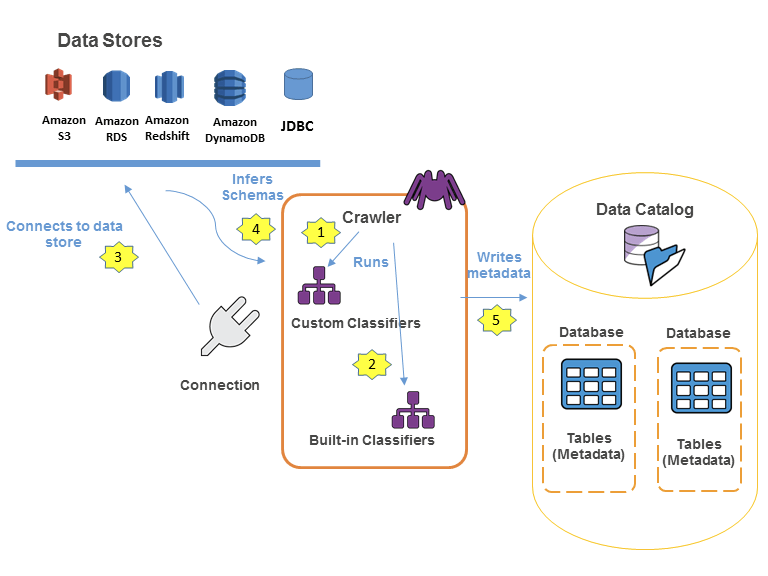
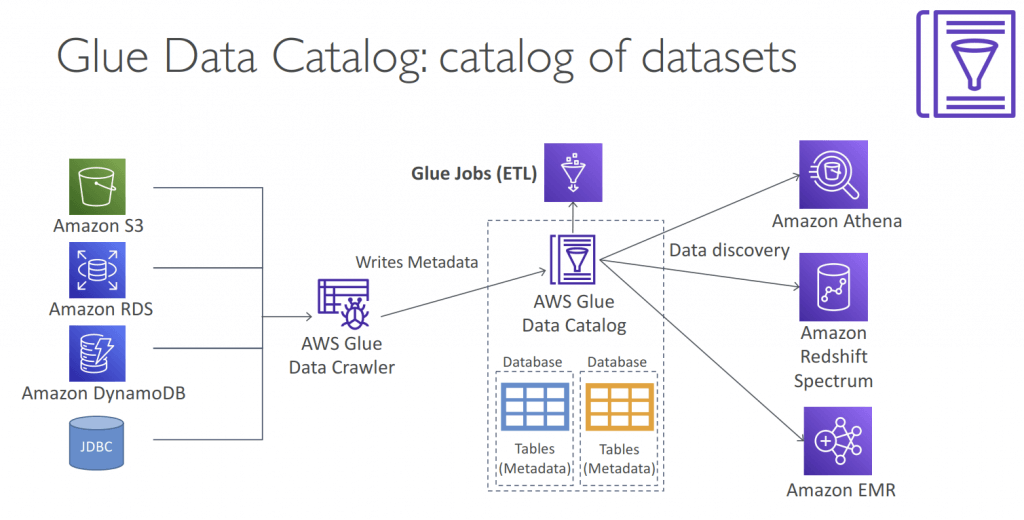
Glue Data Catalog
- Metadata repository for all your tables
- Automated Schema Inference
- Schemas are versioned
- Integrates with Athena or Redshift Spectrum (schema & data discovery)
- Glue Crawlers can help build the Glue Data Catalog
- Works JSON, Parquet, CSV, relational store
- Crawlers work for: S3, Amazon Redshift, Amazon RDS
- Run the Crawler on a Schedule or On Demand
- Need an IAM role / credentials to access the data stores
- Glue crawler will extract partitions based on how your S3 data is organized
AWS Glue Data Quality
- Data quality rules may be created manually or recommended automatically
- Integrates into Glue jobs
- Uses Data Quality Definition Language (DQDL)
- Results can be used to fail the job, or just be reported to CloudWatch
- AWS Glue Data Quality evaluates objects that are stored in the AWS Glue Data Catalog It offers non-coders an easy way to set up data quality rules. These personas include data stewards and business analysts.
- requires a minimum of three data points to detect anomalies. It utilizes a machine learning algorithm to learn from past trends and then predict future values. When the actual value does not fall within the predicted range, AWS Glue Data Quality creates an Anomaly Observation.
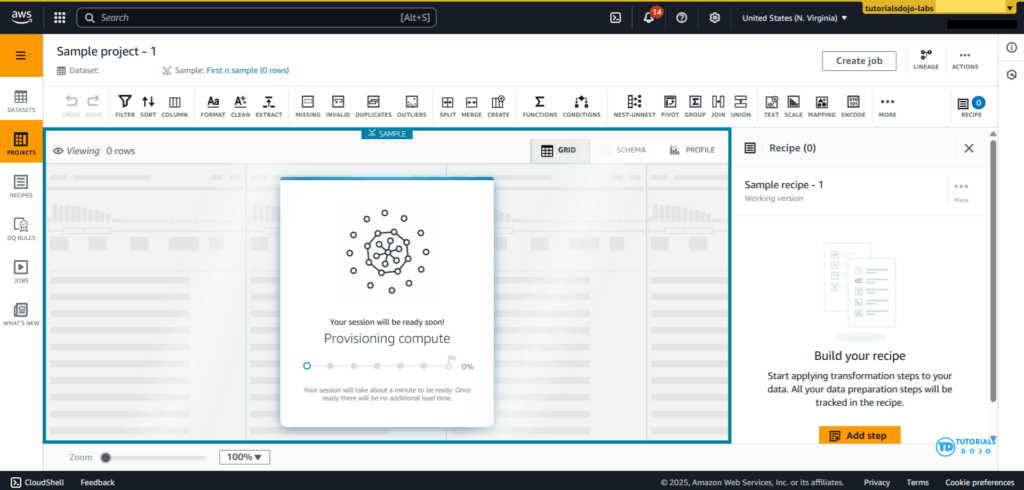
AWS Glue DataBrew
- Allows you to clean and normalize data without writing any code
- clean and normalize data using pre-built transformation
- Reduces ML and analytics data preparation time by up to 80%
- features
- Transformations, such as filtering rows, replacing values, splitting and combining columns; or applying NLP to split sentences into phrases.
- Data Formats and Data Sources
- Job and Scheduling
- Security
- Integration
- integrates seamlessly with multiple AWS data stores, including Amazon S3, Amazon Redshift, and JDBC-compatible databases such as PostgreSQL
- Components
- Project
- an interactive interface to explore datasets and create transformation “recipes visually.” These recipes are version-controlled and reusable, enabling teams to automate data preparation pipelines and maintain data consistency across projects.
- Dataset
- Recipe
- Job
- Data Lineage
- Data Profile
- Project
- AWS Glue DataBrew is a visual data preparation tool that makes it easy for data analysts and data scientists to clean and normalize data to prepare it for analytics and machine learning. It offers a wide selection of pre-built transformations to automate data preparation tasks, all without the need to write any code. You can automate filtering anomalies, converting data to standard formats, and correcting invalid values, and other tasks. After your data is ready, you can immediately use it for analytics and machine learning projects.
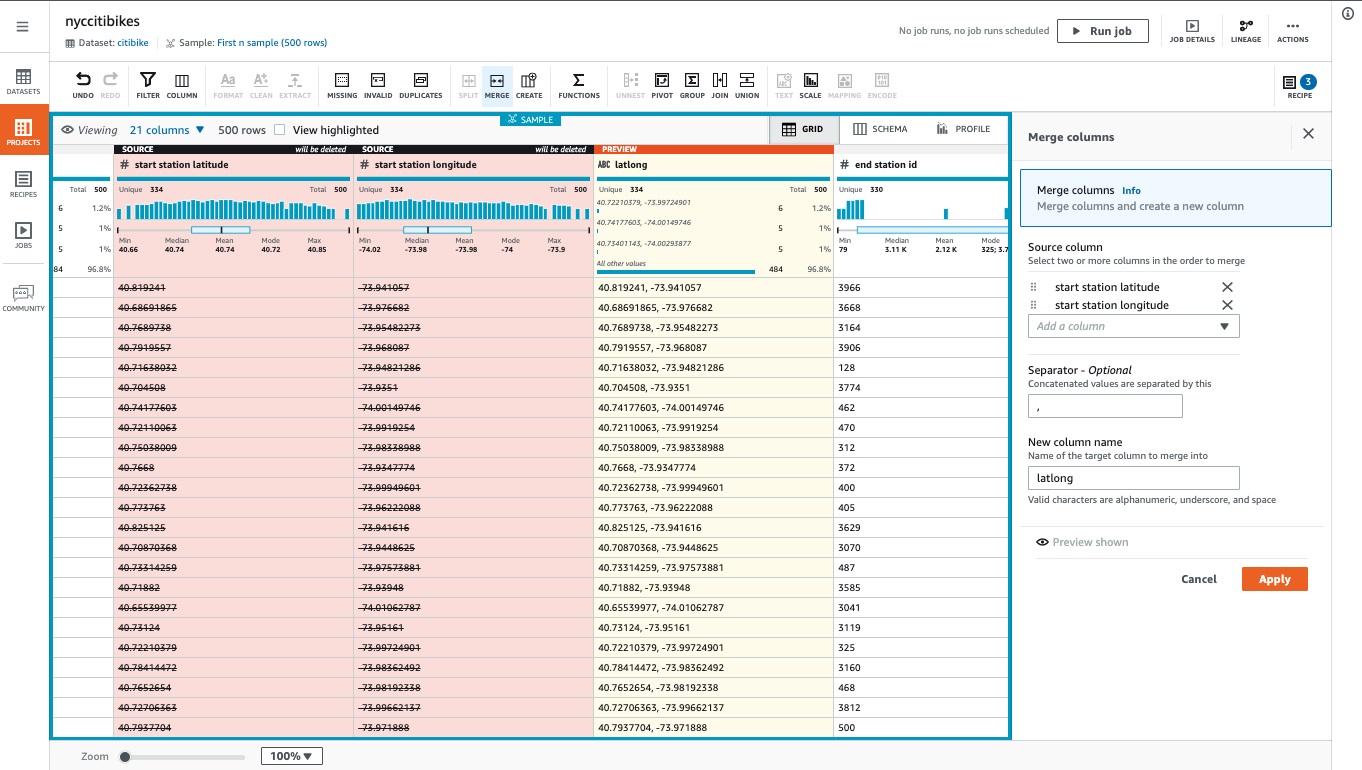
- Since AWS Glue DataBrew is serverless, you do not need to provision or manage any infrastructure to use it. With AWS Glue DataBrew, you can easily and quickly create and execute data preparation recipes through a visual interface. The service automatically scales up or down based on the size and complexity of your data, so you only pay for the resources you use.
- DataBrew projects provide an interactive interface to explore datasets and create transformation “recipes visually.” These recipes are version-controlled and reusable, enabling teams to automate data preparation pipelines and maintain data consistency across projects. The service also supports integration with the AWS Glue Data Catalog, allowing prepared datasets to be registered for discovery by downstream analytics or machine learning services. Additionally, DataBrew includes built-in data profiling capabilities that automatically detect patterns, missing values, and anomalies, helping ensure the prepared data is of high quality before model training. This combination of automation, scalability, and visual authoring makes DataBrew particularly effective for organizations that need to cleanse high-volume data from relational databases like PostgreSQL before applying ML models.
- AWS Glue DataBrew and Amazon SageMaker Canvas form a robust, no-code data-to-insight pipeline. DataBrew handles cleaning and normalizing large datasets sourced from PostgreSQL, ensuring data quality and consistency. The processed data stored in Amazon S3 can then be seamlessly imported into SageMaker Canvas, where business analysts can visually build and deploy predictive models such as churn prediction.
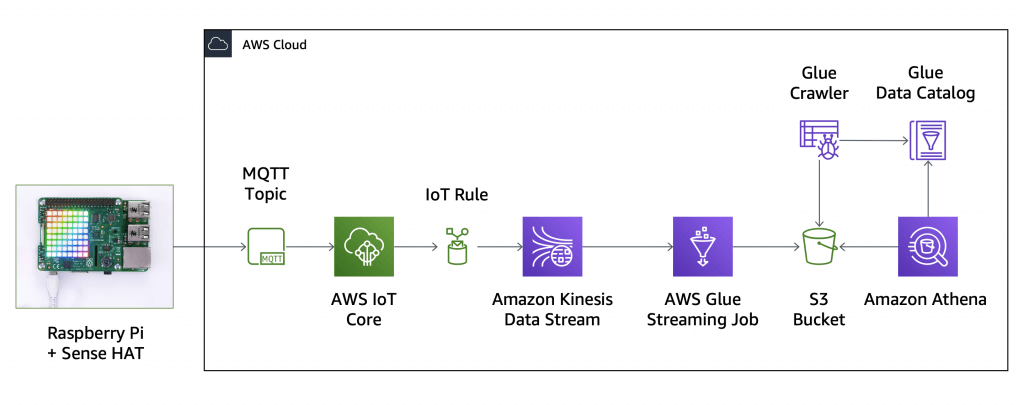
AWS Glue Streaming
- (built on Apache Spark Structured Streaming): compatible with Kinesis Data Streaming, Kafka, MSK (managed Kafka)
- Use cases
- Near-real-time data processing
- Convert CSV to Apache Parquet
- Fraud detection
- Social media analytics
- Internet of Things (IoT) analytics
- Clickstream analysis
- Log monitoring and analysis
- Recommendation systems
- Near-real-time data processing
- When
- If you are already using AWS Glue or Spark for batch processing.
- If you require a unified service or product to handle batch, streaming, and event-driven workloads
- extremely large streaming data volumes and complex transformations
- If you prefer a visual approach to building streaming jobs
- for near-real-time use cases where there are stringent SLAs (Service Level Agreements) greater than 10 seconds.
- If you are building a transactional data lake using Apache Iceberg, Apache Hudi, or Delta Lake
- When needing to ingest streaming data for a variety of data targets
- Data sources
- Amazon Kinesis Data Stream
- Amazon MSK (Managed Streaming for Apache Kafka)
- Self-managed Apache Kafka
- Data Target
- Data targets supported by AWS Glue Data Catalog
- Amazon S3
- Amazon Redshift
- MySQL
- PostgreSQL
- Oracle
- Microsoft SQL Server
- Snowflake
- Any database that can be connected using JDBC
- Apache Iceberg, Delta and Apache Hudi
- AWS Glue Marketplace connectors
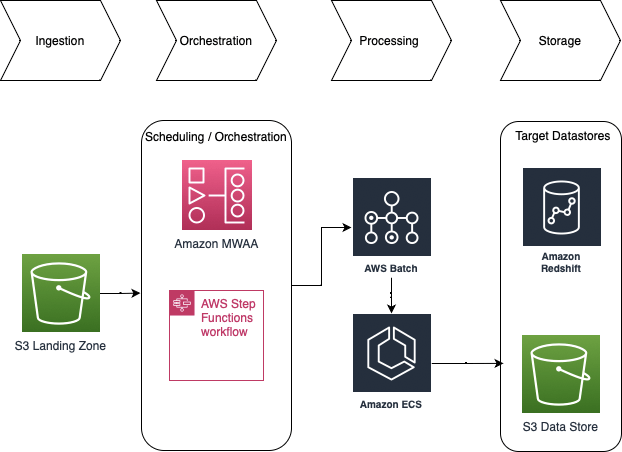
AWS Batch
- Run batch jobs via Docker images
- Dynamic provisioning of the instances (EC2 & Spot Instances)
- serverless
- Schedule Batch Jobs using CloudWatch Events
- Orchestrate Batch Jobs using AWS Step Functions
- AWS Batch is not a valid destination of S3 Events
AWS Batch enables developers, scientists, and engineers to easily and efficiently run hundreds of thousands of batch computing jobs on AWS. With AWS Batch, there is no need to install and manage batch computing software or server clusters that you use to run your jobs, allowing you to focus on analyzing results and solving problems.
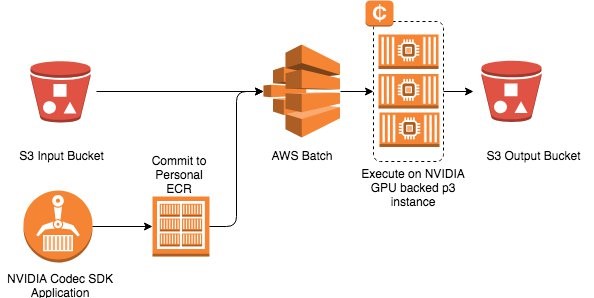
Jobs submitted to AWS Batch are queued and executed based on the assigned order of preference. AWS Batch dynamically provisions the optimal quantity and type of computing resources based on the requirements of the batch jobs submitted. It also offers an automated retry mechanism where you can continuously run a job even in the event of a failure (e.g., instance termination when Amazon EC2 reclaims Spot instances, internal AWS service error/outage).
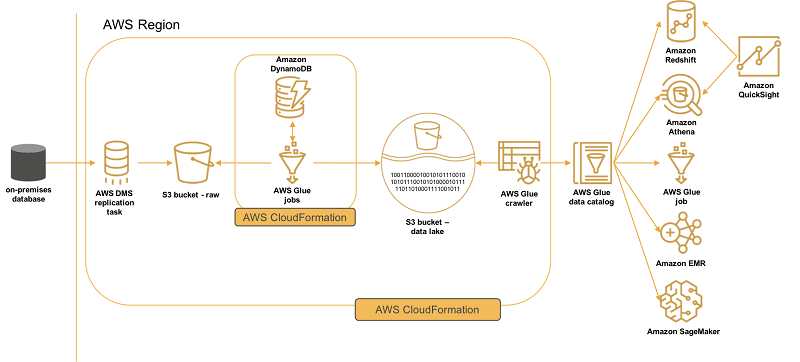
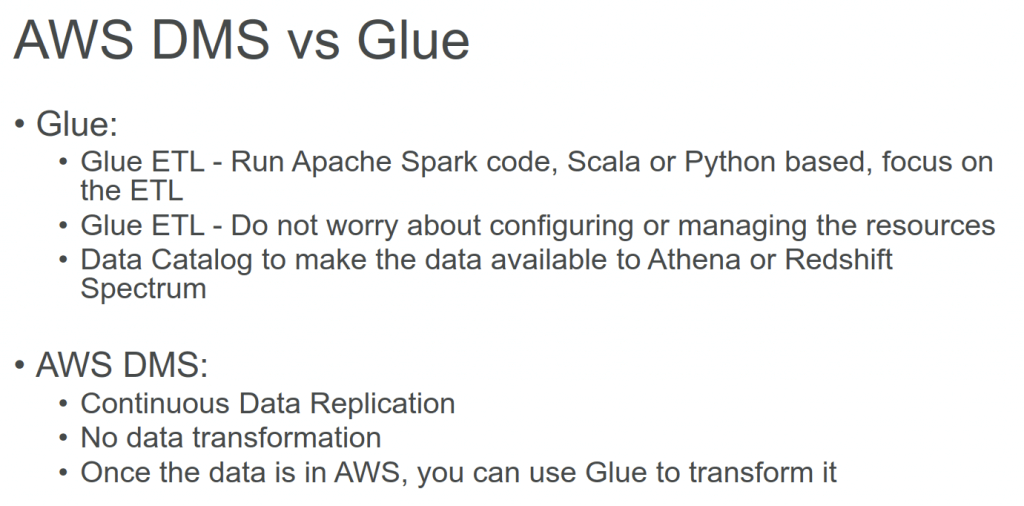
AWS DMS – Database Migration Service
- a cloud service that makes it easy to migrate EXISTING relational databases, data warehouses, NoSQL databases, and other types of data stores
- you can perform one-time migrations, and you can replicate ongoing changes to keep sources and targets in sync
- Continuous Data Replication using CDC (change data capture)
- introduce latency and potential data consistency issues
- You must create an EC2 instance to perform the replication tasks
- Homogeneous migrations: ex Oracle to Oracle, MySQL to Aurora MySQL
- Heterogeneous migrations: ex Microsoft SQL Server to Aurora
- You can migrate data to Amazon S3 using AWS DMS from any of the supported database sources. When using Amazon S3 as a target in an AWS DMS task, both full load and change data capture (CDC) data is written to comma-separated value (.csv) format by default.
- The comma-separated value (.csv) format is the default storage format for Amazon S3 target objects. For more compact storage and faster queries, you can instead use Apache Parquet (.parquet) as the storage format. Apache Parquet is an open-source file storage format originally designed for Hadoop.
AWS CloudWatch
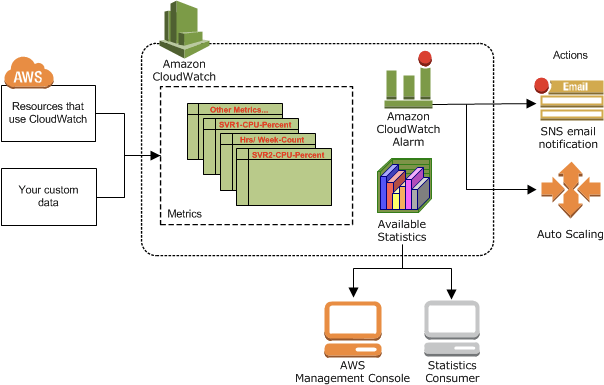
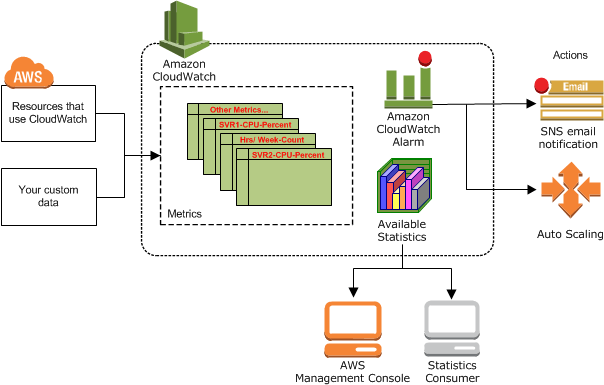
- Metrics: is a variable to monitor (CPUUtilization, NetworkIn…); Collect and track key metrics for every AWS services
- namespace (specify a namespace for each data point, as new metric)
- dimension is an attributes (instance id, environment, …)
- Up to 30 dimensions per metric
- timestamps
- for EC2 memory
- CloudWatch does not monitor the memory, swap, and disk space utilization of your instances. If you need to track these metrics, you can install a CloudWatch agent in your EC2 instances.
- (EC2) Memory usage is a custom metric, using API PutMetricData
- for Lambda function
- The ConcurrentExecutions metric in Amazon CloudWatch explicitly measures the number of instances of a Lambda function that are running at the same time.
- detailed monitoring, just shorten the period to 1-minute; no extra fields
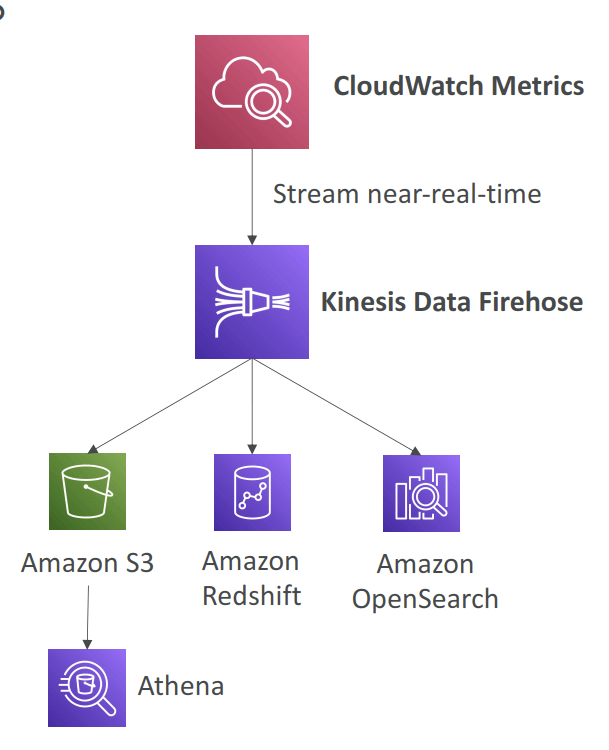
- Metric Streams
- near-real-time delivery
- Option to filter metrics to only stream a subset of them
- Custom Metrics
- Use API call PutMetricData
- Ability to use dimensions (attributes) to segment metrics
- Instance.id
- Environment.name
- Metric resolution (StorageResolution API parameter – two possible value):
- Standard: 1 minute (60 seconds)
- High Resolution: 1/5/10/30 second(s) – Higher cost
- Important: Accepts metric data points two weeks in the past and two hours in the future
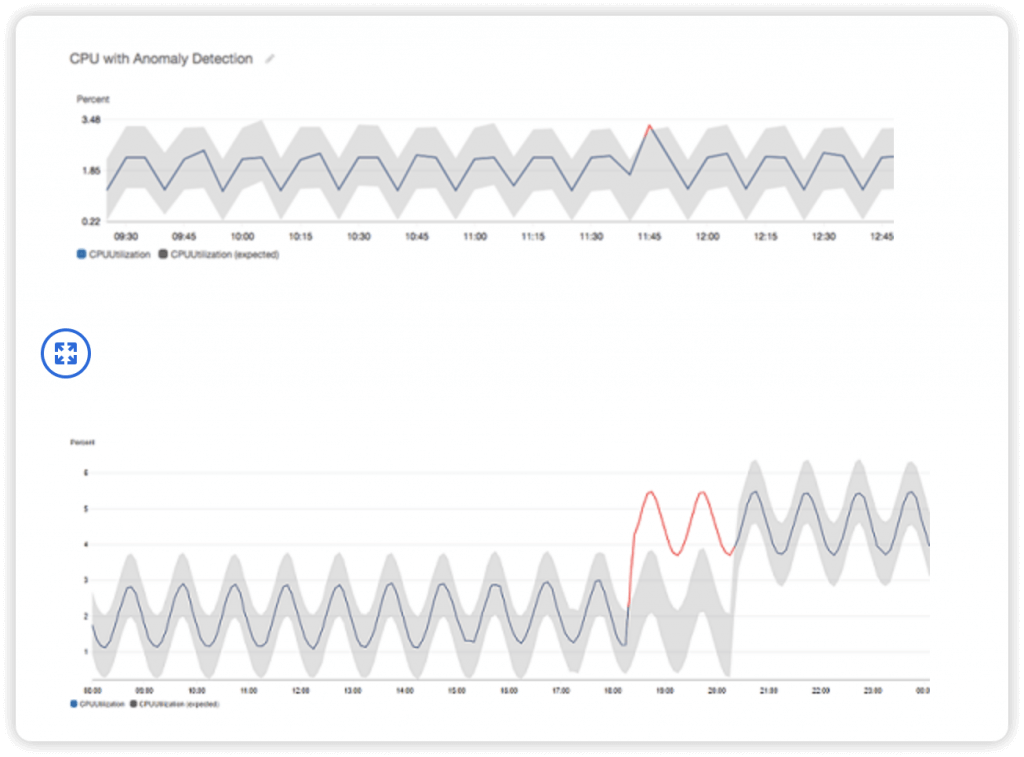
- Anomaly Detection
- Continuously analyze metrics to determine normal baselines and surface anomalies using ML algorithms
- It creates a model of the metric’s expected values (based on metric’s past data)
- Shows you which values in the graph are out of the normal range
- Allows you to create Alarms based on metric’s expected value (instead of Static Threshold)
- Ability to exclude specified time periods or events from being trained
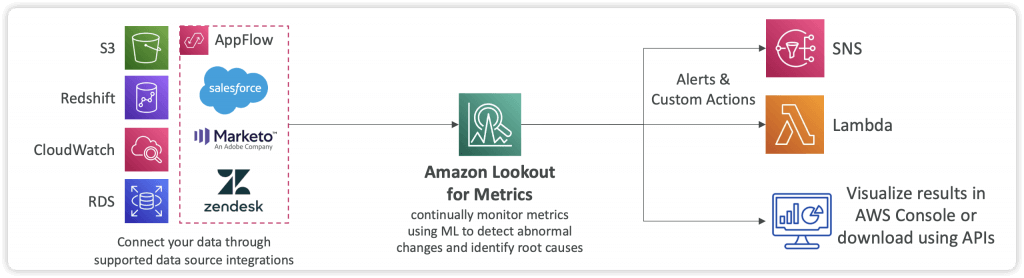
- Amazon Lookout for Metrics (discontinued on SEP 2025)
- Automatically detect anomalies within metrics and identify their root causes using Machine Learning
- It detects and diagnoses errors within your data with no manual intervention
- Integrates with different AWS Services and 3rd party SaaS apps through AppFlow
- Send alerts to SNS, Lambda, Slack, Webhooks…
- Logs: Collect, monitor, analyze and store log files
- group – arbitrary name, usually representing an application (to encrpyt with custom KMS keys, need to use CloudWatch Logs API)
- stream – instances within application / log files / containers
- export
- Amazon S3, may take up to 12 hour, with API CreateExportTask
- Not near-real time or real-time
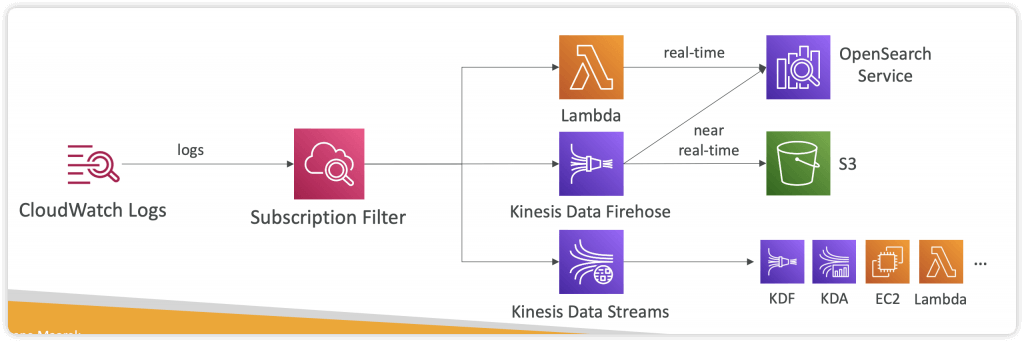
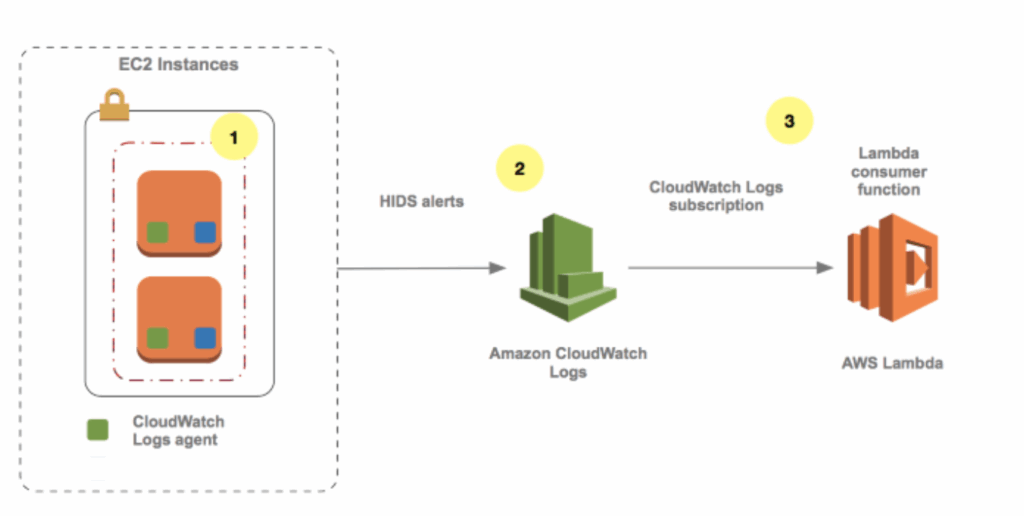
- Using Logs Subscriptions to export real-time events
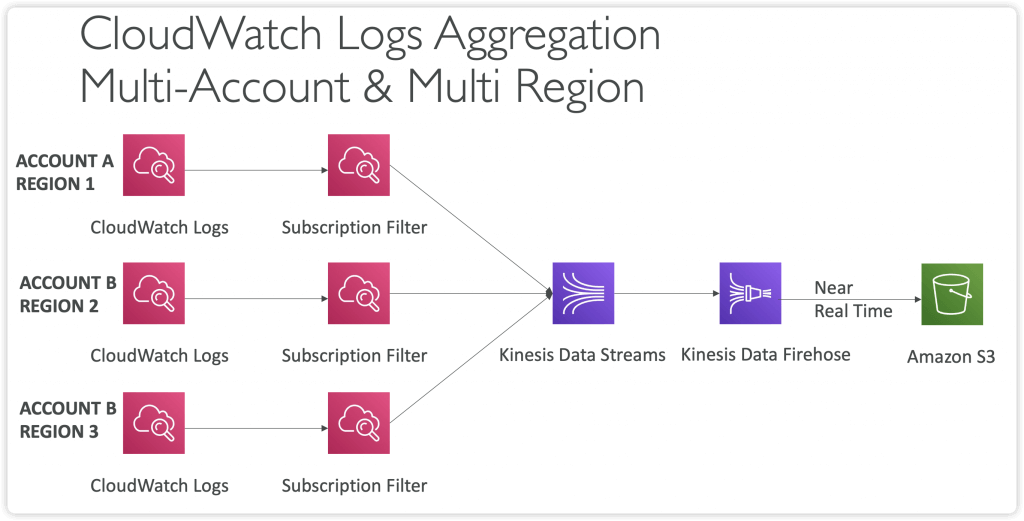
- to Kinesis Data Streams, Kinesis Data Firehose, AWS Lambda
- with Subscription Filter
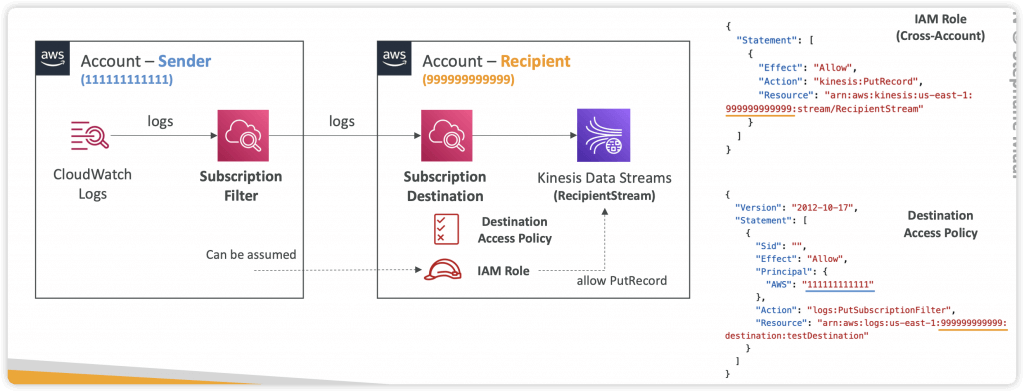
- Cross-Account Subscription (Subscription Filter -> Subscription Destination)
- Cross-Account Subscription – send log events to resources in a different AWS account (KDS, KDF)
- log expiration policies (never expire, 1 day to 10 years…)
- Live Tail – for realtime tail watch
- By default, no logs from EC2 machine to CloudWatch
- CloudWatch Logs Agent – only push logs
- CloudWatch Unified Agent – push logs + collect metrics (extra RAM, Process, Swap) + centralized by SSM Parameter Store
- Metrics
- Collected directly on your Linux server / EC2 instance
- CPU (active, guest, idle, system, user, steal)
- Disk metrics (free, used, total), Disk IO (writes, reads, bytes, iops)
- RAM (free, inactive, used, total, cached)
- Netstat (number of TCP and UDP connections, net packets, bytes)
- Processes (total, dead, bloqued, idle, running, sleep)
- Swap Space (free, used, used %)
- Reminder: out-of-the box metrics for EC2 – disk, CPU, network (high level)
- Collected directly on your Linux server / EC2 instance
- Metrics
- Metric Filters
- Filter expressions
- Metric filters can be used to trigger alarms
- Filters do not retroactively filter data. Filters only publish the metric data points for events that happen after the filter was created.
- • Ability to specify up to 3 Dimensions for the Metric Filter (optional)
- With “aws logs associate-kms-key“, enable (AWS KMS) encryption for an existing log group, eliminating the need to recreate the log group or manually encrypt logs before submission
- Log Insight
- facilitate in-depth analysis of log data
- enables users to run queries on log data collected from various AWS services and applications
- Provides a purpose-built query language
- Automatically discovers fields from AWS services and JSON log
- events
- Fetch desired event fields, filter based on conditions, calculate aggregate statistics, sort events, limit number of events…
- Can save queries and add them to CloudWatch Dashboards
- It’s a query engine, not a real-time engine
- Subscriptions
- get access to a real-time feed of log events from CloudWatch Logs and have it delivered to other services such as an Amazon Kinesis stream, Amazon Data Firehose stream, or AWS Lambda for custom processing, analysis, or loading to other systems.
- A subscription filter defines the filter pattern to use for filtering which log events get delivered to your AWS resource, as well as information about where to send matching log events to.
- CloudWatch Logs also produces CloudWatch metrics about the forwarding of log events to subscriptions. You can use a subscription filter with Kinesis, Lambda, or Data Firehose.
- Alarms: Re-act in real-time to metrics / events
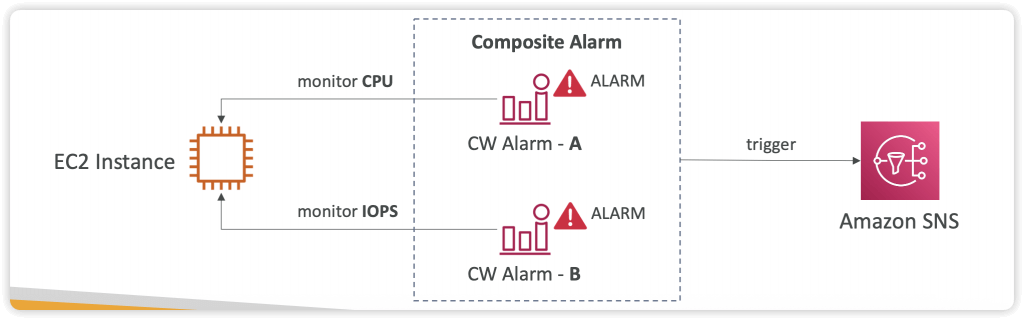
- based on a single metric; Composite Alarms are monitoring on multiple other alarms
- Targets
- EC2
- EC2 ASG action
- Amazon SNS
- Alarm States:
- OK
- INSUFFICIENT_DATA
- ALARM
- Settings
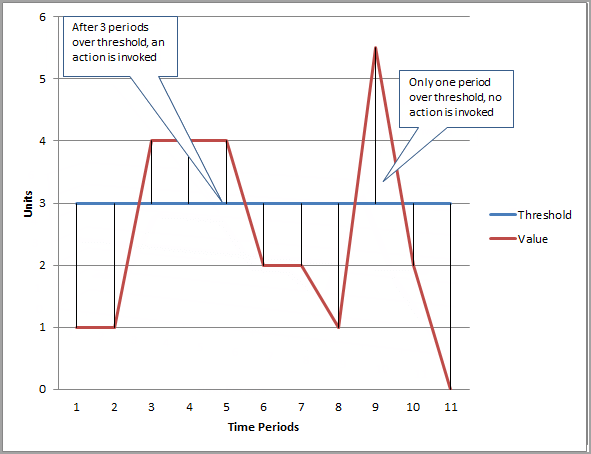
- Period is the length of time to evaluate the metric or expression to create each individual data point for an alarm. It is expressed in seconds. If you choose one minute as the period, there is one datapoint every minute.
- High resolution custom metrics: 10 sec, 30 sec or multiples of 60 sec
- Evaluation Period is the number of the most recent periods, or data points, to evaluate when determining alarm state.
- Datapoints to Alarm is the number of data points within the evaluation period that must be breaching to cause the alarm to go to the ALARM state. The breaching data points do not have to be consecutive, they just must all be within the last number of data points equal to Evaluation Period.
- Period is the length of time to evaluate the metric or expression to create each individual data point for an alarm. It is expressed in seconds. If you choose one minute as the period, there is one datapoint every minute.
- Composite Alarms
- Composite Alarms are monitoring the states of multiple other alarms
- AND and OR conditions
- To test alarms and notifications, set the alarm state to Alarm using CLI
aws cloudwatch set-alarm-state –alarm-name “myalarm” –state-value ALARM –state-reason “testing purposes”
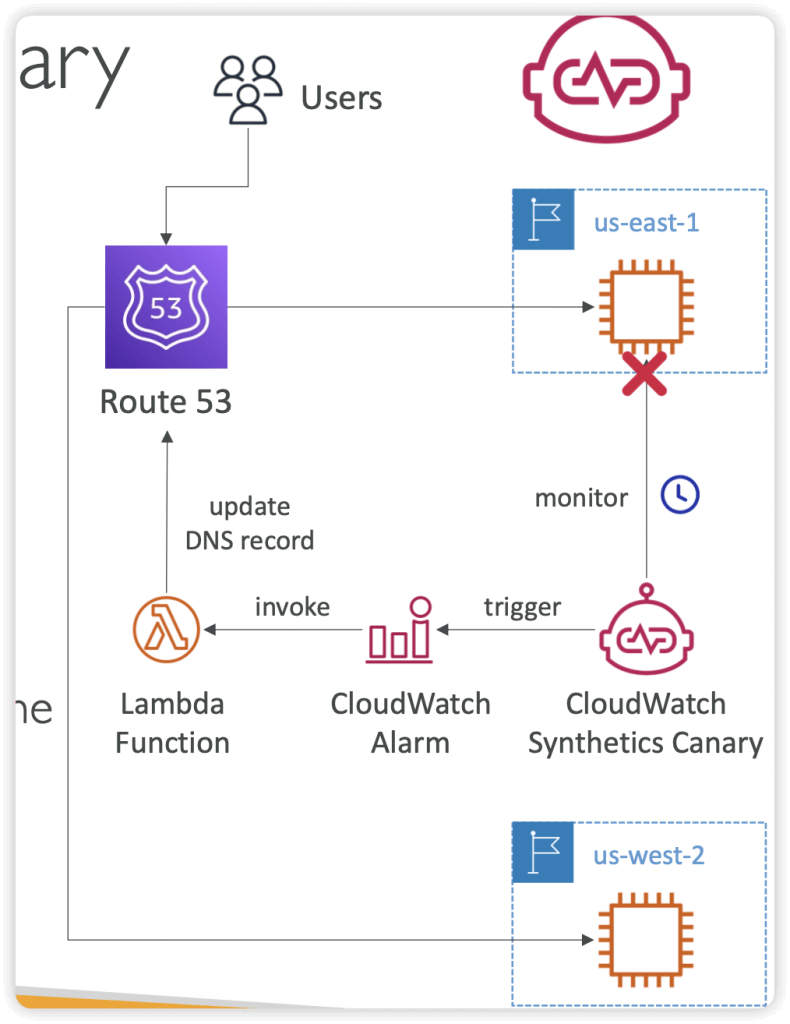
- Synthetics Canary: monitor your APIs, URLs, Websites, …
- Configurable script that monitor your APIs, URLs, Websites…
- Reproduce what your customers do programmatically to find issues before customers are impacted
- Checks the availability and latency of your endpoints and can store load time data and screenshots of the UI
- Integration with CloudWatch Alarms
- Scripts written in Node.js or Python
- Programmatic access to a headless Google Chrome browser
- Can run once or on a regular schedule
- Blueprints
- Heartbeat Monitor – load URL, store screenshot and an HTTP archive file
- API Canary – test basic read and write functions of REST APIs
- Broken Link Checker – check all links inside the URL that you are testing
- Visual Monitoring – compare a screenshot taken during a canary run with a baseline screenshot
- Canary Recorder – used with CloudWatch Synthetics Recorder (record your actions on a website and automatically generates a script for that)
- GUI Workflow Builder – verifies that actions can be taken on your webpage (e.g., test a webpage with a login form)
- Events, now called Amazon EventBridge
- Schedule – cron job
- Event Pattern – rules to react/trigger services
- Event Bus, a router that receives events and delivers them to zero or more destinations, or targets.
- (AWS) default, Partner, Custom
- Schema – the structure template for event (json)
- CloudWatch Evidently
- validate/serve new features to specified % of users only
- Launches (= feature flags) and Experiments (= A/B testing), and Overrides (specific variants assigned to specific user-id)
- evaluation events stored in CloudWatch Logs or S3
- [ 🧐QUESTION🧐 ] Automation delete any EC2 instance with manual SSH Login
- Set up a CloudWatch Logs subscription with an AWS Lambda function which is configured to add a
FOR_DELETIONtag to the Amazon EC2 instance that produced the SSH login event. Run another Lambda function every day using the Amazon EventBridge rule to terminate all EC2 instances with the custom tag for deletion.- a CloudWatch Logs subscription cannot be directly integrated with an AWS Step Functions application
- using SQS as well as worker instances is unnecessary since you can simply use Lambda functions for processing. In addition, Amazon CloudWatch Alarms can only send notifications to SNS and not SQS.
- Set up a CloudWatch Logs subscription with an AWS Lambda function which is configured to add a
- [ 🧐QUESTION🧐 ] Collect aggregated data from multiple instances
- You can view statistical graphs of your published metrics with the AWS Management Console.
- CloudWatch stores data about a metric as a series of data points. Each data point has an associated timestamp. You can even publish an aggregated set of data points called a statistic set.
- When you have multiple data points per minute, aggregating data minimizes the number of calls to put-metric-data. For example, instead of calling put-metric-data multiple times for three data points that are within 3 seconds of each other, you can aggregate the data into a statistic set that you publish with one call, using the
--statistic-valuesparameter.
Amazon Athena is an interactive query service that makes it easy to analyze data directly in Amazon Simple Storage Service (Amazon S3) using standard SQL.
[ 🧐QUESTION🧐 ] Collect on-premise and cloud instances logs also analyse
The unified CloudWatch agent enables you to do the following:
Collect more system-level metrics from Amazon EC2 instances across operating systems. The metrics can include in-guest metrics, in addition to the metrics for EC2 instances. The additional metrics that can be collected are listed in Metrics Collected by the CloudWatch Agent.
Collect system-level metrics from on-premises servers. These can include servers in a hybrid environment as well as servers not managed by AWS.
Retrieve custom metrics from your applications or services using the StatsD and collectd protocols. StatsD is supported on both Linux servers and servers running Windows Server. collectd is supported only on Linux servers.
Collect logs from Amazon EC2 instances and on-premises servers, running either Linux or Windows Server.
The logs collected by the unified CloudWatch agent are processed and stored in Amazon CloudWatch Logs, just like logs collected by the older CloudWatch Logs agent.
Amazon Data Firehose is a service that can be used to capture and automatically load streaming data into destinations like Amazon S3.
Amazon Opensearch Service
- A fork of Elasticsearch and Kibana (visualization, Dashboard)
- A search engine
- An analysis tool
- A visualization tool (Dashboards = Kibana)
- A data pipeline
- Kinesis replaces Beats & LogStash
- Horizontally scalable
- Opensearch Applications
- Full-text search
- Log analytics
- Application monitoring
- Security analytics
- Clickstream analytics
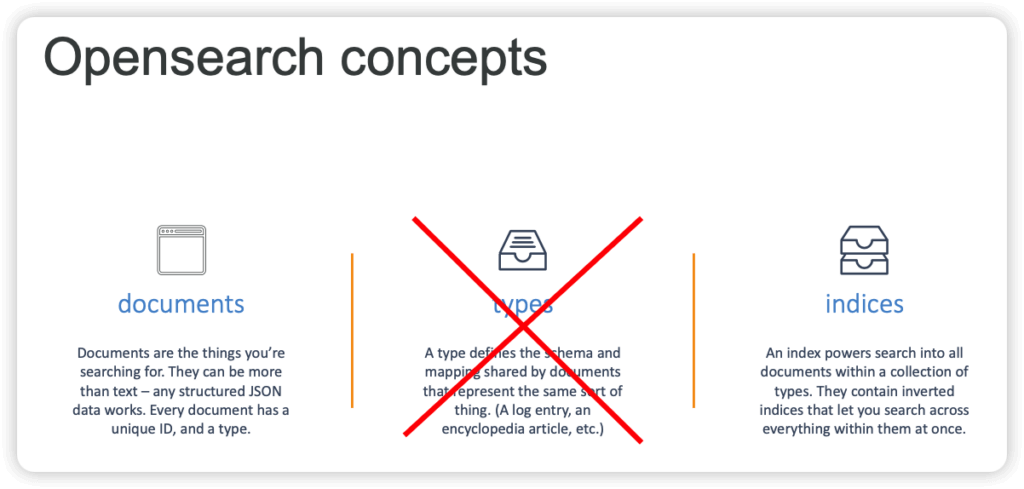
- Index
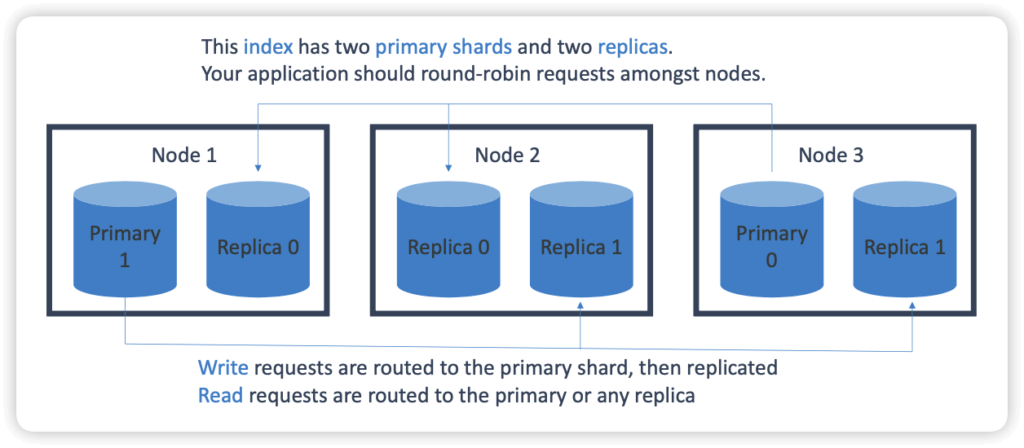
- An index is split into shards
- Documents are hashed to a particular shard
- Each shard may be on a different node in a cluster.
- Every shard is a self-contained Lucene index of its own.
- Redundancy
- Managed
- Fully-managed (but not serverless)
- There is a separate serverless option now
- Scale up or down without downtime, but not automatic
- Pay for what you use on Instance-hours, storage, data transfer
- Network isolation
- AWS integration
- S3 buckets (via Lambda to Kinesis)
- Kinesis Data Streams
- DynamoDB Streams
- CloudWatch / CloudTrail
- Zone awareness
- Options
- Dedicated master node(s), as choice of count and instance types
- “Domains”
- Snapshots to S3
- Zone Awareness
- Cold / warm / ultrawarm / hot storage
- Standard data nodes use “hot” storage
- Instance stores or EBS volumes / fastest performance
- UltraWarm (warm) storage uses S3 + caching
- Best for indices with few writes (like log data / immutable data)
- Slower performance but much lower cost
- Must have a dedicated master node
- Cold storage
- Also uses S3
- Even cheaper
- For “periodic research or forensic analysis on older data”
- Must have dedicated master and have UltraWarm enabled too.
- Not compatible with T2 or T3 instance types on data nodes
- If using fine-grained access control, must map users to cold_manager role in OpenSearch Dashboards
- Data may be migrated between different storage types
- Standard data nodes use “hot” storage
- Index State Management
- Automates index management policies
- Examples
- Delete old indices after a period of time
- Move indices into read only state after a period of time
- Move indices from hot -> UltraWarm -> cold storage over time
- Reduce replica count over time
- Automate index snapshots
- ISM policies are run every 30-48 minutes
- Random jitter to ensure they don’t all run at once
- Can even send notifications when done
- Index rollups
- Periodically roll up old data into summarized indices
- Saves storage costs
- New index may have fewer fields, coarser time buckets
- Index transforms
- Like rollups, but purpose is to create a different view to analyze data differently.
- Groupings and aggregations
- Cross-cluster replication
- Replica indices / mappings / metadata across domains
- Ensures high availability in an outage
- Replicate data geographically for better latency
- “Follower” index pulls data from “leader” index
- Requires fine-grained access control and node-to-node encryption
- “Remote Reindex” allows copying indices from one cluster to another on demand
- Stability
- 3 dedicated master nodes is best
- Avoids “split brain”
- Don’t run out of disk space
- Minimum storage requirement is roughly: Source Data * (1 + Number of Replicas) * 1.45
- Choosing the number of shards
- (source data + room to grow) * (1 + indexing overhead) / desired shard size
- In rare cases you may need to limit the number of shards per node
- You usually run out of disk space first.
- Choosing instance types
- At least 3 nodes
- Mostly about storage requirements
- 3 dedicated master nodes is best
- Security
- Resource-based policies
- Identity-based policies
- IP-based policies
- Request signing
- VPC
- Cognito
- Securing Dashboards
- Cognito
- Getting inside a VPC from outside is hard…
- Nginx reverse proxy on EC2 forwarding to ES domain
- SSH tunnel for port 5601
- VPC Direct Connect
- VPN
- Anti-patterns
- OLTP
- No transactions
- RDS or DynamoDB is better
- Ad-hoc data querying
- Athena is better
- Remember Opensearch is primarily for search & analytics
- OLTP
- Performance
- Memory pressure in the JVM can result if:
- You have unbalanced shard allocations across nodes
- You have too many shards in a cluster
- Fewer shards can yield better performance if JVMMemoryPressure errors are encountered
- Delete old or unused indices
- Memory pressure in the JVM can result if:
- Fully-managed (but not serverless)
- Serverless
- On-demand autoscaling!
- Works against “collections” instead of provisioned domains
- May be “search” or “time series” type
- Always encrypted with your KMS key
- Data access policies
- Encryption at rest is required
- May configure security policies across many collections
- Capacity measured in Opensearch Compute Units (OCUs)
- Can set an upper limit, lower limit is always 2 for indexing, 2 for each
- as a Vector Store
- Serverless vector stores
- Note “serverless” does not mean “scales to zero”
- Remember to shut down your serverless OpenSearch instances if you’re not using them – or you’ll keep getting billed
- The exam treats OpenSearch as the primary implementation for backing Bedrock Knowledge Bases
- Not limited to Bedrock Knowledge Bases
- Can also integrate with SageMaker AI and HuggingFace or custom models for RAG
- Serverless vector stores
- SEMANTIC vs. HYBRID search
- Semantic refers to vector search
- As we’ve seen relevancy can be elusive and dependent on your chunking strategy
- Hybrid combines vector and keyword search
- Requires indexing filterable keyword fields for metadata
- Semantic refers to vector search
- Vector Engines
- Top-level engines are Facebook AI Similarity (FAISS,) Non-Metric Space Library (NMSLib) and Apache Lucene.
- [SLOW] Exact Nearest Neighbor search
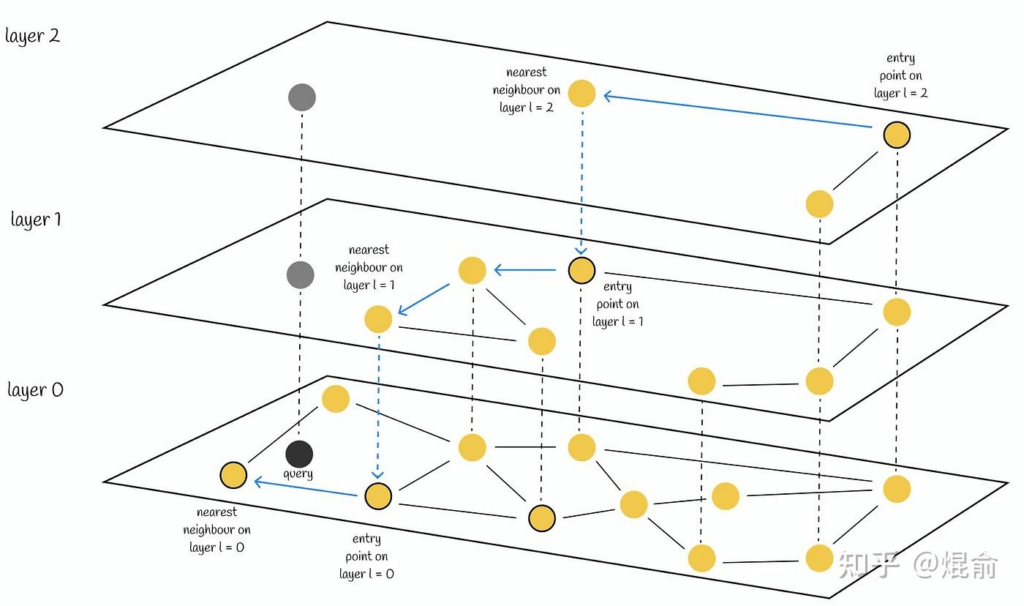
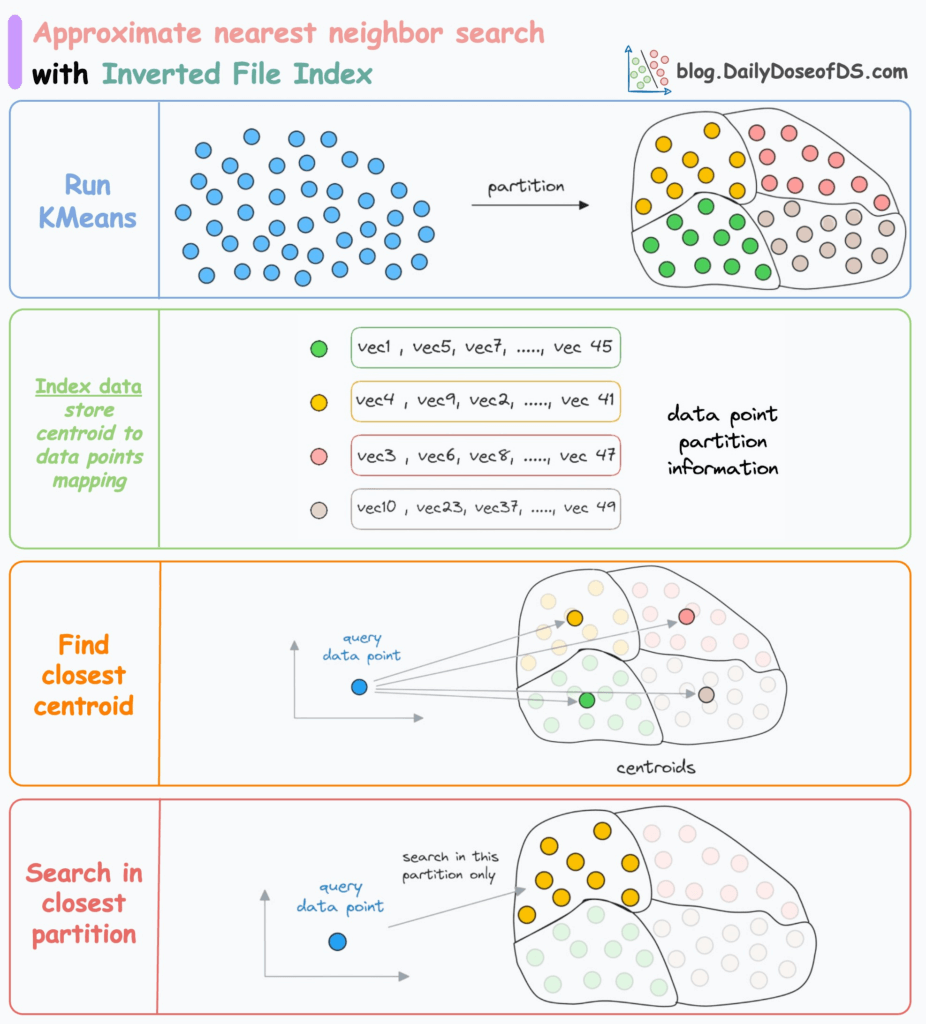
- Approximate Nearest Neighbor (ANN) search
- Heirarchical Navigable Small World (HNSW)
- “Six degrees of separation”
- Fast, high-quality, simple – but uses lots of RAM
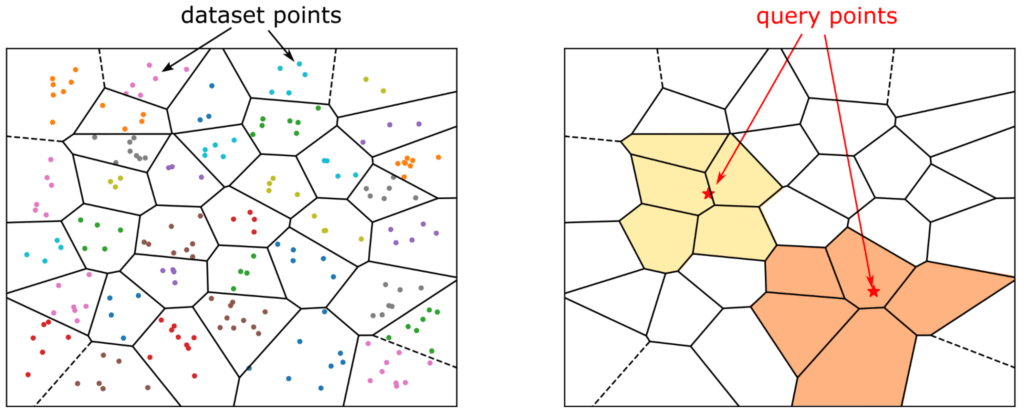
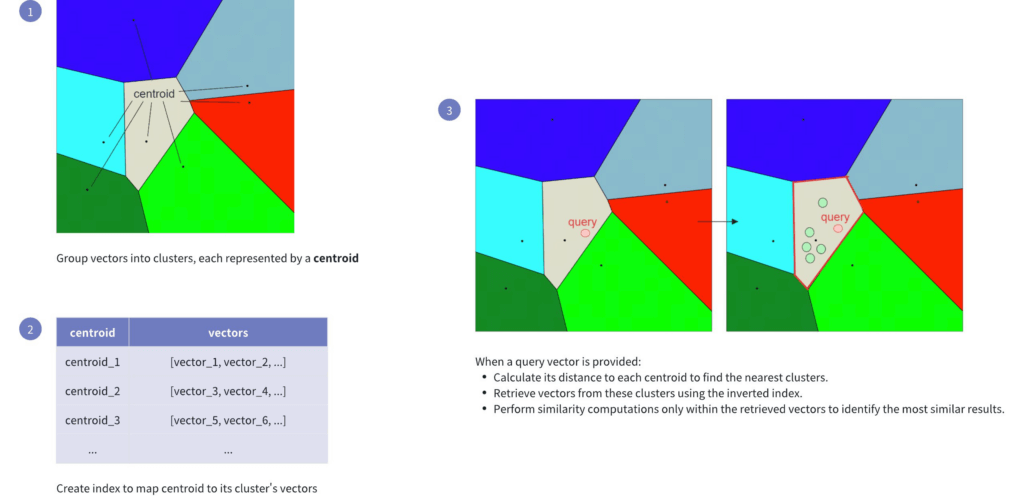
- Inverted File (IVF)
- Better for really huge datasets, can trade recall for speed & memory
- HNSW Tuning
- M = How many edges per node
- Higher M -> denser graph, higher recall, but more memory
- ef_construction = Size of dynamic list used for KNN graph
- Higher -> more accurate graph, slower indexing speed
- ef_search = How thoroughly the graph is explored
- Higher -> higher recall, but slower search performance
- M = How many edges per node
- Heirarchical Navigable Small World (HNSW)
- Vector Store : Finer Points
- Vector compression
- Different ANN methods have their own techniques (HNSW, IVF)
- Dense embeddings add up fast
- Binary vectors
- Bit sequences (stored as bytes)
- Not embeddings, but used for fast distance search
- 32x compression compared to float32
- Mixed Precision Training, using FP16
- A form of scalar quantization
- Store embedding dimensions as 16-bit values instead of 32-bit
- What HNSW does
- Sharding strategies
- Balance shard size and CPU ratio
- Larger shards for semantic search (30-50 GB)
- Vector search benefits from fewer, larger shards because there is less cross-shard coordination.
- Smaller for hybrid (10-30 GB)
- On OpenSearch Serverless, this is automatic
- Multi-index approaches
- Different document types belong in their own index
- This way you can tune performance for each corpus
- You might want different embedding models for different types of data
- You’ll need some sort of query routing to pull this
- Vector compression


- Hierarchical Indices
- A top level index can serve as a general / summary layer
- This index is small and fast
- It routes you to an index with more detailed data per domain
- It’s a way to implement multiple indices that are specialized for different domains or data types
- With their own embedding models, shard sizes, tuning
- You could also use a FM to route to the right index.
- A top level index can serve as a general / summary layer
- Vector Store: Neural Plugin
- Allows you to integrate your embedding model into an OpenSearch ingest pipeline
- “Neural queries” just allow OpenSearch to accept text queries and generate embeddings under the hood for vector queries.
- This is an alternative to using the built-in Bedrock Knowledge Base integration with OpenSearch Serverless
- The Neural plugin allows OpenSearch to call your Bedrock model for embedding as part of search or ingestion
RDS & Aurora
- Transactional DB (OLTP)
- If too much read traffic is clogging up write requests, create an RDS read replica and direct read traffic to the replica. The read replica is updated asynchronously. Multi-AZ creates a read replica in another AZ and synchronously replicates to it
- RDS is a managed database, not a data store. Careful in some questions if they ask about migrating a data store to AWS, RDS would not be suitable.
- To encrypt an existing RDS database, take a snapshot, encrypt a copy of the snapshot, then restore the snapshot to the RDS instance. Since there may have been data changed during the snapshot/encrypt/load operation, use the AWS DMS (Database Migration Service) to sync the data.
- RDS can be restored to a backup taken as recent as 5min ago using point-in-time restore (PITR). When you restore, a new instance is created from the DB snapshot and you need to point to the new instance.
- RDS Enhanced Monitoring metrics – get the specific percentage of the CPU bandwidth and total memory consumed by each database process
- Amazon RDS supports using Transparent Data Encryption (TDE) to encrypt stored data on your DB instances running Microsoft SQL Server. TDE automatically encrypts data before it is written to storage, and automatically decrypts data when the data is read from storage.
- RDS encryption uses the industry standard AES-256 encryption algorithm to encrypt your data on the server that hosts your RDS instance. With TDE, the database server automatically encrypts data before it is written to storage and automatically decrypts data when it is read from storage.
- RDS Proxy helps you manage a large number of connections from Lambda to an RDS database by establishing a warm connection pool to the database.
- Notifications
- Amazon RDS uses the Amazon Simple Notification Service (Amazon SNS) to provide notification when an Amazon RDS event occurs. These notifications can be in any notification form supported by Amazon SNS for an AWS Region, such as an email, a text message, or a call to an HTTP endpoint.
- For Amazon Aurora, events occur at both the DB cluster and the DB instance level, so you can receive events if you subscribe to an Aurora DB cluster or an Aurora DB instance.
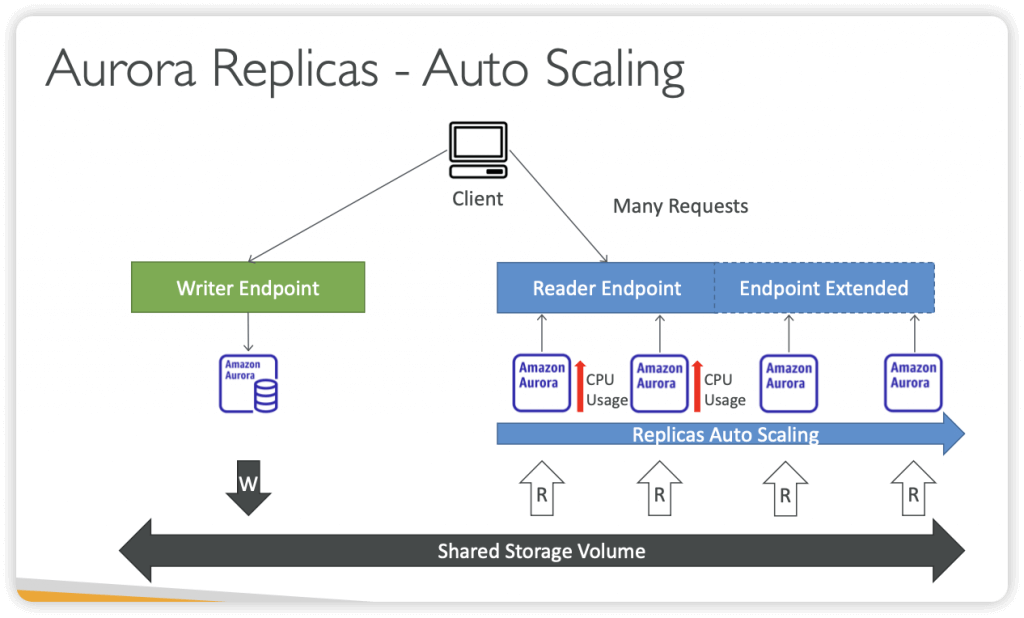
- Read Replicas
- Read Scalibility
- Up to 15 Read Replicas
- Within AZ, Cross AZ or Cross Region
- Replication is ASYNC, so reads are eventually consistent
- Replicas can be promoted to their own DB
- Applications must update the connection string to leverage read replicas
- Use Cases
- You have a production database that is taking on normal load
- You want to run a reporting application to run some analytics
- You create a Read Replica to run the new workload there
- The production application is unaffected
- Read replicas are used for SELECT (=read) only kind of statements (not INSERT, UPDATE, DELETE)
- Cost
- same region, no “data transfer fee”
- cross regions, the async replication would incur the transfer fee
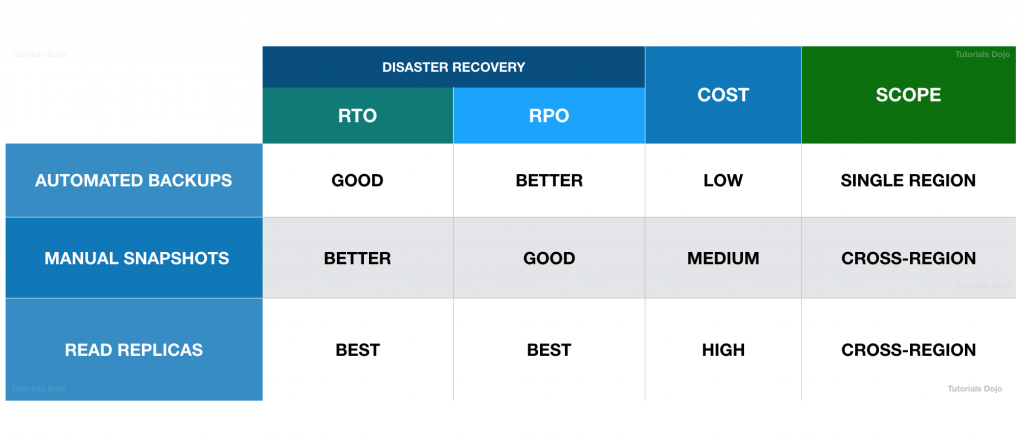
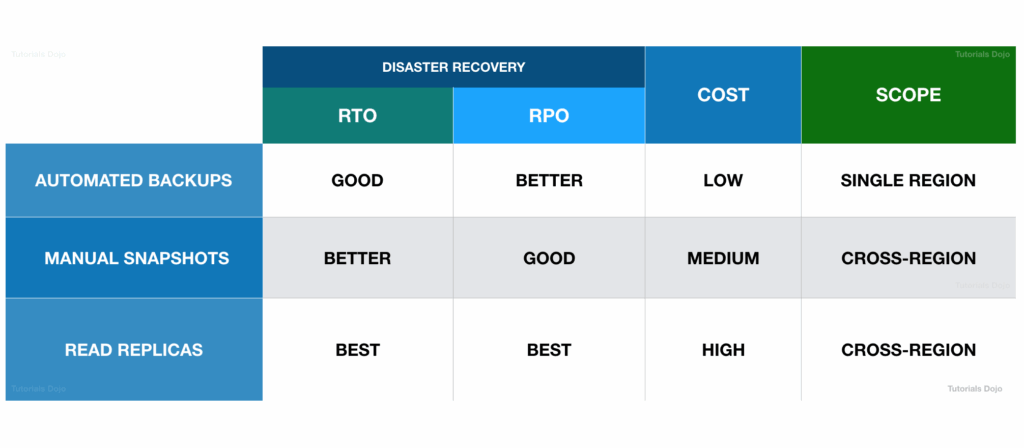
- a cross-region snapshot doesn’t provide a high RPO compared with a Read Replica since the snapshot takes significant time to complete. Although this is better than Multi-AZ deployments since you can replicate your database across AWS Regions, using a Read Replica is still the best choice for providing a high RTO and RPO for disaster recovery.
- RDS Multi AZ (Disaster Recovery)
- SYNC replication
- One DNS name – automatic app failover to standby
- Increase availability
- Failover in case of loss of AZ, loss of network, instance or storage failure
- No manual intervention in apps
- Not used for scaling
- Aurora multi-master & Amazon RDS Multi-AZ
- has its data replicated across multiple Availability Zones only but not to another AWS Region
- still experience downtime in the event of an AWS Region outage
- To prevent Regions failure
- Cross Region Read Replicas
- or Aurora Global Database
- Note: The Read Replicas be setup as Multi AZ for Disaster Recovery (DR)
- Steps for From Single-AZ to Multi-AZ
- Zero downtime operation (no need to stop the DB)
- Just click on “modify” for the database, then these would be automatically running
- A snapshot is taken
- A new DB is restored from the snapshot in a new AZ
- Synchronization is established between the two databases
- Amazon RDS scheduled instance lifecycle events
- Engine Version End-of-Support
- Certificate Authority (CA) Certificate Expiration
- Instance Type Upgrades
- Minor Version Upgrades (if enabled)
- Major Version Deprecation
- But, cannot create a snapshot !
- [ 🧐QUESTION🧐 ] the LOWEST recovery time and the LEAST data loss
- Read replicas can also be promoted when needed to become standalone DB instances.
- Read replicas in Amazon RDS for MySQL, MariaDB, PostgreSQL, and Oracle provide a complementary availability mechanism to Amazon RDS Multi-AZ Deployments. You can promote a read replica if the source DB instance fails. You can also replicate DB instances across AWS Regions as part of your disaster recovery strategy, which is not available with Multi-AZ Deployments since this is only applicable in a single AWS Region. This functionality complements the synchronous replication, automatic failure detection, and failover provided with Multi-AZ deployments.
- When you copy a snapshot to an AWS Region that is different from the source snapshot’s AWS Region, the first copy is a full snapshot copy, even if you copy an incremental snapshot. A full snapshot copy contains all of the data and metadata required to restore the DB instance. After the first snapshot copy, you can copy incremental snapshots of the same DB instance to the same destination region within the same AWS account.
- Depending on the AWS Regions involved and the amount of data to be copied, a cross-region snapshot copy can take hours to complete. In some cases, there might be a large number of cross-region snapshot copy requests from a given source AWS Region. In these cases, Amazon RDS might put new cross-region copy requests from that source AWS Region into a queue until some in-progress copies complete. No progress information is displayed about copy requests while they are in the queue. Progress information is displayed when the copy starts.
- This means that a cross-region snapshot doesn’t provide a high RPO compared with a Read Replica since the snapshot takes significant time to complete. Although this is better than Multi-AZ deployments since you can replicate your database across AWS Regions, using a Read Replica is still the best choice for providing a high RTO and RPO for disaster recovery.
DynamoDB
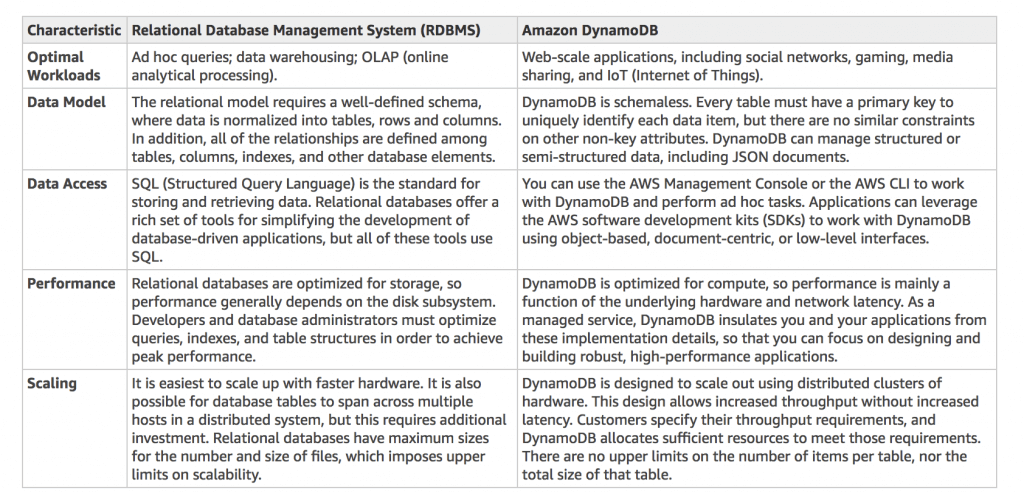
- Fully managed, highly available with replication across multiple AZs
- NoSQL database – not a relational database – with transaction support
- Scales to massive workloads, distributed database
- Millions of requests per seconds, trillions of row, 100s of TB of storage
- Fast and consistent in performance (single-digit millisecond)
- auto-scaling capabilities
- No maintenance or patching, always available
- Standard & Infrequent Access (IA) Table Class
- DynamoDB is made of Tables
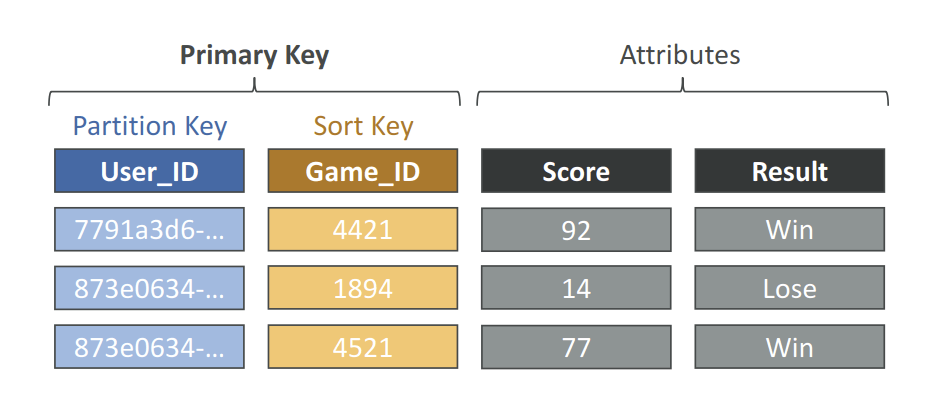
- Each table has a Primary Key (must be decided at creation time)
- Each table can have an infinite number of items (= rows)
- Each item has attributes (can be added over time – can be null)
- Maximum size of an item is 400KB
- Data types supported are:
- Scalar Types – String, Number, Binary, Boolean, Null
- Document Types – List, Map
- Set Types – String Set, Number Set, Binary Set
- Therefore, in DynamoDB you can rapidly evolve schemas
- Read/Write Capacity Modes
- Provisioned Mode (default)
- You specify the number of reads/writes per second
- You need to plan capacity beforehand
- Pay for provisioned Read Capacity Units (RCU) & Write Capacity Units (WCU)
- Possibility to add auto-scaling mode for RCU & WCU
- On-Demand Mode
- Read/writes automatically scale up/down with your workloads
- No capacity planning needed
- Pay for what you use, more expensive ($$$)
- Great for unpredictable workloads, steep sudden spikes
- Provisioned Mode (default)
- Time To Live (TTL) for DynamoDB allows you to define when items in a table expire so that they can be automatically deleted from the database.
- DynamoDB returns all of the item attributes by default. To get just some, rather than all of the attributes, use a projection expression
- condition expressions – is used to determine which items should be modified for data manipulation operations such as PutItem, UpdateItem, and DeleteItem calls
- expression attribute names – a placeholder that you use in a projection expression as an alternative to an actual attribute name
- filter expressions – determines which items (and not the attributes) within the Query results should be returned
- Throughput Capacity
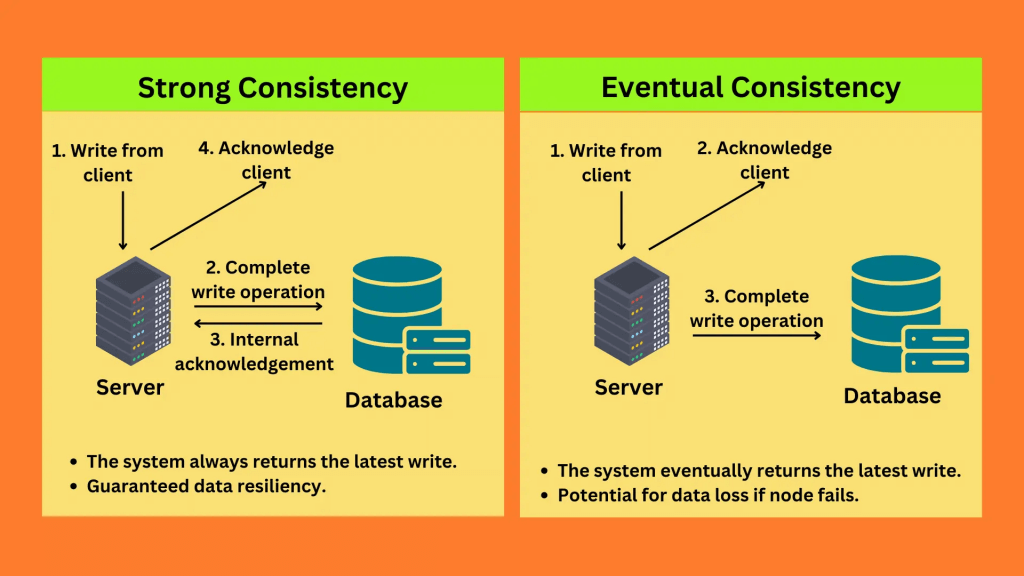
- One read request unit represents one strongly consistent read operation per second, or two eventually consistent read operations per second, for an item up to 4 KB in size.
- One write request unit represents one write operation per second, for an item up to 1 KB in size.
- For any “transactional” operation (read or write), double the request units needed.
- Partitions throttled
- Increase the amount of read or write capacity (RCU and WCU) for your table to anticipate short-term spikes or bursts in read or write operations.
- Cons: manual config, also expensive
- Implement error retries and exponential backoff.
- Distribute your read operations and write operations as evenly as possible across your table.
- Implement a caching solution, such as DynamoDB Accelerator (DAX) or Amazon ElastiCache.
- Cons: only works for massive read; also expensive
- Increase the amount of read or write capacity (RCU and WCU) for your table to anticipate short-term spikes or bursts in read or write operations.
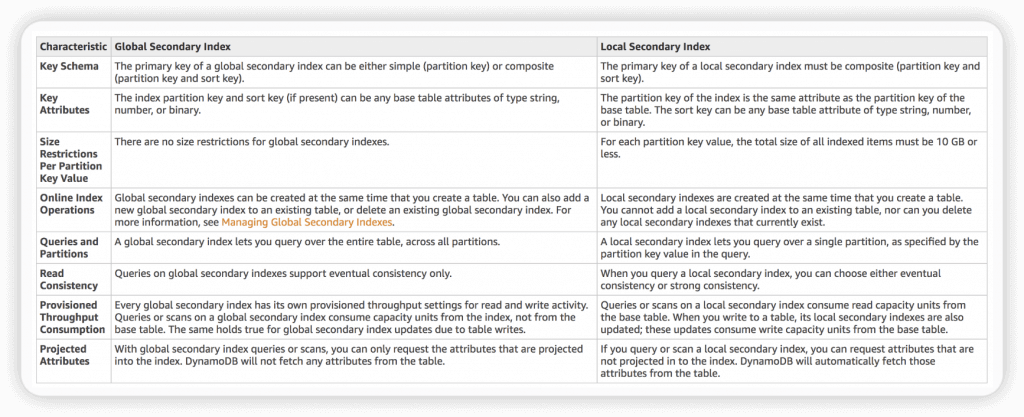
- Global Secondary Index is an index with a partition key and a sort key that can be different from those on the base table.
- To speed up queries on non-key attributes
- Can span all of the data in the base table, across all partitions.
- “CreateTable” operation with the “GlobalSecondaryIndexes” parameter
- 20 global secondary indexes (default limit) per table
- only “eventual consistency”
- Local Secondary Index cannot add into existing table; but Global Secondary Index can.
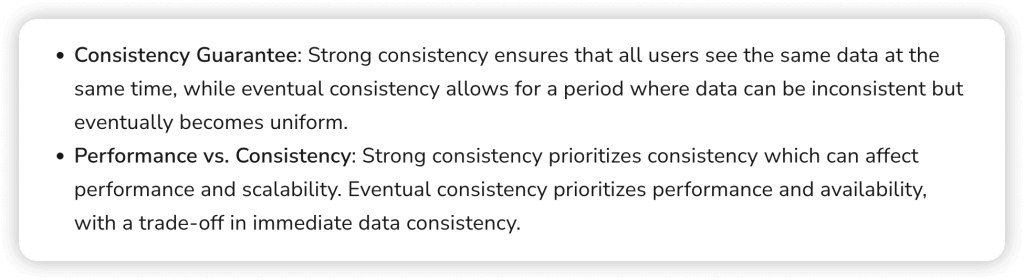
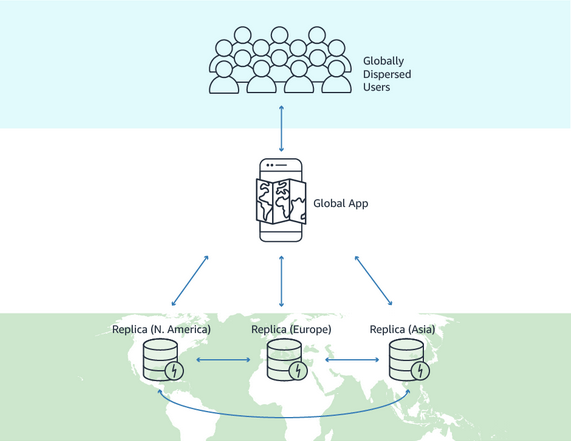
- DynamoDB Global Tables
- Make a DynamoDB table accessible with low latency in multiple-regions
- a fully managed, multi-Region, and multi-active database option that delivers fast and localized read and write performance for massively scaled global applications.
- Global tables provide automatic multi-active replication to AWS Regions worldwide.
- Active-Active replication
- Applications can READ and WRITE to the table in any region
- Must enable DynamoDB Streams as a pre-requisite
- Make a DynamoDB table accessible with low latency in multiple-regions
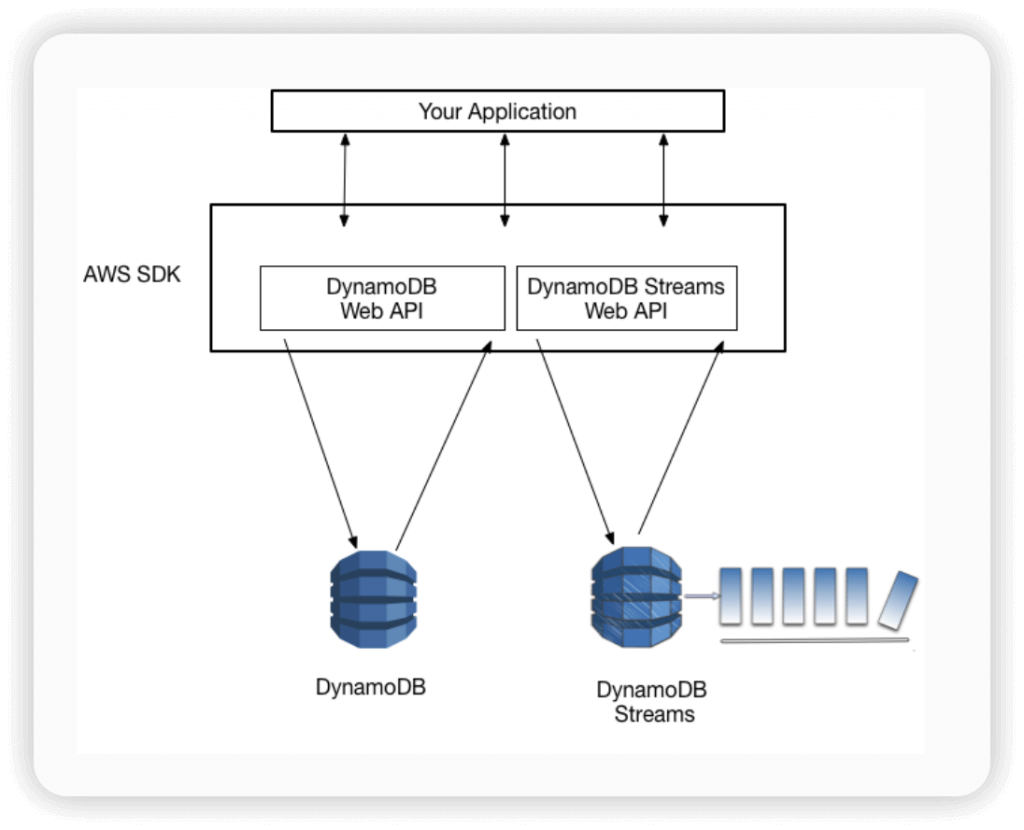
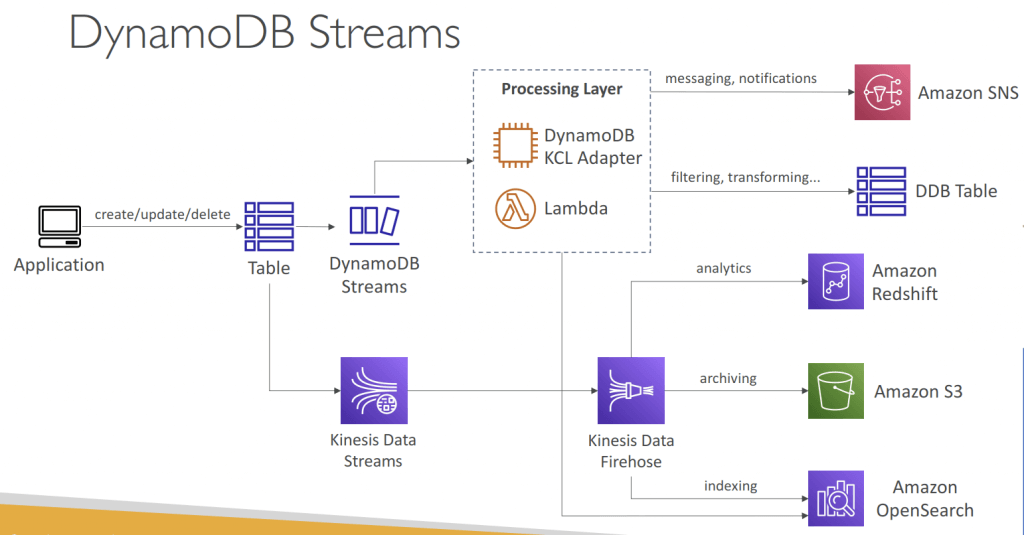
- Amazon DynamoDB Streams
- Process using AWS Lambda Triggers, or DynamoDB Stream Kinesis adapter
- All data in DynamoDB Streams is subject to a 24-hour lifetime.
- Ordered stream of item-level modifications (create/update/delete) in a table
- Use cases:
- React to changes in real-time (welcome email to users)
- Real-time usage analytics
- Inser t into derivative tables
- Implement cross-region replication
- Invoke AWS Lambda on changes to your DynamoDB table
- StreamEnabled (Boolean)
- StreamViewType (string)
- KEYS_ONLY – Only the key attributes of the modified items are written to the stream.
- NEW_IMAGE – The entire item, as it appears after it was modified, is written to the stream.
- OLD_IMAGE – The entire item, as it appeared before it was modified, is written to the stream.
- NEW_AND_OLD_IMAGES – Both the new and the old item images of the items are written to the stream.
- Amazon DynamoDB Accelerator (DAX) is a fully managed, highly available, in-memory cache for DynamoDB
- Help solve read congestion by caching
- Microseconds latency for cached data
- 5 minutes TTL for cache (default)
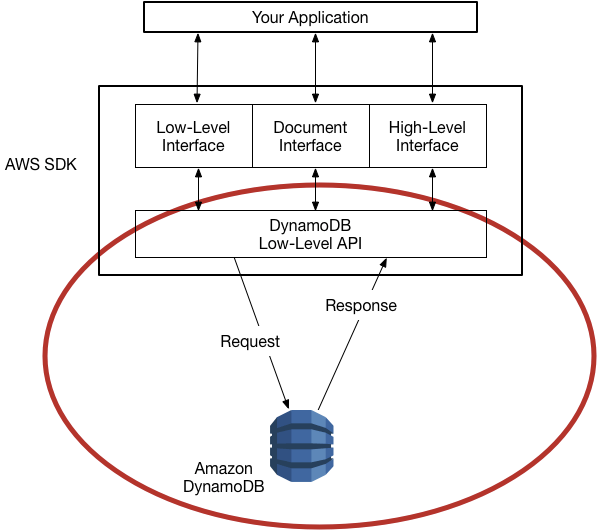
- works transparently with existing DynamoDB API calls, and the application code does not need to be modified to take advantage of the caching layer.
- Item Cache — Used to store results of GetItem and BatchGetItem operations
- Query Cache —Used to store results of Query and Scan operations
- – As an in-memory cache, DAX reduces the response times of eventually consistent read workloads by an order of magnitude, from single-digit milliseconds to microseconds.
- – DAX reduces operational and application complexity by providing a managed service that is API-compatible with DynamoDB. Therefore, it requires only minimal functional changes to use with an existing application.
- – For read-heavy or bursty workloads, DAX provides increased throughput and potential operational cost savings by reducing the need to over-provision read capacity units. This is especially beneficial for applications that require repeated reads for individual keys

- For massive read requests
- using “Query” rather than “Scan” operation
- reducing page size (because Scan operation reads an entire page (default 1MB)
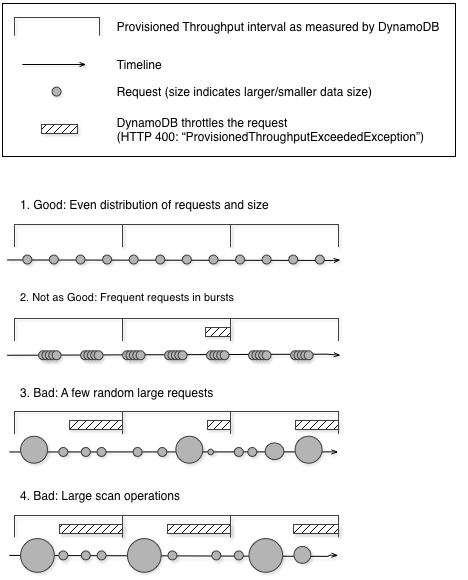
- ProvisionedThroughputExceededException means that your request rate is too high. The AWS SDKs for DynamoDB automatically retries requests that receive this exception.
- Reduce the frequency of requests using error retries and exponential backoff
- Backups for disaster recovery
- Continuous backups using point-in-time recovery (PITR)
- Optionally enabled for the last 35 days
- Point-in-time recovery to any time within the backup window
- The recovery process creates a new table
- On-demand backups
- Full backups for long-term retention, until explicitely deleted
- Doesn’t affect performance or latency
- Can be configured and managed in AWS Backup (enables cross-region copy)
- The recovery process creates a new table
- Continuous backups using point-in-time recovery (PITR)
- Integration with Amazon S3
- Export to S3 (must enable PITR)
- Works for any point of time in the last 35 days
- Doesn’t affect the read capacity of your table
- Perform data analysis on top of DynamoDB
- Retain snapshots for auditing
- ETL on top of S3 data before importing back into DynamoDB
- Export in DynamoDB JSON or ION format
- Import from S3
- Import CSV, DynamoDB JSON or ION format
- Doesn’t consume any write capacity
- Creates a new table
- Import errors are logged in CloudWatch Logs
- Export to S3 (must enable PITR)
- —–
- Use when the question talks about key/value storage, near-real time performance, millisecond responsiveness, and very high requests per second
- Not compatible with relational data such as what would be stored in a MySQL or RDS DB
- DynamoDB measures RCUs (read capacity units, basically reads per second) and WCUs (write capacity units)
- DynamoDB auto scaling uses the AWS Application Auto Scaling service to dynamically adjust throughput capacity based on traffic.
- Best practices:
- keep item sizes small (<400kb) otherwise store in S3 and use pointers from DynamoDB
- store more frequently and less frequently accessed data in different tables
- if storing data that will be accessed by timestamp, use separate tables for days, weeks, months
S3
- durable (99.999999999%)
- a best practice is to enable versioning and MFA Delete on S3 buckets
- S3 lifecycle 2 types of actions:
- transition actions (define when to transition to another storage class)
- expiration actions (objects expire, then S3 deletes them on your behalf)
- objects have to be in S3 for > 30 days before lifecycle policy can take effect and move to a different storage class.
- Intelligent Tiering automatically moves data to the most cost-effective storage
- Standard-IA is multi-AZ whereas One Zone-IA is not
- A pre-signed URL gives you access to the object identified in the URL (URL is made up of bucket name, object key, HTTP method, expiration timestamp). If you want to provide an outside partner with an object in S3, providing a pre-signed URL is a more secure (and easier) option than creating an AWS account for them and providing the login, which is more work to then manage and error-prone if you didn’t lock down the account properly.
- You can’t send long-term storage data directly to Glacier, it has to pass through an S3 first
- Accessed via API, if you want to access S3 directly it can require modifying the app to use the API which is extra effort
- Can host a static website but not over HTTPS. For HTTPS use CloudFront+S3 instead.
- Best practice: use IAM policies to grant users fine-grained control to your S3 buckets rather than using bucket ACLs
- Can use multi-part upload to speed up uploads of large files to S3 (>100MB)
- Amazon S3 Transfer Acceleration – leverages Amazon CloudFront’s globally distributed AWS Edge Locations. As data arrives at an AWS Edge Location, data is routed to your Amazon S3 bucket over an optimized network path.
- The name of the bucket used for Transfer Acceleration must be DNS-compliant and must not contain periods (“.”).
- S3 Event Notifications – trigger Lambda functions to do pre-process, like “ObjectCreated:Put” event
- S3 Storage Lens – provide visibility into storage usage and activity trends
- S3 Lifecycle policy – simply manage storage transitions and object expirations
- S3 Object Lambda – only trigger on “object – retrieving”;
- so it’s not ideal for waterproofing unless we want keep S3 objects as untouched as original.
- but it’s good to “redact PII” before sending to application.
- Cross-origin resource sharing (CORS)
- AllowedOrigin – Specifies domain origins that you allow to make cross-domain requests.
- AllowedMethod – Specifies a type of request you allow (GET, PUT, POST, DELETE, HEAD) in cross-domain requests.
- AllowedHeader – Specifies the headers allowed in a preflight request.
- MaxAgeSeconds – Specifies the amount of time in seconds that the browser caches an Amazon S3 response to a preflight OPTIONS request for the specified resource. By caching the response, the browser does not have to send preflight requests to Amazon S3 if the original request will be repeated.
- ExposeHeader – Identifies the response headers that customers are able to access from their applications (for example, from a JavaScript XMLHttpRequest object).
- To upload an object to the S3 bucket, which uses SSE-KMS
- send a request with an x-amz-server-side-encryption header with the value of aws:kms.
- Only with “aws:kms”, it would be SSE-KMS (AWS KMS keys)
- else it may be using (Amazon S3 managed keys), with value “AES256”
- (optional) x-amz-server-side-encryption-aws-kms-key-id header, which specifies the ID of the AWS KMS master encryption key
- If the header is not present in the request, Amazon S3 assumes the default KMS key.
- Regardless, the KMS key ID that Amazon S3 uses for object encryption must match the KMS key ID in the policy, otherwise, Amazon S3 denies the request.
- (optional) supports encryption context with the x-amz-server-side-encryption-context header.
- For a large file uploading (which would use “multipart”)
- The kms:GenerateDataKey permission allows you to initiate the upload.
- The kms:Decrypt permission allows you to encrypt newly uploaded parts with the key that you used for previous parts of the same object.
- send a request with an x-amz-server-side-encryption header with the value of aws:kms.
- Using server-side encryption with customer-provided encryption keys (SSE-C) allows you to set your own encryption keys. With the encryption key you provide as part of your request, Amazon S3 manages both the encryption, as it writes to disks, and decryption, when you access your objects.
- Amazon S3 does not store the encryption key you provide
- only a randomly salted HMAC value of the encryption key in order to validate future requests, which cannot be used to derive the value of the encryption key or to decrypt the contents of the encrypted object
- That means, if you lose the encryption key, you lose the object.
- Headers
- x-amz-server-side-encryption-customer-algorithm – This header specifies the encryption algorithm. The header value must be “AES256”.
- x-amz-server-side-encryption-customer-key – This header provides the 256-bit, base64-encoded encryption key for Amazon S3 to use to encrypt or decrypt your data.
- x-amz-server-side-encryption-customer-key-MD5 – This header provides the base64-encoded 128-bit MD5 digest of the encryption key according to RFC 1321. Amazon S3 uses this header for a message integrity check to ensure the encryption key was transmitted without error.
- Object Integrity
- S3 uses checksum to validate the integrity of uploaded objects
- MD5, MD5 & ETag, SHA-1, SHA-256, CRC32, CRC32C
- ETag – represents a specific version of the object, ETag = MD5 (if SSE-S3)
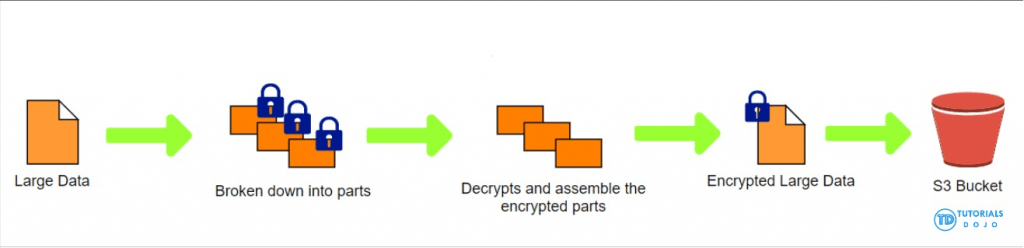
- Replication
- Must enable Versioning in source and destination buckets
- Buckets can be in different AWS accounts
- Copying is asynchronous
- Must give proper IAM permissions to S3
- Use cases:
- Cross-Region Replication (CRR) – compliance, lower latency access, replication across accounts
- Same-Region Replication (SRR) – log aggregation, live replication between production and test accounts
- After you enable Replication, only new objects are replicated
- Optionally, you can replicate existing objects using S3 Batch Replication
- Replicates existing objects and objects that failed replication
- For DELETE operations
- Can replicate delete markers from source to target (optional setting)
- Deletions with a version ID are not replicated (to avoid malicious deletes)
- There is no “chaining” of replication
- If bucket 1 has replication into bucket 2, which has replication into bucket 3
- Then objects created in bucket 1 are not replicated to bucket 3
- By default, Amazon S3 allows both HTTP and HTTPS requests
- To determine HTTP or HTTPS requests in a bucket policy, use a condition that checks for the key “aws:SecureTransport”.
- When this key is true, this means that the request is sent through HTTPS.
- To be sure to comply with the s3-bucket-ssl-requests-only rule, create a bucket policy that explicitly denies access when the request meets the condition “aws:SecureTransport”: “false”. This policy explicitly denies access to HTTP requests.
- To determine HTTP or HTTPS requests in a bucket policy, use a condition that checks for the key “aws:SecureTransport”.
- Granting account access to a group
- Amazon S3 has a set of predefined groups
- -Authenticated Users group – Represented by /AuthenticatedUsers. This group represents all AWS accounts. Access permission to this group allows any AWS account to access the resource. However, all requests must be signed (authenticated).
- -All Users group – Represented by /AllUsers. Access permission to this group allows anyone in the world access to the resource. The requests can be signed (authenticated) or unsigned (anonymous). Unsigned requests omit the Authentication header in the request.
- -Log Delivery group – Represented by /LogDelivery. WRITE permission on a bucket enables this group to write server access logs to the bucket.
- Access control lists (ACLs) are one of resource-based options that you can use to manage access to your buckets and objects. You can use ACLs to grant basic read/write permissions to other AWS accounts
- Amazon S3 has a set of predefined groups
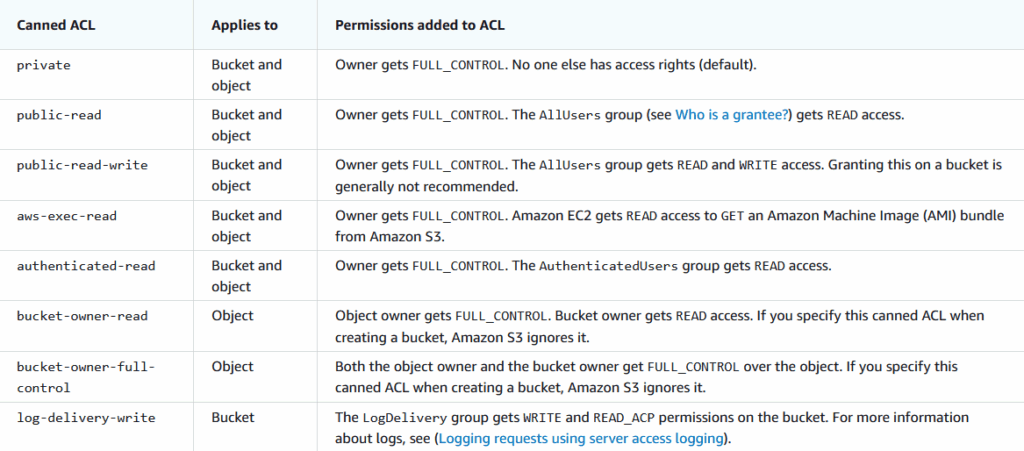
- [ 🧐QUESTION🧐 ] enable the replications across regions and users must use the same endpoint to access the assets, as always be accessible
- AWS CloudFormation StackSets extends the capability of stacks by enabling you to create, update, or delete stacks across multiple accounts and AWS Regions with a single operation.
- S3 Replication enables automatic, asynchronous copying of objects across Amazon S3 buckets. You can replicate objects to a single destination bucket or to multiple destination buckets. The destination buckets can be in different AWS Regions or within the same Region as the source bucket. S3 Replication requires that the source and destination buckets must have versioning enabled.
- CloudFront origin group can be used to configure origin failover for scenarios when you need high availability. Use origin failover to designate a primary origin for CloudFront plus a second origin that CloudFront automatically switches to when the primary origin returns specific HTTP status code failure responses.
- Route 53 has several routing policies to choose from, which determines how Route 53 responds to queries. This includes:
- -Simple routing policy – Use for a single resource that performs a given function for your domain, for example, a web server that serves content for the example.com website. You can use simple routing to create records in a private hosted zone.
- -Failover routing policy – Use when you want to configure active-passive failover. You can use failover routing to create records in a private hosted zone.
- In this scenario, StackSets provides an operationally efficient multi-Region deployment strategy for the Region-specific Amazon S3 buckets. S3 replication then copies new and existing objects in the primary Region to multiple deployment Regions. We can leverage a CloudFront distribution to make a single endpoint available to resolve these multiple S3 origins. Since the CloudFront origin configurations are already handling the failover, we can set Route 53 to use a simple routing policy.
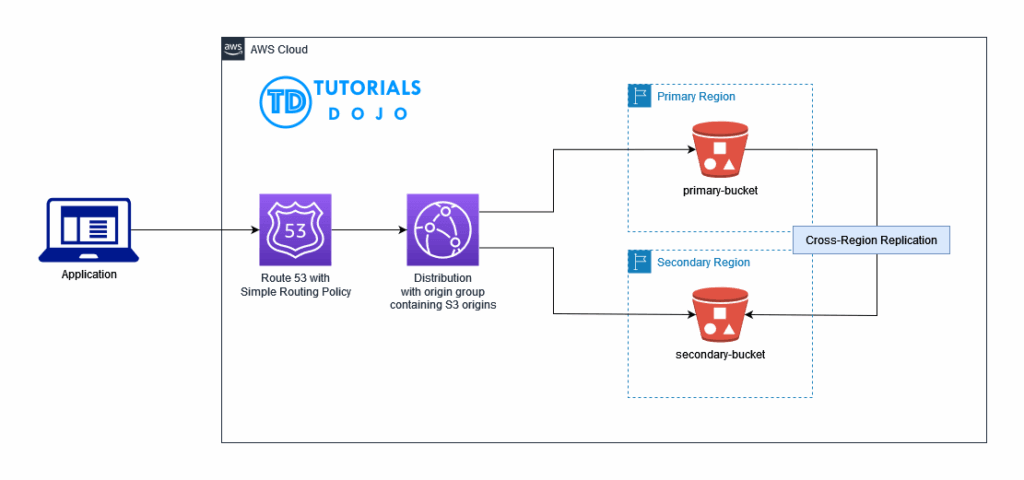
S3 Access Points can simplify access management, they do not support cross-account console access
Amazon S3 Vectors
- Up to 90% cheaper (and a lot simpler)
- Create a S3 vector bucket
- Then create a vector index
- Specify dimensions and distance metric
- Now you can store your vector embeddings with put_vectors
- Include whatever metadata you want
- Query them with query_vectors
- Generate your own vectors with an embedding model and store them
- Or it’s fully integrated with Bedrock Knowledge Bases
- Also integrates with Bedrock within SageMaker Unified Studio
- Alternative API: s3vectors-embed-cli
- Original, useuse boto3 or the AWS CLI
- But there’s also a dedicated S3 vectors CLI, s3vectors-embed-cli
- s3vectors-embed put
- Converts text or images to embeddings using Bedrock, stores them.
- s3vectors-embed query
- Generates an embedding for your query, queries your vector index.
- Original, useuse boto3 or the AWS CLI
- Strongly consistent
- Newly added data is immediately available
- The vector data is automatically optimized over time for price performance
- But actual performance is only advertised as 100ms-1s
- AWS recommends a hybrid approach with OpenSearch for performance-critical queries
- They call this a “tiered search strategy” – use S3 for infrequently queried vectors only
- S3 Vectors has connectivity with OpenSearch for this purpose
- This COPIES (exports) data from S3 into OpenSearch – you end up paying for both if you’re not careful!
- You can also use OpenSearch with S3 Vectors engine
- Only works with OpenSearch managed clusters
- Give you OpenSearch functionality with S3 Vectors as the backend
- Max indices per bucket: 10,000 (2B vectors per index)
- Best Practices
- Insert or delete vectors in large batches (500 per API call)
- Use concurrent requests for smaller batches
- Can get up to 2500 vectors per second
- Have a retry mechanism for queries
- Only hundreds per second supported per index before you get an 429 error
- Use multiple indexes when possible
- Improves per-index performance
- Also useful for data isolation, multi-tenancy
- If a metadata field doesn’t need to be filtered, mark it as non-filterable
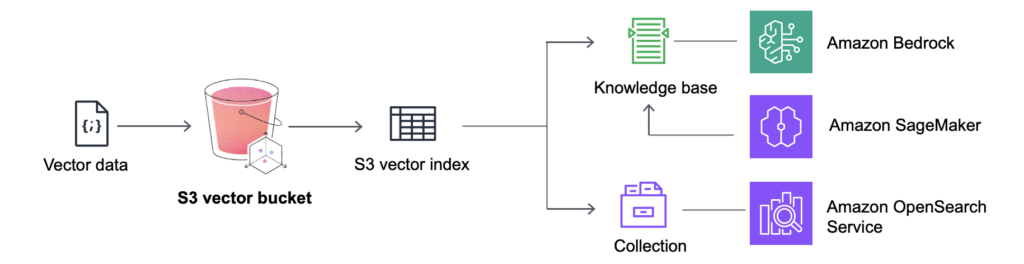
Amazon Neptune
- Fully managed graph database
- A popular graph dataset would be a social network
- Users have friends
- Posts have comments
- Comments have likes from users
- Users share and like posts…
- Highly available across 3 AZ, with up to 15 read replicas
- Build and run applications working with highly connected datasets – optimized for these complex and hard queries
- Can store up to billions of relations and query the graph with milliseconds latency
- Highly available with replications across multiple AZs
- Great for knowledge graphs (Wikipedia), fraud detection, recommendation engines, social networking
- Neptune Analytics
- Analytics engine built on top of Neptune database
- vectors.topKByEmbedding
- Query vector databases with explicit vector values
- Can filter by vertex attributes
- Returns top nodes and their scores