Identity and Access Management (IAM)
- Users (one physical user = one AWS user) and Groups (groups contain only users, no subgroups)
- The permissions boundary for an IAM entity (user or role) sets the max permissions that the entity can have
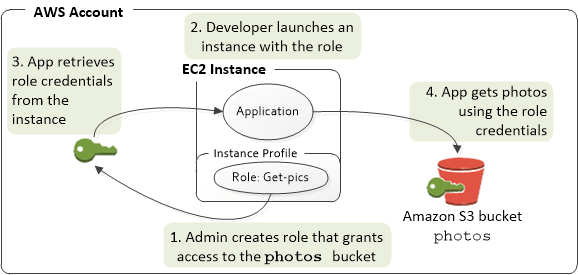
- IAM Role
- Roles hand out automatic credentials and permissions
- Giving permissions to non-humans, such as services / applications
- Giving permissions to federated / outside users & groups
- Authorisations from identity providers (like AWS Cognito) are mapped to your IAM role(s), NOT users or groups
- to pass the role to service, the users need to have iam:PassRole permission; to see, using iam:GetRole
- Roles can only passed to what their trust allows, using “Trust Relationships”
- Use Case: An IAM role is primarily used when one AWS resource or entity (such as an EC2 instance, Lambda function, or AWS service) needs to assume a set of permissions to interact with other AWS resources. The role itself doesn’t have credentials; instead, entities assume the role and inherit its permissions.
- vs “Resources Policies”
- Use Case: Resource policies are DIRECTLY attached to resources like S3 buckets, SNS topics, or SQS queues to specify which principals (AWS users, accounts, or services) can access them. These are directly associated with the resource, not a user or entity.”
- When you need to control access to a resource directly and specify which principals (IAM users, roles, services, or accounts) can access it.
- Roles hand out automatic credentials and permissions
- IAM Policies
- assign permissions, using JSON documents
- using “least privilege principle”
- consist of
- version
- id (optional)
- statement
- Sid (optional)
- Effect: Allow or Deny
- Principal: account/user/group/role
- Action: list of action, like S3:GetObject, S3:PutObject, iam:PassRole, iam:GetRole
- Resource: AWS resource
- Condition (optional)
- Permission Evaluation Flow
- If there’s explicit DENY, end flow with DENY
- Else, if there is an ALLOW, end flow with ALLOW
- Else, DENY
- Dynamic Policy, with variable as ${aws:username}
- Policy Management
- AWS Managed Policy
- Customer Managed Policy, has version control + rollback
- Inline Policy, strict 1-to-1 relationship with principal; would be also deleted while delete principal
- IAM Password Policy, set minimum length, require specific character types (number, upper/lower-case letters, non-alphabetic), expiration, and re-use forbidden
- Multi Factor Authentication (MFA)
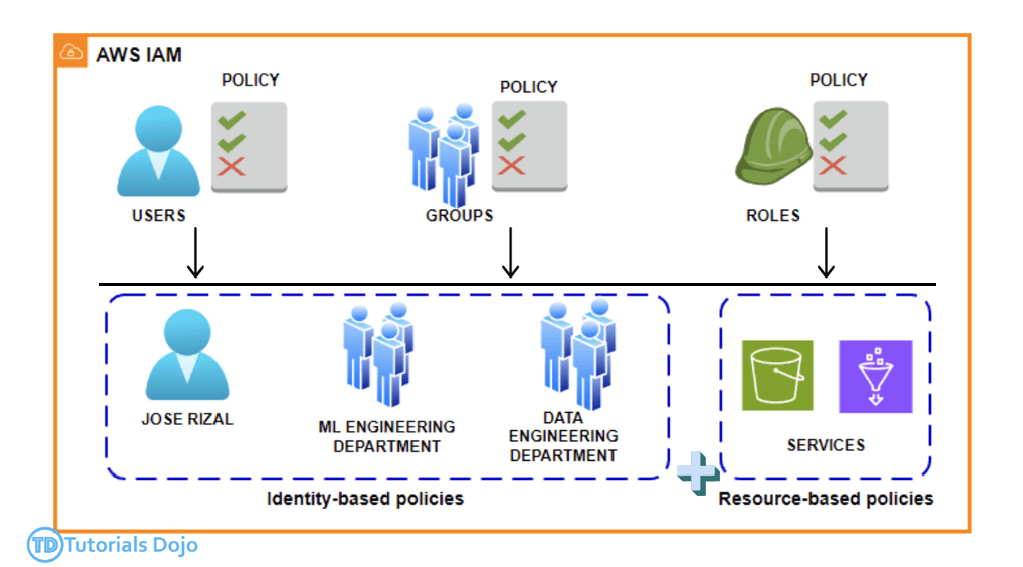
- [ 🧐QUESTION🧐 ] limit access to the SageMaker notebook instances, ensuring only authorized VPC users can connect
- To secure the SageMaker notebook instances and ensure that only authorized users within the VPC can access them, IAM policies can be used to control the actions allowed on these instances. By creating an IAM policy with a condition that restricts access to the VPC interface endpoint, you can ensure that only traffic from the designated endpoint can interact with SageMaker notebook instances.
- For example, you could create an IAM policy that restricts the actions
sagemaker:CreatePresignedNotebookInstanceUrlandsagemaker:DescribeNotebookInstanceto only be allowed if the request is coming from the specified VPC interface endpoint. This would prevent access from any source other than the VPC endpoint, ensuring that only authorized users or services within the VPC can interact with the notebook instances. This approach directly secures the SageMaker notebook instances and prevents unauthorized external access. - [ NOT ] Update the security group for the notebook instances to restrict incoming traffic
- configuring a security group only restricts traffic at the network interface level. While this approach controls access to the instances themselves, it does not prevent users from accessing the SageMaker API over the internet, which is required to interact with the notebook instances. Therefore, this method does not fully secure access to the notebook instances.
- [ NOT ] Set up VPC Traffic Mirroring to capture traffic
- VPC Traffic Mirroring is a monitoring tool that primarily captures and inspects network traffic. It does not block or restrict access to resources.
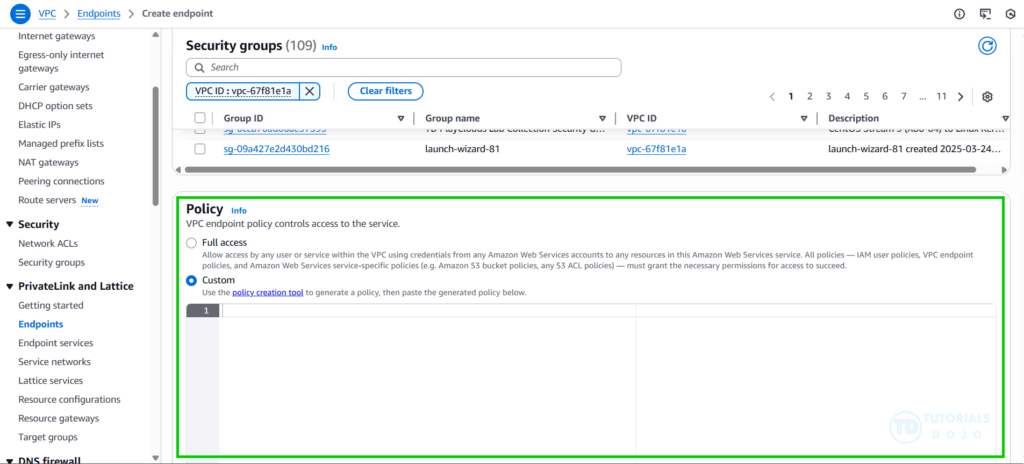
- [ NOT ] Apply VPC Endpoint Policies to control which IAM users or services can access SageMaker AI through the VPC interface endpoint
- VPC Endpoint Policies typically control access to AWS services over the VPC endpoint but do not restrict access to the SageMaker notebook instances themselves. They manage which users or services can access the SageMaker API through the endpoint
- IAM policies define who (user/role) can do what, while VPC endpoint policies define how (via the endpoint) and what (service/resource) they can do over that private connection.
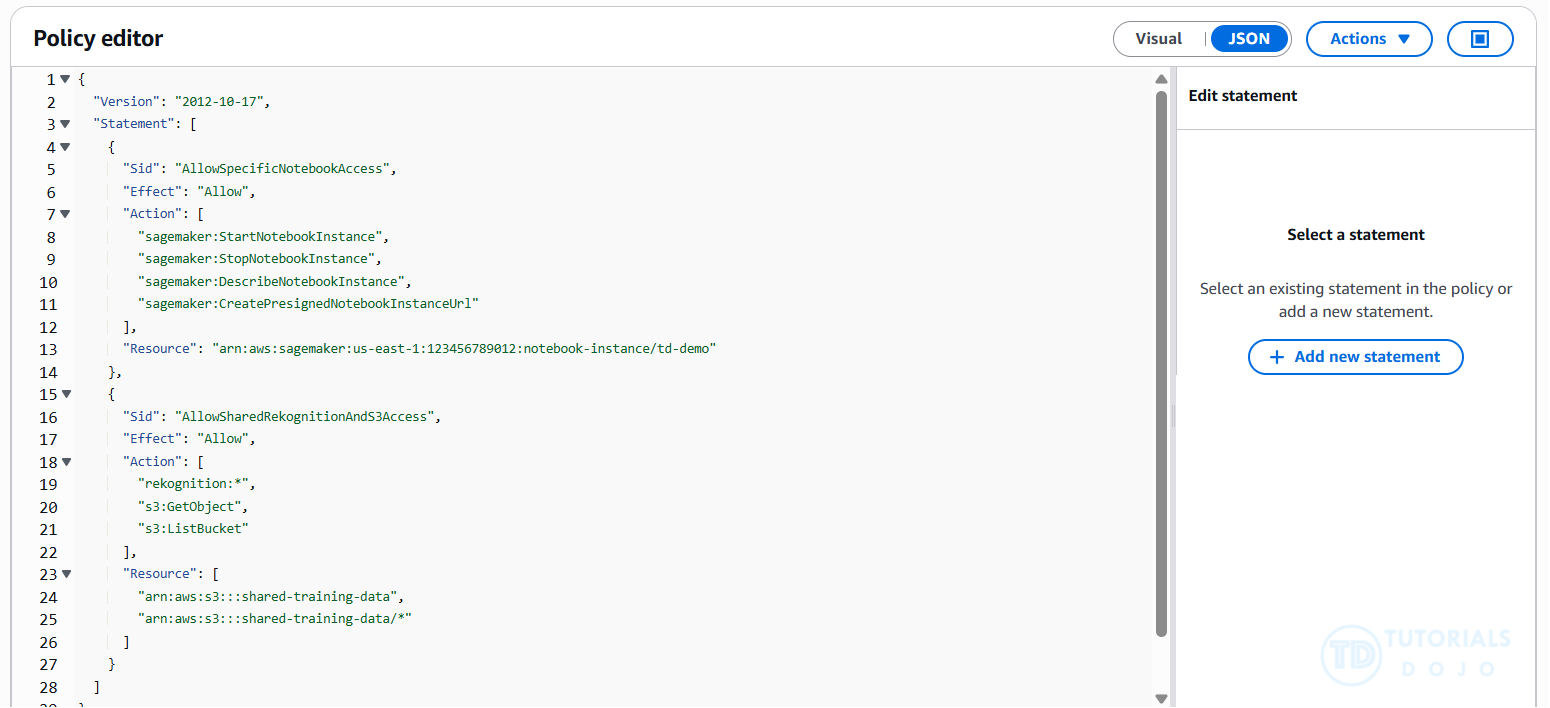
- [ 🧐QUESTION🧐 ] can access only the assigned SageMaker notebook instance
- By default, IAM users and roles do not have permission to create or modify SageMaker AI resources. They also cannot perform tasks using the AWS Management Console, AWS CLI, or AWS API. An IAM administrator must create IAM policies that grant users and roles the necessary permissions to perform specific API operations on the relevant resources. After creating these policies, the administrator must attach them to the IAM users or groups that need those permissions.
- Identity-based policies determine whether someone can create, access, or delete SageMaker AI resources in your account. These actions can incur costs for your AWS account.
- Amazon Resource Name (ARN) condition operators let you construct
Conditionelements that restrict access by comparing a key to an ARN. The ARN is considered a string. - while shared access to Amazon Rekognition and S3 can be granted through additional IAM permissions.
- [ 🧐QUESTION🧐 ] SageMaker notebook instance to access other S3 buckets
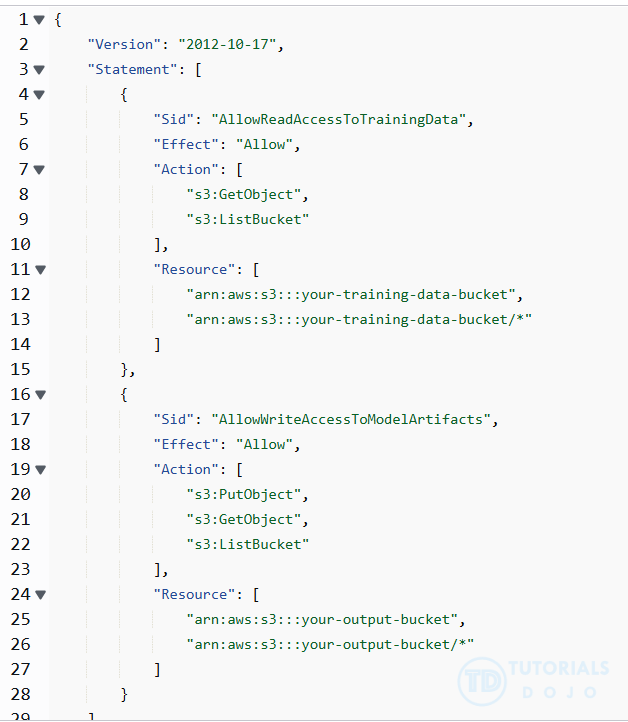
- Amazon SageMaker AI carries out tasks on your behalf by utilizing other AWS services. To enable this functionality, you need to grant SageMaker AI the necessary permissions to use these services and the corresponding resources. You can provide these permissions by creating an AWS Identity and Access Management (IAM) execution role for SageMaker AI.
- When you use a SageMaker AI feature with resources in Amazon S3, such as input data, the execution role you specify in your request (for example
CreateTrainingJob) is used to access these resources. - If you attach the IAM managed policy,
AmazonSageMakerFullAccess, to an execution role, that role has permission to perform certain Amazon S3 actions on buckets or objects withSageMaker,Sagemaker,sagemaker, oraws-gluein the name. For tighter security and better control, it’s best to define a custom IAM policy that grants only the required actions on the specific buckets involved in the training workflow. - [ NOT ] Define a bucket policy on the S3 bucket that allows the SageMaker AI notebook instance by its ARN to perform
s3:GetObject,s3:PutObject, ands3:ListBucketactions, though it’s workable but not best practice. - [ NOT ] S3 Access Points are primarily designed for managing access to shared datasets at scale, especially in multi-tenant environments
- [ NOT ] IAM identity federation is intended for external identities (e.g., corporate users or third-party apps), not for AWS services like SageMaker AI. SageMaker AI should use its IAM role for access, not federated identities.
- [ 🧐QUESTION🧐 ] ensure that only specific Amazon EC2 instances and IAM users can invoke SageMaker API operations (training model) through these instances
- An endpoint policy is a resource-based policy attached to a VPC endpoint, controlling which AWS principals can access an AWS service through the endpoint.
- the endpoint policy does not override or replace identity-based policies or resource-based policies. For instance, when using an interface endpoint to connect to Amazon S3, you can also use Amazon S3 bucket policies to control access to buckets from specific endpoints or specific VPCs.
- To specify subnets and security groups in your private VPC, use the
VpcConfigrequest parameter of theCreateModelAPI, or provide this information when you create a model in the SageMaker AI console. SageMaker AI uses this information to create network interfaces and attach them to your model containers. The network interfaces provide your model containers with a network connection within your VPC that is not connected to the internet. They also enable your model to connect to resources in your private VPC. - – Attach a custom VPC endpoint policy that explicitly grants access to selected IAM identities. It allows fine-grained control over which IAM users or roles can invoke SageMaker API operations through the endpoint. This aligns with the goal of restricting access to specific identities and complies with internal security policies.
- – Configure the security group linked to the endpoint network interface to allow traffic only from approved instances. It enforces network-level access control. By limiting inbound traffic to the endpoint’s elastic network interface, only designated EC2 instances can reach the SageMaker API, adding an essential layer of protection.
- [ NOT ] VPC Flow Logs are primarily designed for monitoring and diagnostics, not for enforcing access control
- [ NOT ] private DNS typically helps route traffic internally, but does not restrict which identities or instances can access the endpoint
- An endpoint policy is a resource-based policy attached to a VPC endpoint, controlling which AWS principals can access an AWS service through the endpoint.
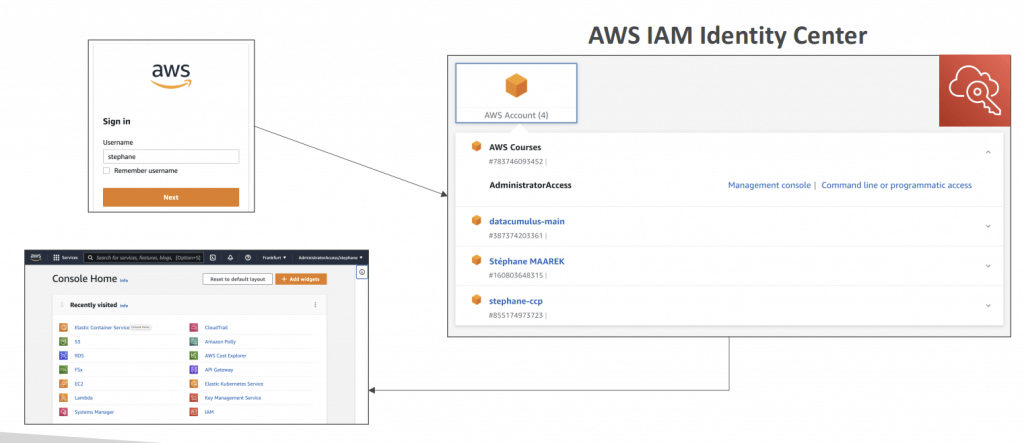
AWS IAM Identity Center
- successor to AWS Single Sign-On
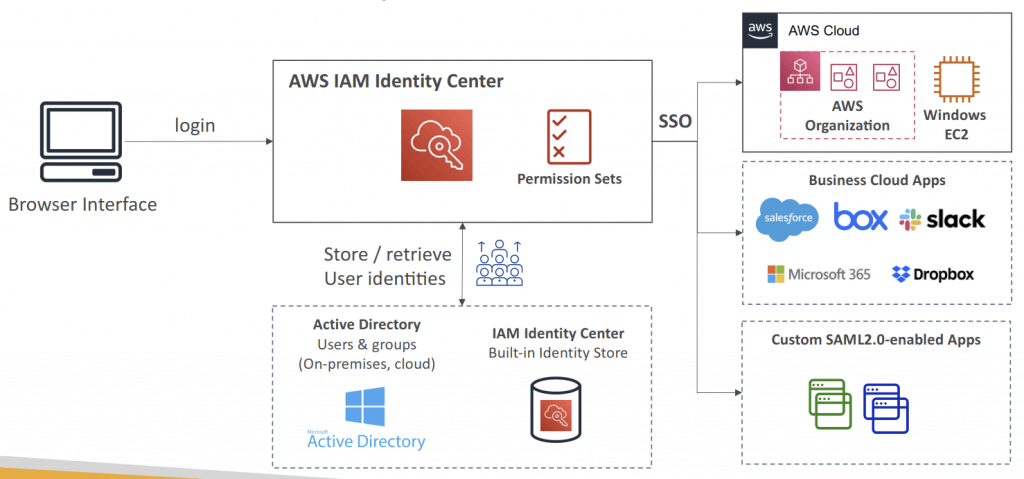
- centralizes access management across AWS accounts and applications
- One login (single sign-on) for all your
- AWS accounts in AWS Organizations
- Business cloud applications (e.g., Salesforce, Box, Microsoft 365…)
- SAML2.0-enabled applications
- EC2 Windows Instances
- Identity providers
- Built-in identity store in IAM Identity Center
- 3rd party: Active Director y (AD), OneLogin, Okta…
- issues temporary security credentials for users to access AWS resources
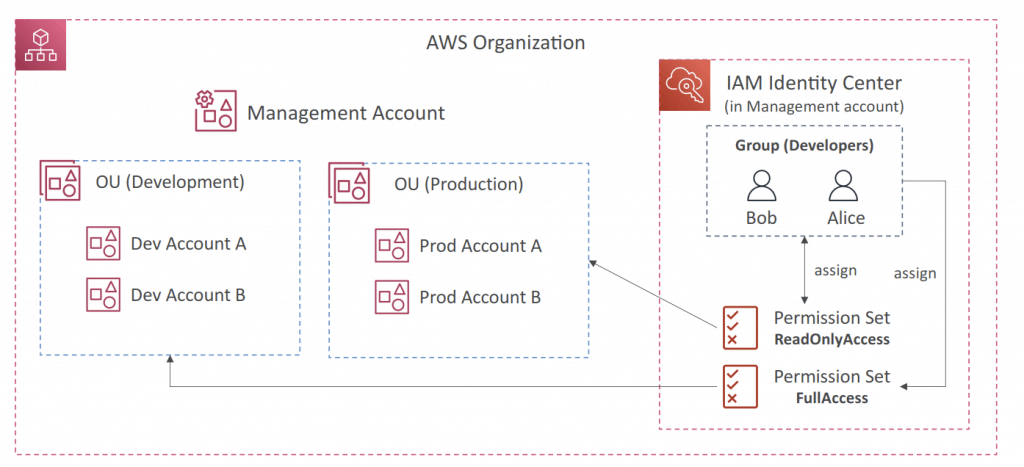
- Fine-grained Permissions and Assignments
- Multi-Account Permissions
- Manage access across AWS accounts in your AWS Organization
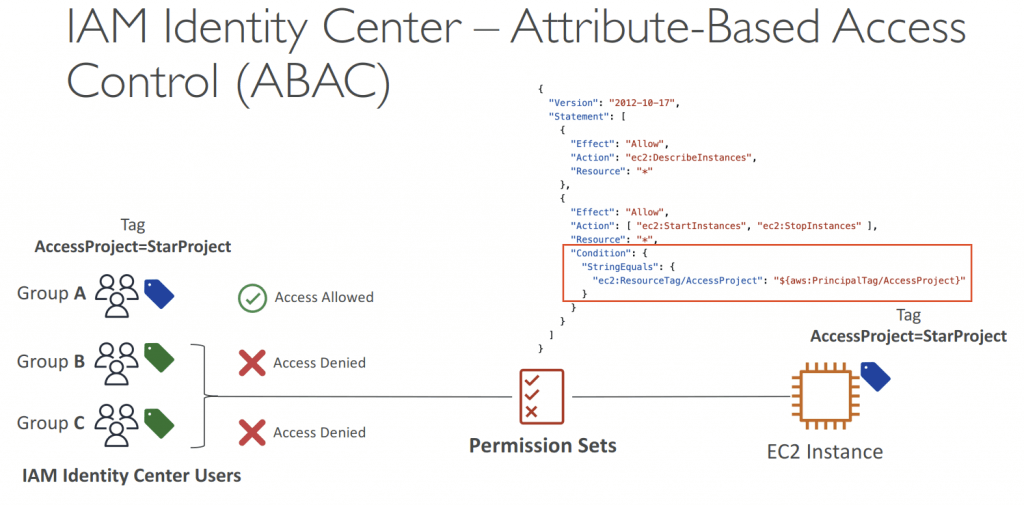
- Permission Sets – a collection of one or more IAM Policies assigned to users and groups to define AWS access
- Application Assignments
- SSO access to many SAML 2.0 business applications (Salesforce, Box, Microsoft 365…)
- Provide required URLs, cer tificates, and metadata
- Attribute-Based Access Control (ABAC)
- Fine-grained permissions based on users’ attributes stored in IAM Identity Center Identity Store
- Example: cost center, title, locale…
- Use case: Define permissions once, then modify AWS access by changing the attributes IAM
- User attributes are mapped from the IdP as key-value pairs
- Multi-Account Permissions
- External IdPs
- SAML 2.0: authenticate identities from external IdP
- Users sign into AWS access por tal using their corporate identities
- Suppor ts Okta, Azure AD, OneLogin…
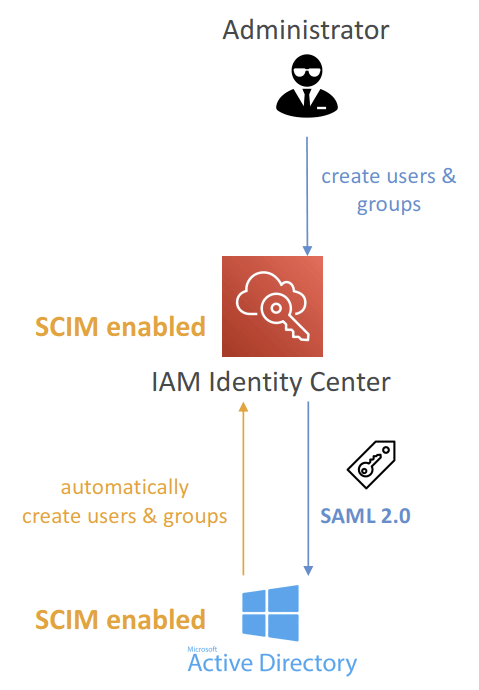
- SAML 2.0 does NOT provide a way to query the IdP to learn about users and groups
- You must create users and groups in the IAM Identity Center that are identical to the users and groups in the External IdP
- SCIM: automatic provisoning (synchronization) of user identities from an external IdP into IAM Identity Center
- SCIM = System for Cross-domain Identity Management
- Must be supported by the external IdP
- Perfect complement to using SAML 2.0
- SAML 2.0: authenticate identities from external IdP
- Multi-Factor Authentication (MFA)
- Every Time They Sign-in (Always-on)
- Only When Their Sign-in Context Changes (Context-aware) – analyzes user behavior (e.g., device, browser, location…)
AWS Organizations strengthens governance by allowing accounts to be grouped into organizational units (OUs). Administrators can apply policies at the OU level and manage access requirements consistently across multiple accounts. This structure makes it possible to enforce organization-wide guardrails while still giving individual teams the flexibility to operate within the boundaries defined by leadership.
Service Control Policies (SCPs) in AWS Organizations act as permission boundaries that apply across all accounts within an OU. SCPs do not grant permissions but instead define the maximum set of permissions that identities can use. When SCPs are combined with IAM Identity Center permission sets, the organization ensures that only approved model-invocation actions for Amazon Bedrock are available to the designated teams, even if a lower-level policy is misconfigured.
This layered approach of SAML federation, Identity Center permission sets, and SCP-based governance creates a consistent and secure access model for Amazon Bedrock. Teams can only access the foundation models (FMs) authorized for their department, and the enterprise maintains a clear division of access across multiple OUs. The architecture supports least privilege, adheres to enterprise governance requirements, and provides centralized control without restricting departmental autonomy.
AWS Control Tower
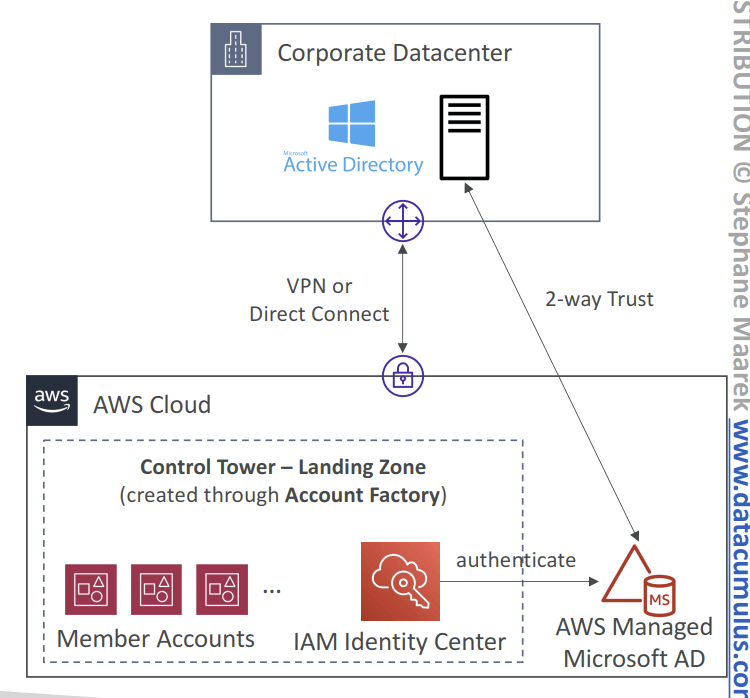
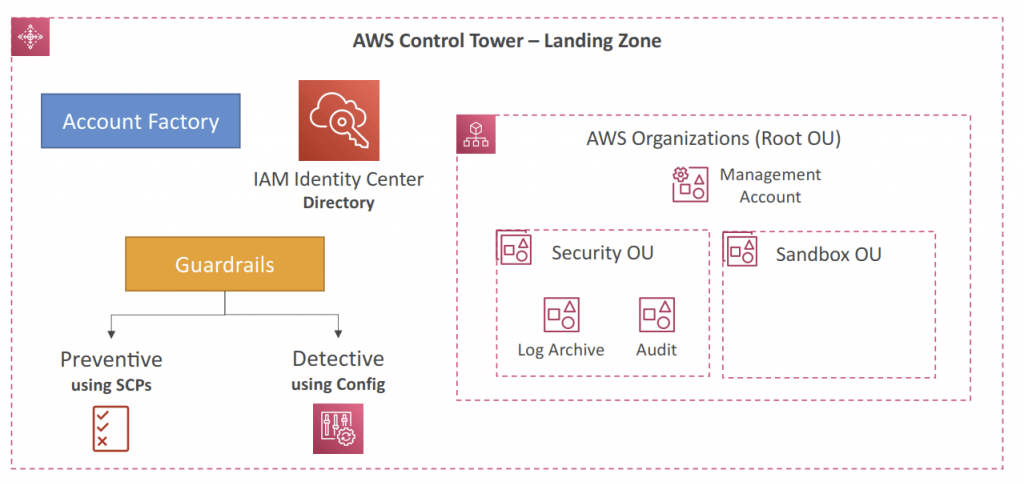
- Easy way to set up and govern a secure and compliant multi-account AWS environment based on best practices
- Benefits:
- Automate the set up of your environment in a few clicks
- Automate ongoing policy management using guardrails
- Detect policy violations and remediate them
- Monitor compliance through an interactive dashboard
- AWS Control Tower runs on top of AWS Organizations:
- It automatically sets up AWS Organizations to organize accounts and implement SCPs (Service Control Policies)
- AWS Organizations strengthens governance by allowing accounts to be grouped into organizational units (OUs). Administrators can apply policies at the OU level and manage access requirements consistently across multiple accounts. This structure makes it possible to enforce organization-wide guardrails while still giving individual teams the flexibility to operate within the boundaries defined by leadership.
- Service Control Policies (SCPs) in AWS Organizations act as permission boundaries that apply across all accounts within an OU. SCPs do not grant permissions but instead define the maximum set of permissions that identities can use. When SCPs are combined with IAM Identity Center permission sets, the organization ensures that only approved model-invocation actions for Amazon Bedrock are available to the designated teams, even if a lower-level policy is misconfigured.
- Account Factory
- Automates account provisioning and deployments
- Enables you to create pre-approved baselines and configuration options for AWS accounts in your organization (e.g., VPC default configuration, subnets, region, …)
- Uses AWS Service Catalog to provision new AWS accounts
- Guardrail
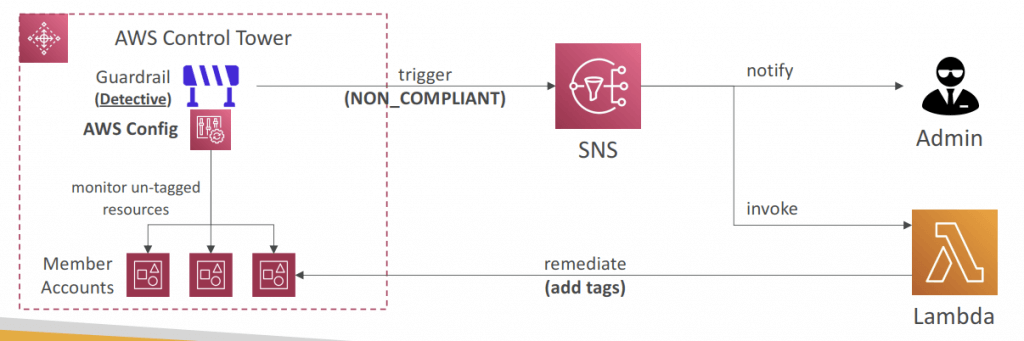
- Detect and Remediate Policy Violations
- Provides ongoing governance for your Control Tower environment (AWS Accounts)
- Preventive – using SCPs (e.g., Disallow Creation of Access Keys for the Root User)
- Detective – using AWS Config (e.g., Detect Whether MFA for the Root User is Enabled)
- Example: identify non-compliant resources (e.g., untagged resources)
- Guardrails Levels
- Mandatory
- Automatically enabled and enforced by AWS Control Tower
- Example: Disallow public Read access to the Log Archive account
- Strongly Recommended
- Based on AWS best practices (optional)
- Example: Enable encryption for EBS volumes attached to EC2 instances
- Elective
- Commonly used by enterprises (optional)
- Example: Disallow delete actions without MFA in S3 buckets
- Mandatory
- Landing Zone
- Automatically provisioned, secure, and compliant multi-account environment based on AWS best practices
- Landing Zone consists of:
- AWS Organization – create and manage multi-account structure
- Account Factory – easily configure new accounts to adhere to config. and policies
- Organizational Units (OUs) – group and categorize accounts based on purpose
- Service Control Policies (SCPs) – enforce fine-grained permissions and restrictions
- IAM Identity Center – centrally manage user access to accounts and services
- Guardrails – rules and policies to enforce security, compliance and best practices
- AWS Config – to monitor and assess your resources’ compliance with Guardrails
- Account Factory
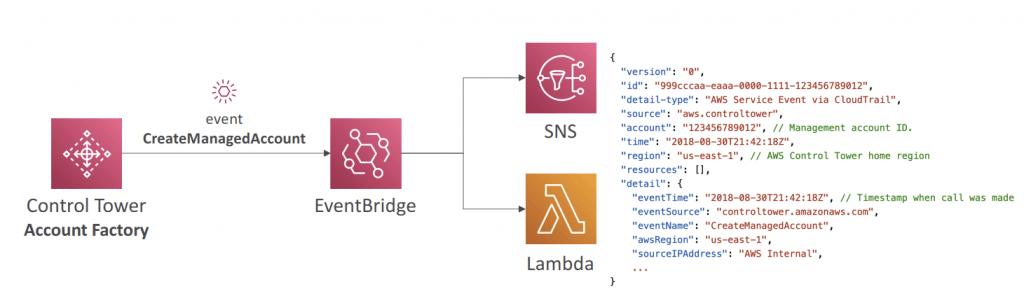
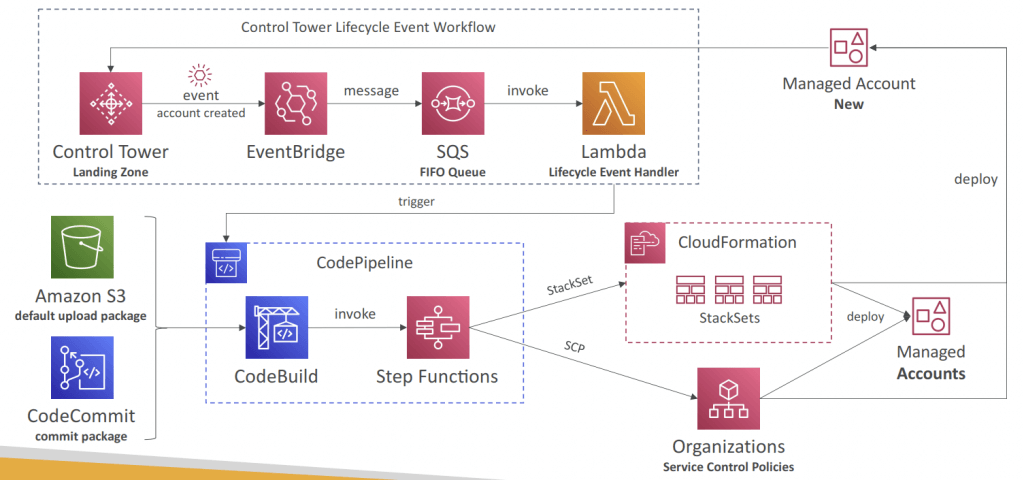
- You can react to new accounts created using EventBridge
- Account Factory Customization (AFC)
- Automatically customize resources in new and existing accounts created through Account Factory
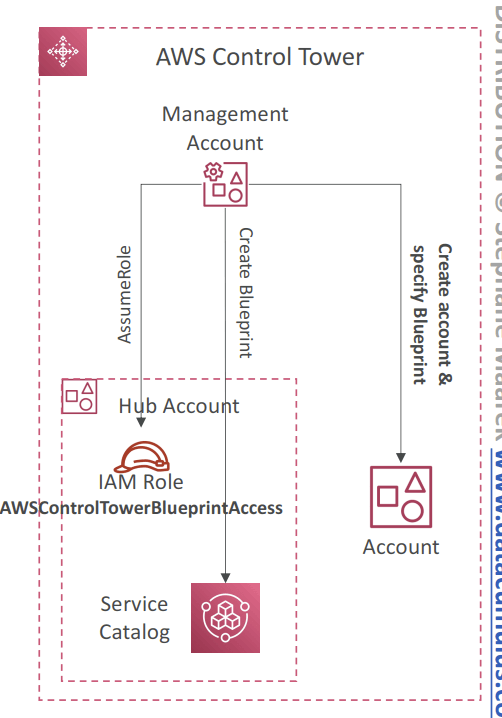
- Custom Blueprint
- CloudFormation template that defines the resources and configurations you want to customize in the account
- Defined in the form on a Service Catalog Product
- Stored in a Hub Account, which stores all the Custom Blueprints (recommended: don’t use the Management account)
- Also available pre-defined blueprints created by AWS Partners
- Only one blueprint can be deployed to the account
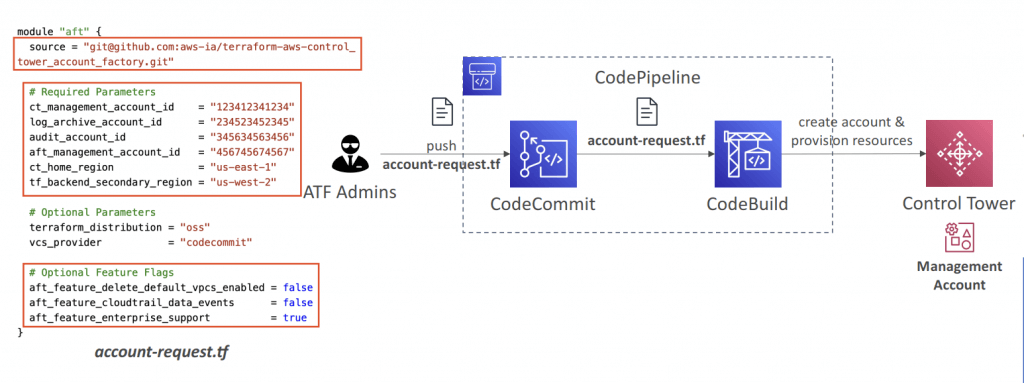
- Account Factor y for Terraform (AFT)
- Helps you provision and customize AWS accounts in Control Tower through Terraform using a deployment pipeline
- You create an account request Terraform file which triggers the AFT workflow for account provisioning
- Offers built-in feature options (disabled by default)
- AWS CloudTrail Data Events – creates a Trail & enables CloudTrail Data Events
- AWS Enterprise Support Plan – turns on the Enterprise Suppor t Plan
- Delete The AWS Default VPC – deletes the default VPCs in all AWS Regions
- Terraform module maintained by AWS
- Works with Terraform Open-source, Terraform Enterprise, and Terraform Cloud
- Customizations for AWS Control Tower (CfCT)
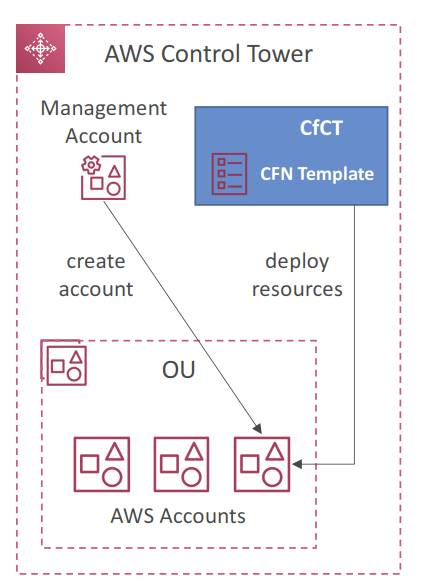
- GitOps-style customization framework created by AWS
- Helps you add customizations to your Landing Zone using your custom CloudFormation templates and SCPs
- Automatically deploy resources to new AWS accounts created using Account Factory
- Note: CfCT is different from AFC (Account Factory Customization ; blueprint)
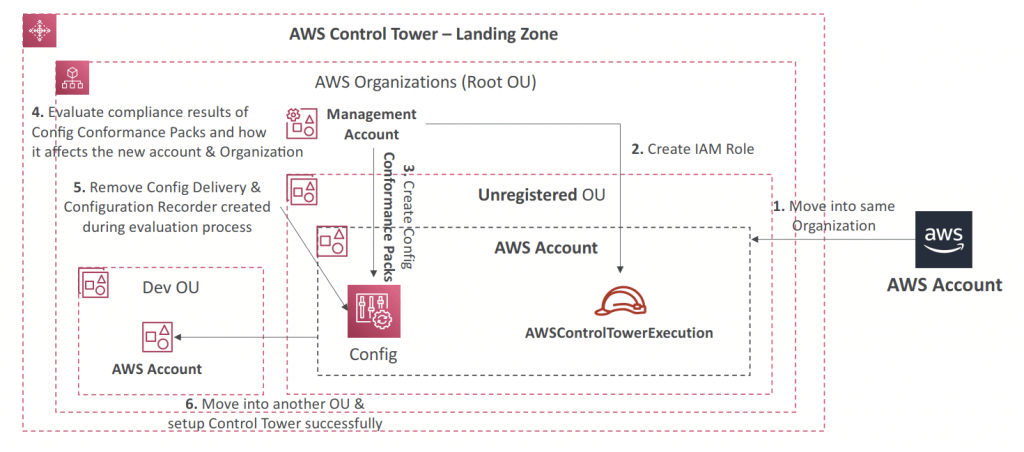
- AWS Config Integration
- Control Tower uses AWS Config to implement Detective Guardrails
- Control Tower automatically enables AWS Config in enabled Regions
- AWS Config Configuration History and snapshots delivered to S3 bucket in a centralized Log Archive account
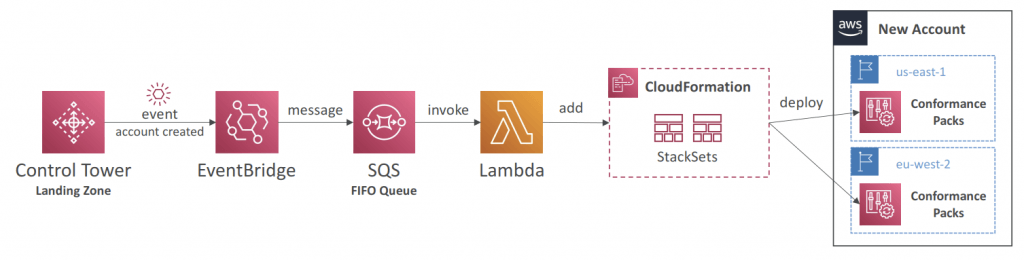
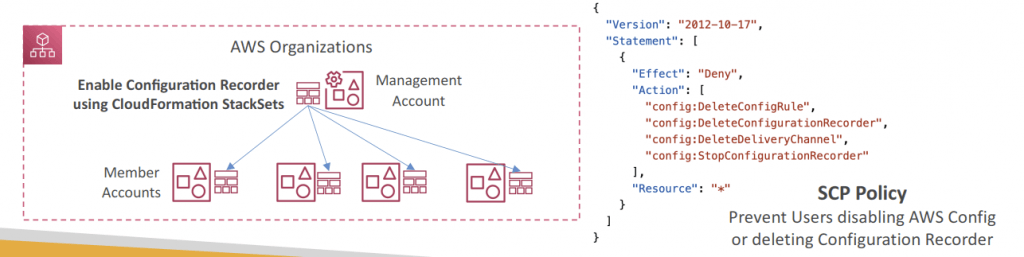
- Control Tower uses CloudFormation StackSets to create resources like Config Aggregator, CloudTrail, and centralized logging
- Config Conformance Packs – enables you to create packages of Config Compliance Rules & Remediations for easy deployment at scale
- Deploy to individual AWS accounts or entire and AWS Organization
AWS Key Management Service (KMS)
- AWS manages encryption keys for us
- Fully integrated with IAM for authorization
- Able to audit KMS Key usage using CloudTrail
- KMS Keys is the new name of KMS Customer Master Key (KMS CMK)
- Symmetric (AES-256 keys)
- AWS services default
- must call KMS API
- encrypt up to 4 KB of data through KMS
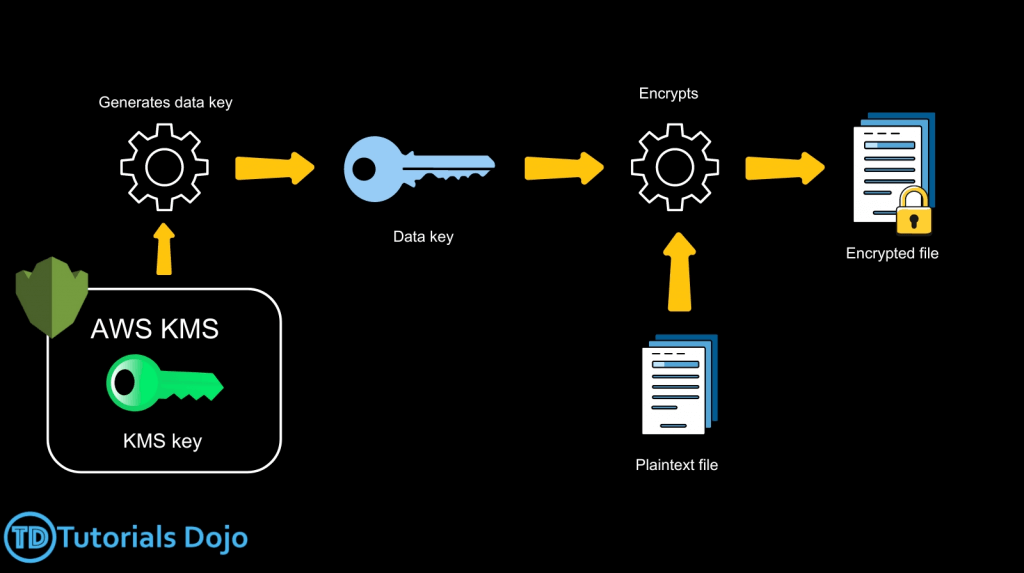
- to encrypt > 4KB with KMS Encrypt API call, need to use Envelope Encryption (aka GenerateDataKey API), let client side to Encrypt/Decrypt with DEK received
- GenerateDataKey: generates a unique symmetric data key (DEK)
- returns a plaintext copy of the data key
- AND a copy that is encrypted under the CMK
- GenerateDataKeyWithoutPlaintext
- Generate a DEK that is encrypted under the CMK
- Decrypt: decrypt up to 4 KB of data (also “Data Encryption Keys”)
- GenerateRandom: Returns a random byte string
- Encrypt data locally in your application (ie, Envelope Encryption) with KMS
- Use the GenerateDataKey operation to get a data encryption key.
- Use the plaintext data key (returned in the Plaintext field of the response) to encrypt data locally, then erase the plaintext data key from memory.
- Store the encrypted data key (returned in the CiphertextBlob field of the response) alongside the locally encrypted data.
- To Decrypt data locally:
- Use the Decrypt operation to decrypt the encrypted data key. The operation returns a plaintext copy of the data key.
- Use the plaintext data key to decrypt data locally, then erase the plaintext data key from memory.
- Envelope encryption is the practice of “encrypting plaintext data with a data key and then encrypting the data key under another key”. But, eventually, one key must remain in plaintext so you can decrypt the keys and your data. This top-level plaintext encryption key is known as the root key.
- GenerateDataKey: generates a unique symmetric data key (DEK)
- Asymmetric (RSA & ECC key pairs)
- Public (Encrypt) and Private Key (Decrypt) pair
- Symmetric (AES-256 keys)
- Types of KMS Keys
- AWS Owned Keys (free): SSE-S3, SSE-SQS, SSE-DDB (DynamoDB)
- AWS Managed Key (free): aws/service-name, automatic renew every 1 year
- Customer managed keys created in KMS: $1 / month, can be renewed automatic & on-demand
- Customer managed keys imported: $1 / month, only manual rotation
- AWS Encryption SDK has already implemented Envelope Encryption
- the feature – Data Key Caching, can reuse the data keys, with LocalCryptoMaterialsCache
- Request Quotas: if got ThrottlingException, use exponential backoff (backoff and retry); and all cryptographic operations (aka Encrypt and Decrypt), they share a quota
- To hugely reduce the cost on S3 encryption, use “S3 Bucket Key”
Macie
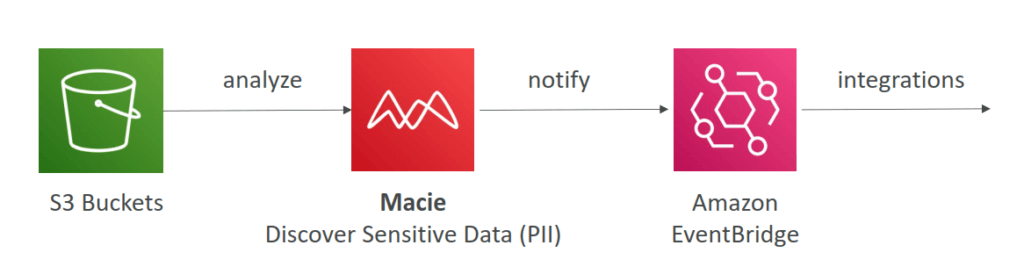
- Amazon Macie is a fully managed data security and data privacy
- service that uses machine learning and pattern matching to
- discover and protect your sensitive data in AWS.
- Macie helps identify and alert you to sensitive data, such as personally identifiable information (PII)
Secrets Manager
- Newer service, meant for storing secrets
- Capability to force rotation of secrets every X days
- Automate generation of secrets on rotation (uses Lambda)
- Managed rotation – Secrets Manager can automatically rotate secrets for supported services like Amazon RDS, Amazon DocumentDB, and Amazon Redshift. In this mode, AWS handles the rotation, and you only need to enable automatic rotation and set the interval.
- Custom rotation using AWS Lambda – Uses a Lambda function to define how to rotate secrets for unsupported services, third-party APIs, or custom applications.
- When combined with AWS Lambda, Secrets Manager enables automated secret rotation by invoking Lambda functions that generate and apply new credentials at scheduled intervals or in response to specific triggers. By dynamically retrieving secrets from Secrets Manager, applications can always access the latest, valid tokens without downtime.
- Integration with Amazon RDS (MySQL, PostgreSQL, Aurora)
- Secrets are encrypted using KMS
- Mostly meant for RDS integration
- Multi-Region Secrets
- Replicate Secrets across multiple AWS Regions
- Secrets Manager keeps read replicas in sync with the primary Secret
- Ability to promote a read replica Secret to a standalone Secret
- Use cases: multi-region apps, disaster recovery strategies, multi-region DB…
AWS System Manager (SSM) Parameter Store
- Secure storage for configuration and secrets
- Version tracking of configurations / secrets
- Allow to assign a TTL to a parameter (expiration date) to force updating or deleting sensitive data such as passwords
- Parameter policies are only available for parameters in the Advanced tier
- Expiration – deletes the parameter at a specific date
- ExpirationNotification – sends an event to Amazon EventBridge (Amazon CloudWatch Events) when the specified expiration time is reached.
- NoChangeNotification – sends an event to Amazon EventBridge (Amazon CloudWatch Events) when a parameter has not been modified for a specified period of time.
Cognito
WAF (Web Application Firewall)
VPC
Internet Gateway & NAT Gateways
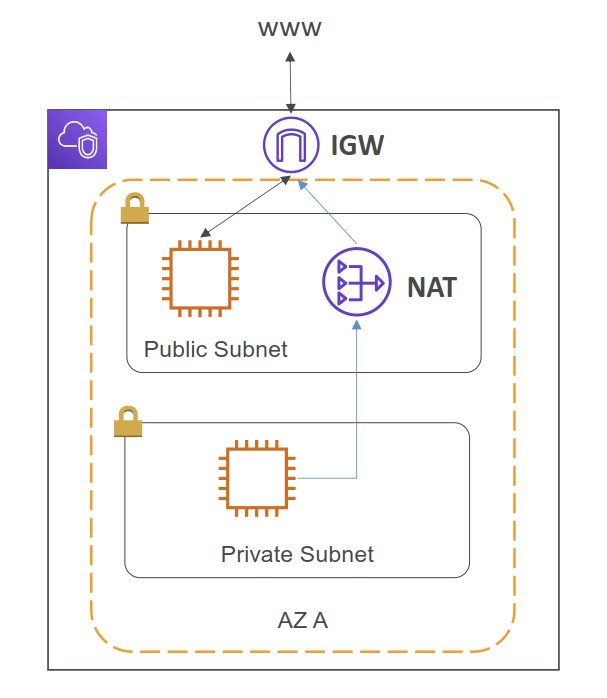
- Internet Gateways helps our VPC instances connect with the internet
- Public Subnets have a route to the internet gateway.
- NAT Gateways (AWS-managed) & NAT Instances (self-managed) allow your instances in your Private Subnets to access the internet while remaining private
Network ACL & Security Groups
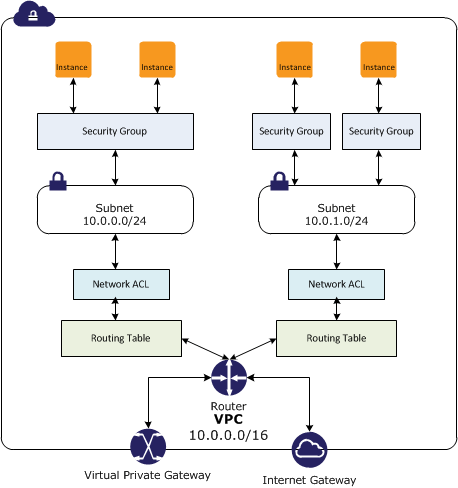
- NACL (Network ACL)
- A firewall which controls traffic from and to subnet
- Can have ALLOW and DENY rules
- Are attached at the Subnet level
- Rules only include IP addresses
- Security Groups
- A firewall that controls traffic to and from an ENI / an EC2 Instance
- Can have only ALLOW rules
- Rules include IP addresses and other security groups
| Feature | Network ACL (NACL) | Security Group (SG) |
|---|---|---|
| Level | Subnet | Instance / ENI |
| State | Stateless | Stateful (return traffic is automatically allowed) |
| Rule Type | Allow & Deny | Allow Only (Implicit Deny) |
| Rule Eval | Numbered Order (Lowest First) | All Rules Evaluated |
| Association | One NACL per Subnet (applied to ALL instances in the subnet) | Multiple SGs per Instance/ENI possible (only works on the instances user manually associates, no matter it’s specified when instance launching or later) |
| Default | Default NACL: Allow All In/Out | Default SG: Allow All Out, Deny All In * |
| Custom NACL: Deny All In/Out | Custom SG: Allow All Out, Deny All In |
VPC Flow Logs
- Capture information about IP traffic going into your interfaces:
- VPC Flow Logs
- Subnet Flow Logs
- Elastic Network Interface Flow Logs
- Helps to monitor & troubleshoot connectivity issues. Example:
- Subnets to internet
- Subnets to subnets
- Internet to subnets
- Captures network information from AWS managed interfaces too: Elastic Load Balancers, ElastiCache, RDS, Aurora, etc…
- VPC Flow logs data can go to S3, CloudWatch Logs, and Kinesis Data Firehose
VPC Peering
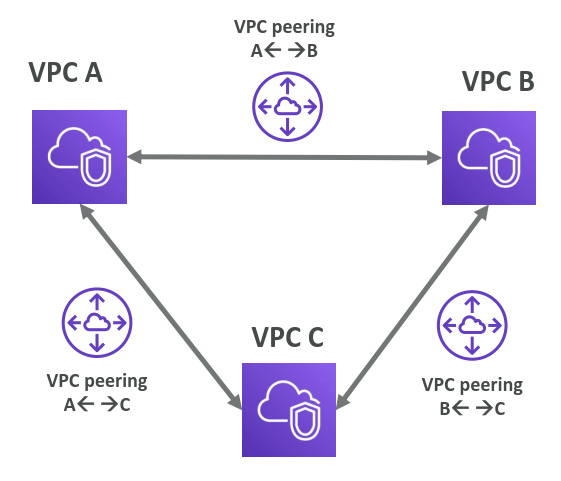
- Connect two VPC, privately using AWS’ network
- Make them behave as if they were in the same network
- Must not have overlapping CIDR (IP address range)
- VPC Peering connection is not transitive (must be established for each VPC that need to communicate with one another)
VPC Endpoints
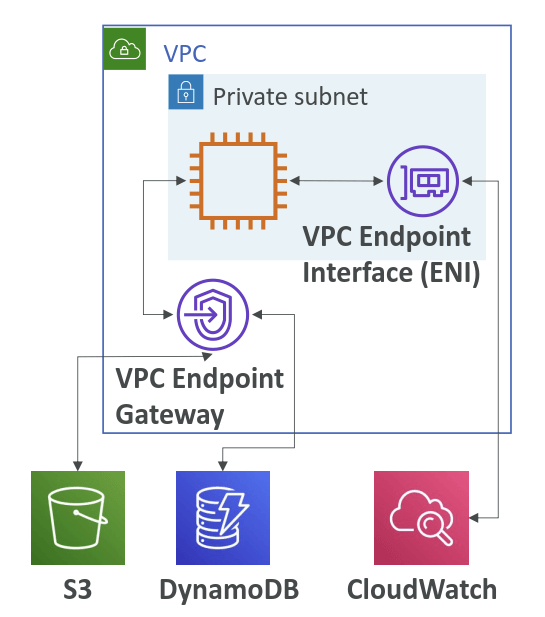
- Endpoints allow you to connect to AWS Services using a private network instead of the public www network
- This gives you enhanced security and lower latency to access AWS services
- VPC Endpoint Gateway: S3 & DynamoDB
- VPC Endpoint Interface: most services (including S3 & DynamoDB)
- Only used within your VPC
Site to Site VPN
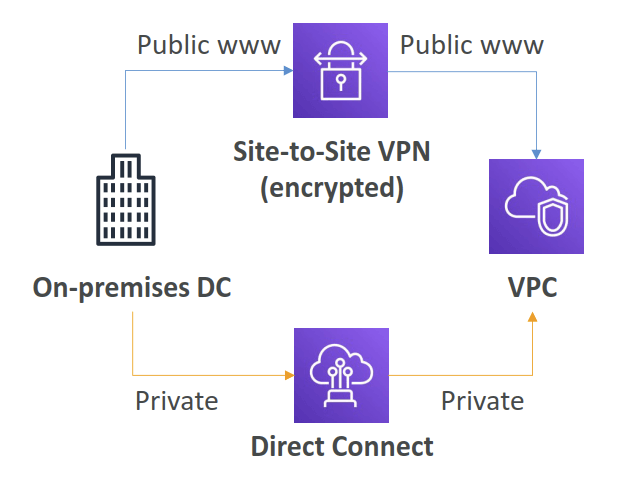
- Connect an on-premises VPN to AWS
- The connection is automatically encrypted
- Goes over the public internet
Direct Connect
- Establish a physical connection between on-premises and AWS
- The connection is private, secure and fast
- Goes over a private network
- Takes at least a month to establish
AWS Private Link
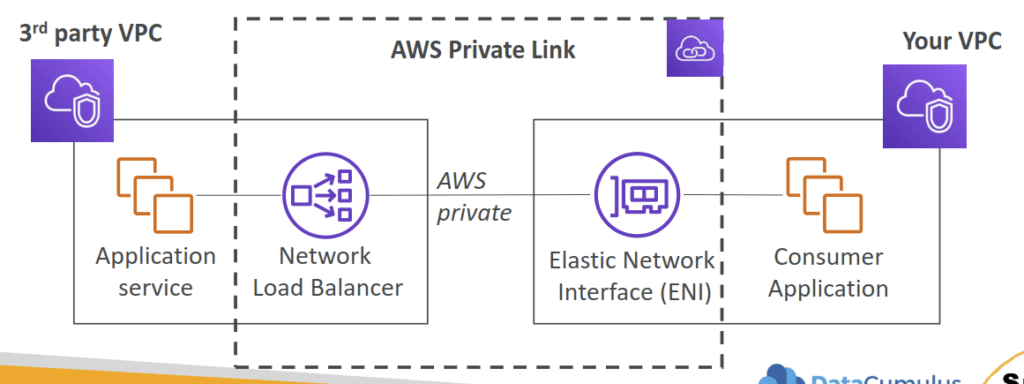
- part of VPC Endpoint Services (VPC interface endpoints)
- Most secure & scalable way to expose a service to 1000s of VPCs
- Does not require VPC peering, internet gateway, NAT, route tables…
- Requires a network load balancer (Service VPC) and ENI (Customer VPC)
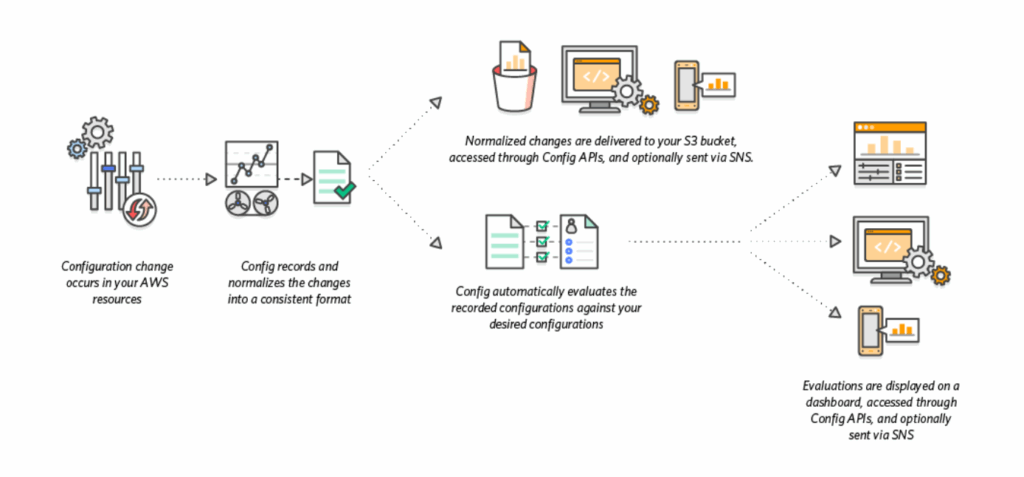
AWS Config
- auditing and recording compliance of your AWS resources
- tracks resource inventory, config history and config change notifications for the purpose of security and compliance. Assess, audit and evaluate the configurations of AWS resources.
- Questions that can be solved by AWS Config:
- Is there unrestricted SSH access to my security groups?
- Do my buckets have any public access?
- How has my ALB configuration changed over time?
- You can receive alerts (SNS notifications) for any changes
- AWS Config is a per-region service
- Can be aggregated across regions and accounts
- Possibility of storing the configuration data into S3 (analyzed by Athena)
- Config Rules
- AWS managed config rules
- custom config rules (must be defined in AWS Lambda)
- allow organizations to define compliance checks as code, enabling continuous monitoring of cloud resources against specific configuration requirements
- The AWS Rule Development Kit (RDK) is a toolkit that simplifies the creation, deployment, and management of AWS Config custom rules. RDK provides a standardized structure for authoring rules in languages such as Python and enables rapid deployment across multiple accounts and Regions. Developers can embed logic that checks specific resource attributes, including whether S3 buckets enforce server-side encryption with AWS KMS customer-managed keys. RDK also supports automated remediation actions, such as applying missing bucket policies or routing alerts to security teams.
- Rules can be evaluated / triggered
- Upon config change
- and/or: at regular time intervals
- AWS Config Rules does not prevent actions from happening (no deny)
- Configuration Recorder
- Stores the configurations of your AWS resources as Configuration Items
- Configuration Item – a point-in-time view of the various attributes of an AWS resource. Created
whenever AWS Config detects a change to the resource (e.g., attributes, relationships, config.,
events…) - Custom Configuration Recorder to record only the resource types that you specify
- Must be created before AWS Config can track your resources (created automatically when you enable AWS Config using AWS CLI or AWS Console)
- Remediations
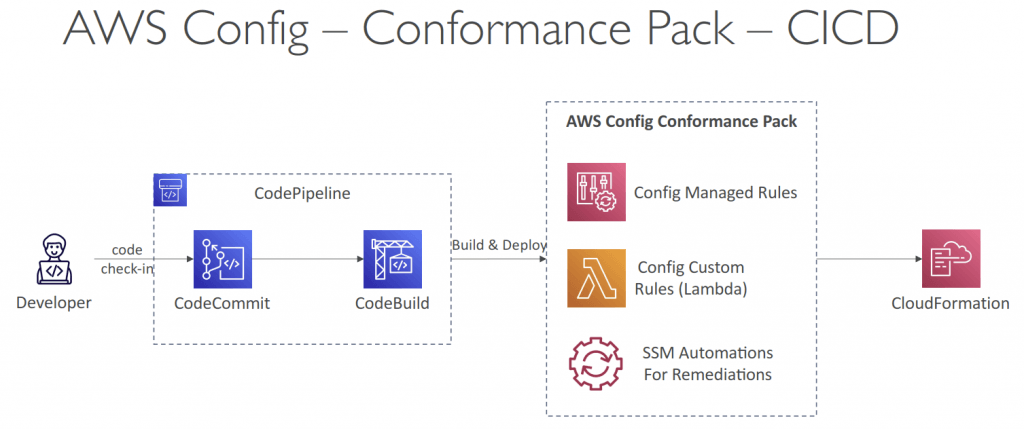
- Automate remediation of non-compliant resources using SSM Automation Documents
- Use AWS-Managed Automation Documents or create custom Automation Documents
- Tip: you can create custom Automation Documents that invokes Lambda function
- You can set Remediation Retries if the resource is still non-compliant after auto-remediation
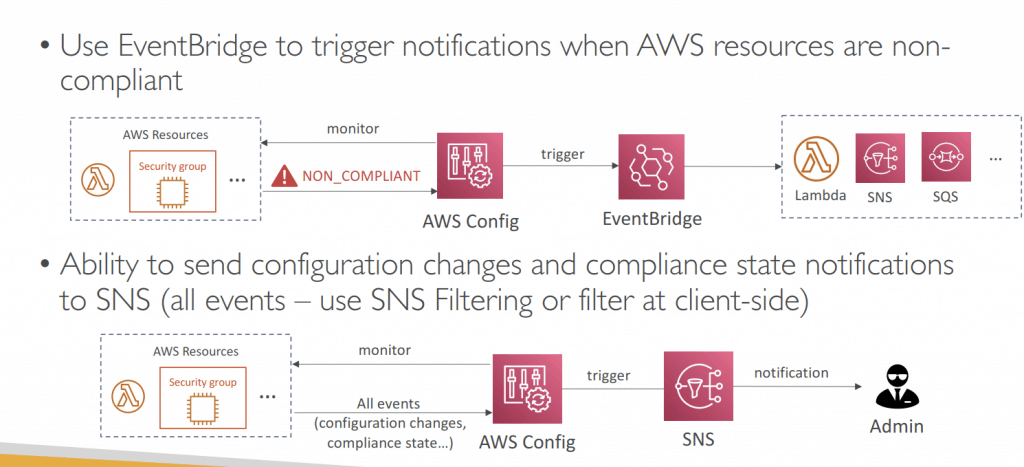
- Notifications
- Use EventBridge to trigger notifications when AWS resources are non-compliant
- Ability to send configuration changes and compliance state notifications to SNS (all events – use SNS Filtering or filter at client-side)
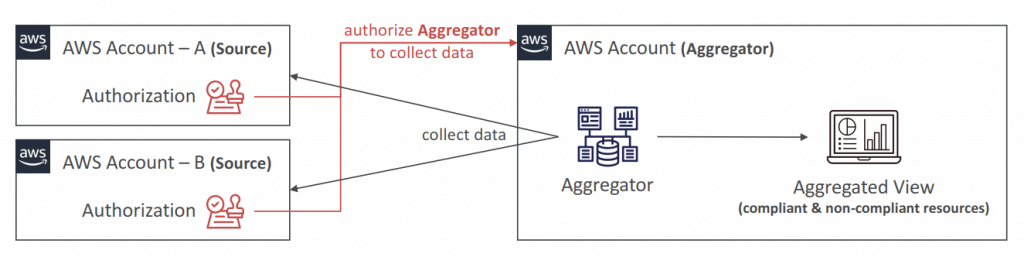
- Aggregators
- The aggregator is created in one central aggregator account
- Aggregates rules, resources, etc… across multiple accounts & regions
- If using AWS Organizations, no need for individual Authorization
- Rules are created in each individual source AWS account
- Can deploy rules to multiple target accounts using CloudFormation StackSets
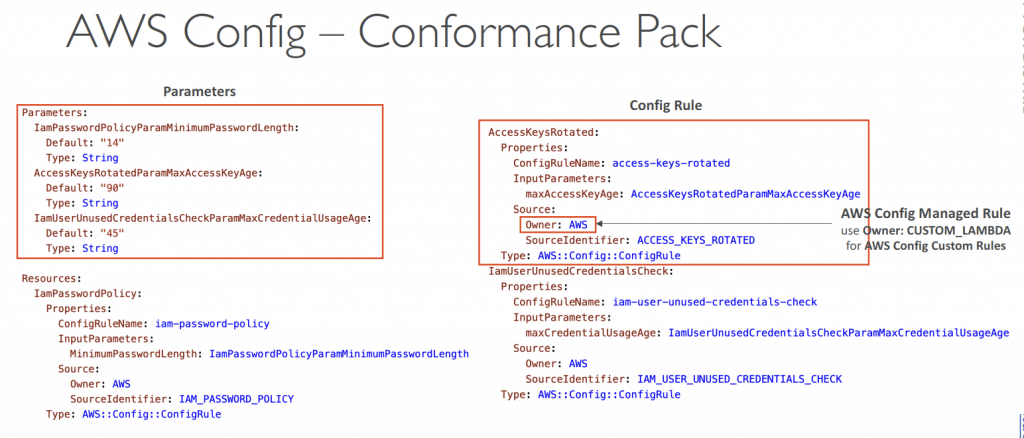
- Conformance Pack
- Collection of AWS Config Rules and Remediation actions
- Packs are created in YAML-formatted files (similar to CloudFormation)
- Deploy to an AWS account and regions or across an AWS Organization
- Pre-built sample Packs or create your own Custom Conformance Packs
- Can include custom Config Rules which are backed by Lambda functions to evaluate whether your resources are compliant with the Config Rules
- Can pass inputs via Parameters section to make it more flexible
- Can designate a Delegated Administrator to deploy Conformance Packs to your AWS Organization (can be Member account)
- Organizational Rules
- manage across all accounts within an AWS Organization
| Organizational Rules | Conformance Packs | |
|---|---|---|
| Scope | AWS Organization | AWS Accounts and AWS Organization |
| Evaluation Type | Evaluate resources against predefined rules that are defined and enforced at Organization level | Evaluate resources against predefined rules that are defined and enforced at the Account level |
| Rules Count | One rule | Many rules at a time |
| Compliance Level | Managed at the Organizational level | Managed at the Account level |
| AWS Config | AWS Trusted Advisor | AWS Inspector | |
|---|---|---|---|
| Purpose | To continuously record and evaluate your AWS resource configurations and the relationships between them. | To provide real-time, actionable recommendations for optimizing your AWS environment across multiple pillars of the AWS Well-Architected Framework. | An automated security assessment service that identifies vulnerabilities, misconfigurations, and unintended network exposure on your workloads. |
| How it works? | It creates a detailed view of your AWS resource configurations, tracks changes, and allows you to create custom rules to assess compliance with your desired settings. | It scans your infrastructure and provides guidance on how to improve your AWS environment based on established best practices. | It continuously scans your applications and EC2 instances to find security flaws, software vulnerabilities, and deviations from AWS security best practices. |
| Key uses | – Tracking resource changes and configuration history. – Ensuring compliance with specific policies (e.g., running only approved AMIs or using encrypted volumes). – Managing resources across multiple accounts and regions. | – Cost Optimization: Identifying underutilized resources to reduce costs. – Performance: Recommending adjustments for better resource utilization. – Security: Alerting you to potential security vulnerabilities and deviations from best practices. – Fault Tolerance & Resilience: Suggesting improvements to your architecture for better availability. – Service Limits: Warning you about potential breaches of service quotas. | – Detecting known vulnerabilities and security issues. – Assessing network accessibility and security posture. – Generating prioritized lists of security findings to help remediate issues. |
- [ 🧐QUESTION🧐 ] prevent CloudTrail from being disabled on some AWS accounts automatically
- Use the
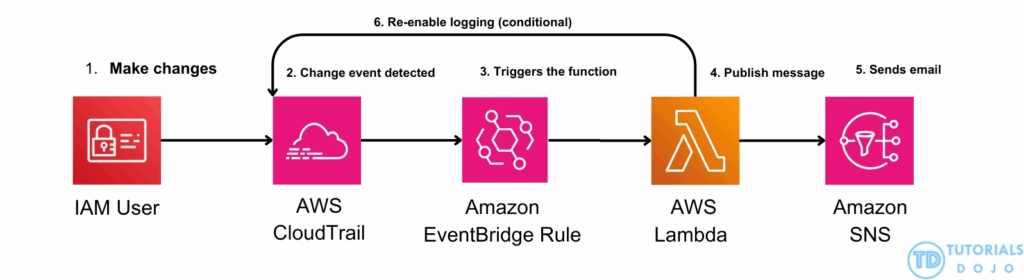
cloudtrail-enabledAWS Config managed rule with a periodic interval of 1 hour to evaluate whether your AWS account enabled the AWS CloudTrail. Set up an Amazon EventBridge rule for AWS Config rules compliance change. Launch a Lambda function that uses the AWS SDK and add the Amazon Resource Name (ARN) of the Lambda function as the target in the Amazon EventBridge rule. Once aStopLoggingevent is detected, the Lambda function will re-enable the logging for that trail by calling theStartLoggingAPI on the resource ARN. - Configuration changes – AWS Config triggers the evaluation when any resource that matches the rule’s scope changes in configuration. The evaluation runs after AWS Config sends a configuration item change notification.
- Periodic – AWS Config runs evaluations for the rule at a frequency that you choose (for example, every 24 hours)
- the
cloudtrail-enabledAWS Config managed rule is only available for theperiodic triggertype and notConfiguration changes
- Use the
Generative AI Security Scoping Matrix
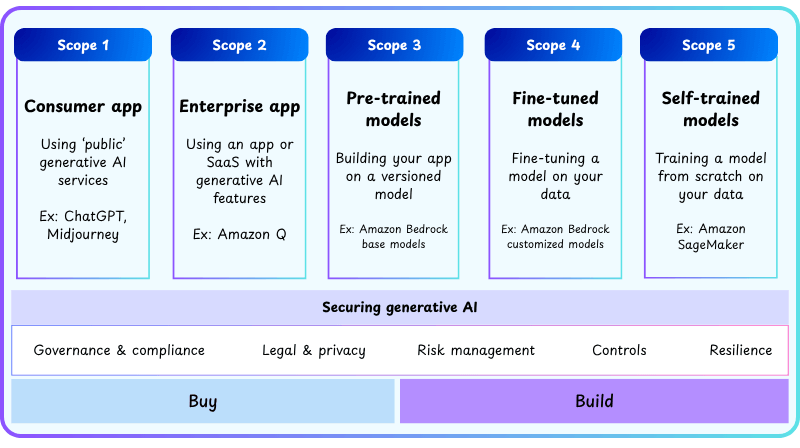
- a framework provided by AWS to help organizations determine their security responsibilities based on how generative AI models are used, the ownership and sensitivity of data, and the level of control over the AI models.
- It serves as a guideline for assessing risks, implementing security controls, and maintaining compliance with internal policies and regulatory requirements.
- The matrix classifies generative AI workloads into five distinct scopes
- Scope 1: Consumer applications
- In this scope, the generative AI model is provided as a publicly accessible service or consumer-facing application, such as a public chatbot or web app offered directly by a cloud provider. The organization has minimal control over the underlying model or infrastructure, and the provider is primarily responsible for security, model updates, and data protection. Organizational responsibility is generally limited to user data policies and ensuring that users understand the terms of service. This scope represents the lowest level of operational responsibility because the enterprise does not handle sensitive data internally.
- Scope 2: Enterprise applications
- Scope 2 involves the use of generative AI through third-party enterprise software or SaaS applications. Here, organizations integrate the AI service into internal workflows without directly managing the model. The key responsibilities include ensuring compliance with vendor contracts, enforcing service-level agreements (SLAs), monitoring the use of organizational data by the AI service, and verifying that vendor data-use policies align with internal compliance requirements. While some security oversight is required, most technical infrastructure and model management remain under the vendor’s control.
- Scope 3: Pre-trained models
- Workloads in Scope 3 utilize foundation or pre-trained models from a provider without modification. Organizations can integrate the models via APIs or managed services, but do not perform fine-tuning or further train the model. Security responsibilities focus on data handling during inference and reviewing licensing or model terms to ensure that proprietary or sensitive data is not inadvertently used for further training by the vendor. Enterprises must understand vendor policies and avoid exposing confidential data, but they are not responsible for managing the model’s architecture or training lifecycle.
- Scope 4: Fine-tuned models
- Scope 4 applies when an organization takes a pre-trained foundation model and fine-tunes it using internal, often proprietary or sensitive data. This increases organizational responsibility because the enterprise now controls both the training data and the modified model. Security and governance requirements include:
- Classifying, encrypting, and controlling access to proprietary datasets.
- Maintaining audit trails of model versions, training processes, and data lineage.
- Securing model deployment endpoints and monitoring inference usage.
- In this scope, tools like Amazon SageMaker JumpStart are critical because they provide pre-trained models that can be securely fine-tuned, deployed, and monitored. Similarly, Amazon OpenSearch Service can provide a secure knowledge base for retrieval during inference while ensuring that data remains internal, access-controlled, and auditable. Scope 4 balances the usability of advanced generative AI models with stringent security and compliance obligations.
- Scope 4 applies when an organization takes a pre-trained foundation model and fine-tunes it using internal, often proprietary or sensitive data. This increases organizational responsibility because the enterprise now controls both the training data and the modified model. Security and governance requirements include:
- Scope 5: Self-trained models
- Scope 5 represents the highest level of responsibility, where an organization trains generative AI models entirely from scratch. Enterprises must manage all aspects of the model lifecycle, including training pipelines, GPU infrastructure, dataset curation, encryption, access control, and governance processes. This scope demands comprehensive oversight of both technical infrastructure and regulatory compliance, because the organization has full ownership of both the model and the data. It is suitable for organizations that require complete control over sensitive data or specialized AI capabilities not available in pre-trained models.
Employ Amazon Bedrock native data privacy features to prevent prompt and output retention, and ensure isolated foundation model interactions.
By ensuring that FM inputs and outputs are not retained and that customer data is never used to train or fine-tune shared foundation models, Amazon Bedrock supports workloads that must prevent data persistence or cross-request leakage. These protections make Bedrock suitable for deploying AI systems in environments that demand strict privacy controls, including finance, healthcare, and public sector operations. Organizations can rely on these safeguards without implementing additional custom sanitization or retention-management processes. Here are some examples of the data privacy features that support these protections.
– Prompts and completions are not stored – Amazon Bedrock does not store or log FM inputs or outputs, ensuring that sensitive content is never retained after invocation.
– Customer data is not used for model training – Inputs provided during FM interactions are not used to train, improve, or fine-tune shared foundation models.
– Data isolation from model providers – Model providers cannot access customer inputs or outputs because all FM invocations are processed in isolated deployment accounts.
– Encryption in transit and at rest – All data passing through Bedrock is encrypted using AWS-managed or customer-managed keys to maintain confidentiality.
– Region-scoped data control – Data is processed in the Region selected by the customer, supporting compliance with geographic data-handling requirements.
– No cross-tenant visibility – Tenant isolation ensures that customer data is not visible to other AWS customers or to the foundation model providers.
These capabilities ensure that sensitive financial data, confidential identifiers, or regulated content processed through foundation models cannot be stored, reused, logged, or unintentionally exposed. As a result, Amazon Bedrock is a strong fit for environments requiring strict non-retention, isolation of FM interactions, and compliance with confidentiality mandates.