Token Efficiency
- Token Estimation and Tracking
- Bedrock has a CountTokens API
- Returns token count for a given request without actually running it
- Different models behave differently
- Costs nothing
- Estimate costs prior to inference
- Optimize prompts to fit within token limits
- Bedrock has a CountTokens API
- CloudWatch tracks
- InputTokenCount
- outputTokenCount
- Token Efficiency Techniques
- Context Window Optimization / Context Pruning
- Chunking RAG data, limiting # of chunks retrieved
- Filtering chunks by metadata to toss irrelevant stuff
- Summarize (or even toss) older parts of conversation history
- Response Size Controls / Response Limiting
- Use maxTokens
- Bake desired length in the prompt (“respond in 50 words or less”)
- Use few-shot examples to illustrate the desired verbosity
- Use JSON output to force a given format / length
- Prompt Compression
- Use a small model to summarize large chats, documents before sending to larger model
- Use Knowledge Bases instead of complete documents in the prompt
- Context Window Optimization / Context Pruning
Cost-Effective Model Selection
- Cost / Capability Tradeoff
- Do you really need the largest, most expensive model?
- If the “smarts” are in RAG and tool usage, maybe a smaller model will do just fine
- Smaller models may also play a role in pre-processing
- Summarization, compression, classification, chunking – doesn’t need PhD-level smarts
- Tiered usage based on query complexity – Dynamic Routing
- aka Intelligent Prompt Routing (This is now a feature in Bedrock as well)
- AWS intelligent prompt routing typically operates only within the same model family and cannot compare or route requests across unrelated models like Titan and Claude
- Route to different models based on the complexity of the query (This is how ChatGPT works under the hood…)
- Many ways to route
- A conditional Flow; Lambda; Agent Squad; Strands
- This is a great application of agents – with a tool to score “complexity”
- aka Intelligent Prompt Routing (This is now a feature in Bedrock as well)
Model Cascading
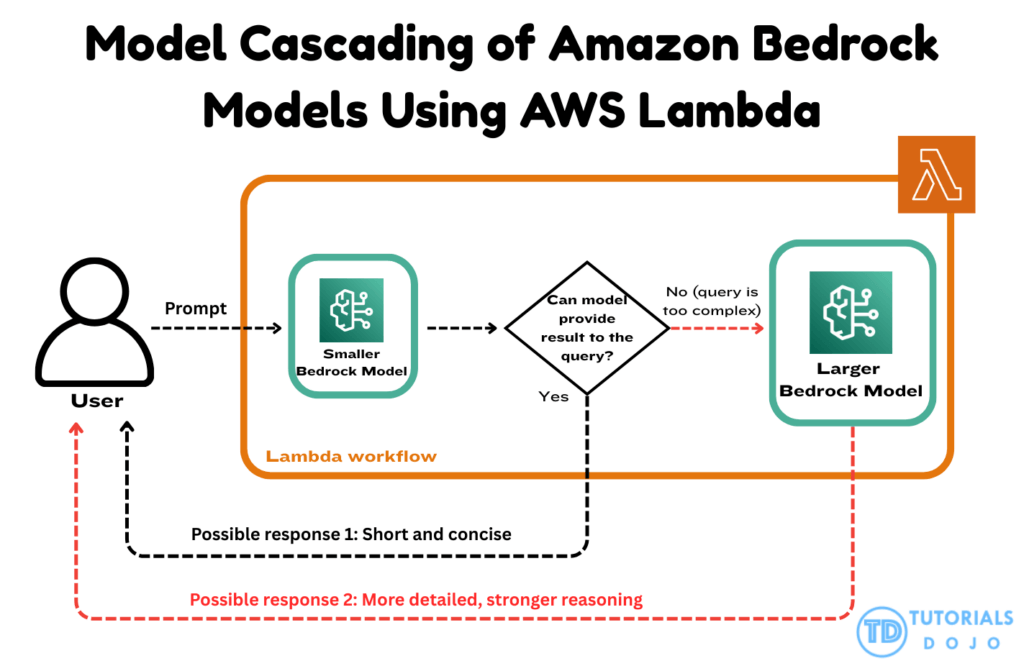
- a common architectural technique in generative AI systems where a smaller, lightweight model handles simple or low-complexity queries first. When the smaller model identifies that a request exceeds its reasoning or generative capacity, the input is escalated to a larger, more capable model.
- This pattern is particularly effective because it minimizes costs by using the larger model only when necessary while keeping latency low for routine interactions. AWS Lambda enables this cascading flow by orchestrating the decision logic between multiple Bedrock models in a serverless, event-driven manner.
- Amazon Bedrock provides access to a variety of foundation models (FMs) through a unified API, enabling developers to invoke smaller or larger models depending on the capabilities needed. This flexible FM-selection mechanism allows organizations to combine cost-efficient inference with high-performance generative reasoning.
- By combining Lambda orchestration with Bedrock’s flexible model invocation, a GenAI workflow can distinguish between routine and high-complexity inputs without relying on heavyweight preprocessing components. The smaller model provides rapid responses for straightforward queries, ensuring low latency and efficient resource utilization. Meanwhile, more complex or analytical requests are routed to a larger foundation model, ensuring higher-quality outputs when deeper reasoning or creative composition is required. This design supports high scalability, predictable performance, and streamlined cost management across large volumes of queries.
- This approach aligns with AWS best practices for building cost-optimized and scalable generative AI systems. Lambda’s event-driven architecture removes operational overhead, and Bedrock’s multi-model access simplifies the orchestration of diverse foundation models within a single pipeline.
Amazon Bedrock provides access to a variety of foundation models (FMs) through a unified API, enabling developers to invoke smaller or larger models depending on the capabilities needed. This flexible FM-selection mechanism allows organizations to combine cost-efficient inference with high-performance generative reasoning.
Resource utilization and throughput
- Batching strategies
- Batch embeddings up for vector stores
- Bedrock Batch Inference
- Submit many prompts together in S3, get responses in S3
- Capacity planning with Bedrock
- Work from desired tokens per minute (TPM), requests per minute (RPM)
- AWS Service Quotas has a Bedrock tool
- Request a quota increase if necessary, or provisioned throughput
- AWS CloudFormation templates can help with capacity planning
- Tensor parallelism
- Shards LLM weights across GPU’s
- Better memory utilization per container
- Provisioned throughput
- Bedrock allows you to provision by Tokens or by Model Units (MU’s) which corresponds to token throughput
- You must provision for customized models
- Useful for consistent performance with high volume
- Utilization monitoring
- CloudWatch is your friend, with dashboards
- AWS Cost Explorer to attribute model costs to business functions
- Auto-scaling
- Serverless solutions like Lambda, Bedrock, OpenSearch serverless, AgentCore
Intelligent Caching Systems
- optimizing large-scale generative AI workloads by reducing redundant foundation model invocations, improving response times, and lowering overall operational costs
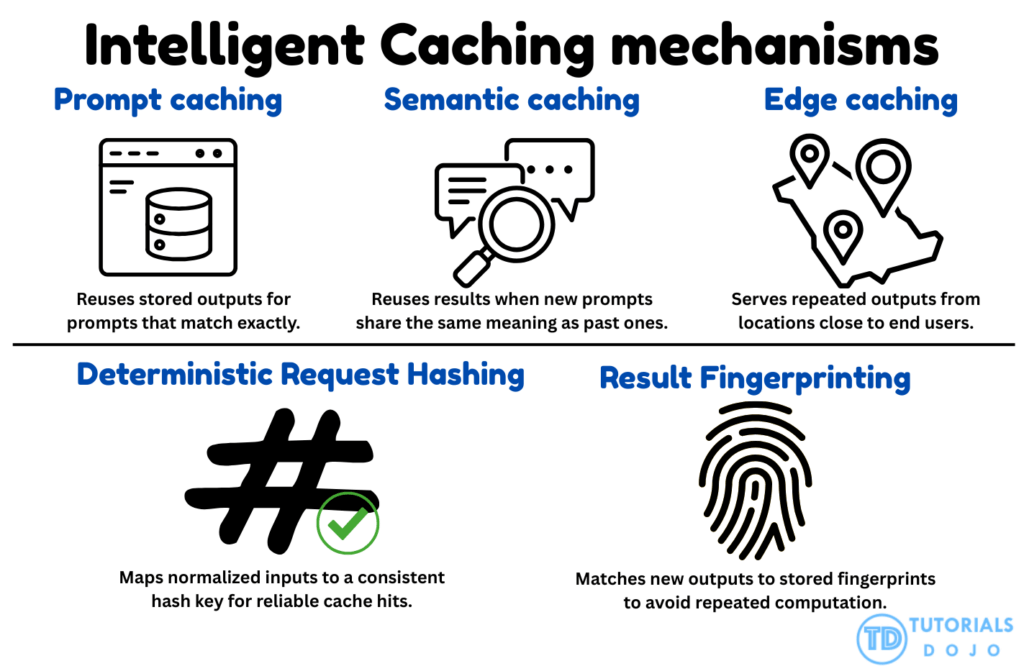
- Prompt Caching
- Improves latency for supported models
- Built into Bedrock
- You cache a prompt prefix
- Static content, like instructions, and few-shot examples
- Like a system prompt
- Place dynamic content at the end
- A cache checkpoint separates the two
- No need to tokenize the prefix again
- You might also cache an uploaded document that is queried repeatedly
- Cached content is discounted per token
- But writes may be more expensive
- Cache reads & writes are monitored in CloudWatch
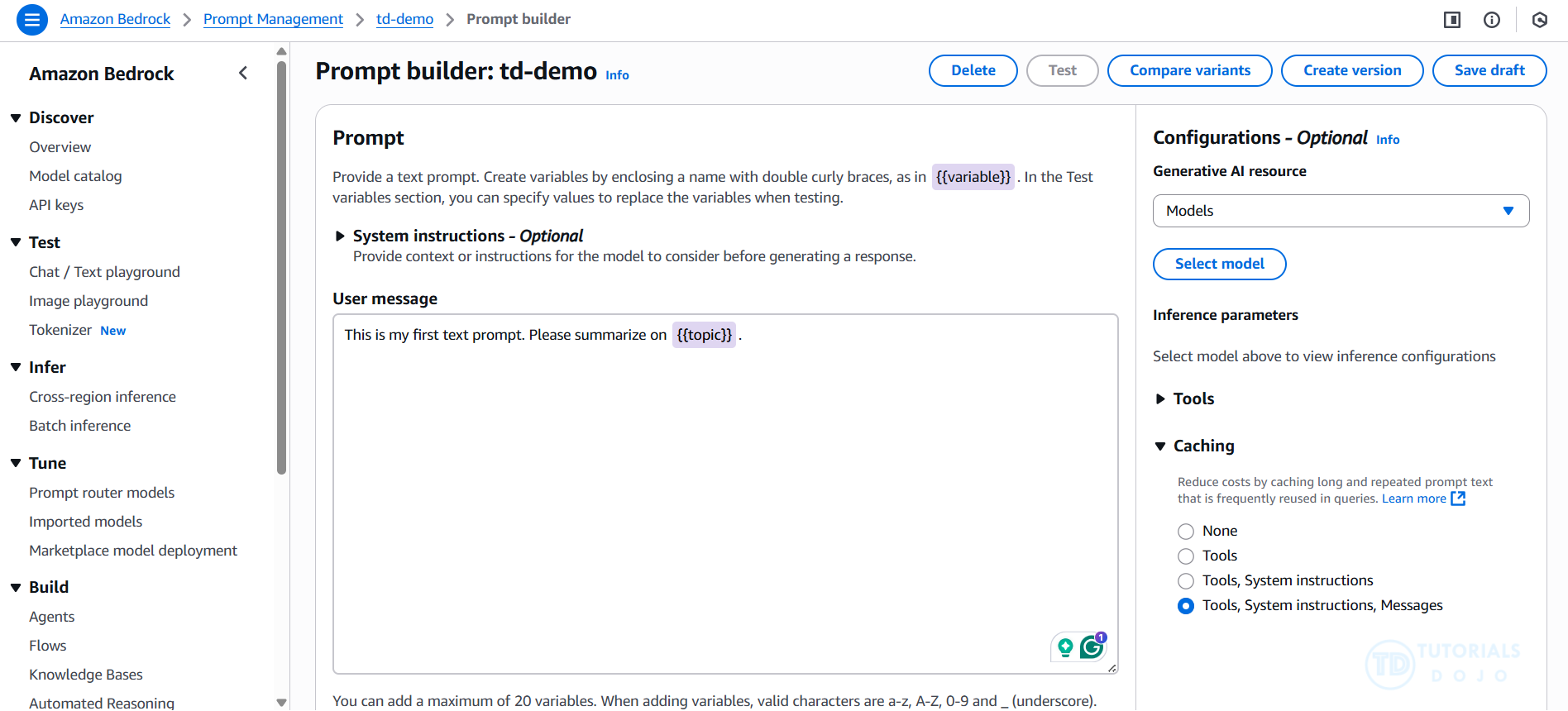
- Prompt caching is an option in Bedrock Prompt Management as well
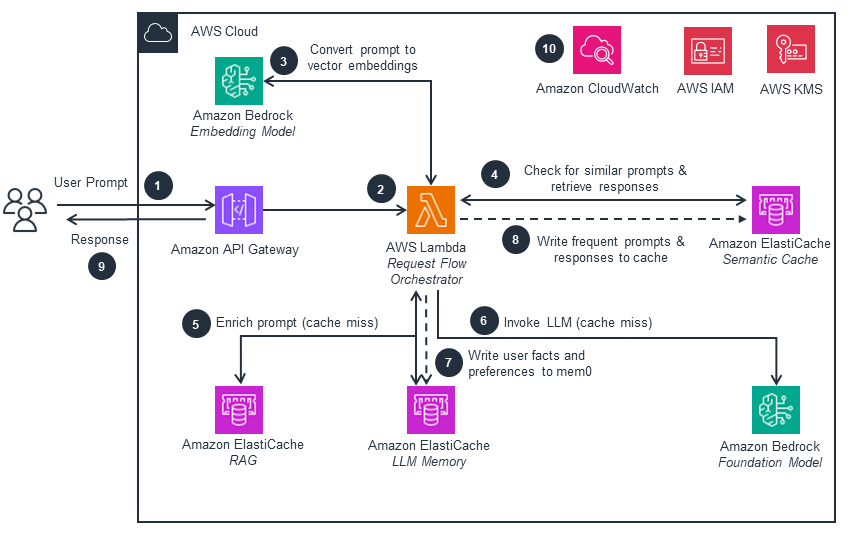
- Prompt Caching is a straightforward yet powerful strategy that stores responses from previously executed prompts. AWS architectures often implement this technique using low-latency data stores such as Amazon DynamoDB or in-memory caches like Amazon ElastiCache. When the system encounters an identical prompt in the future, the cached response is returned instantly rather than performing a new inference call. This approach is especially effective in generative AI workloads where users frequently submit recurring queries or template-based prompts, allowing the platform to reduce unnecessary compute activity and improve overall responsiveness.
- Improves latency for supported models
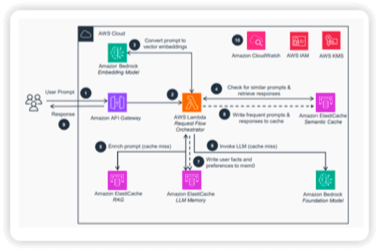
- Semantic Caching
- Cache embeddings of prompts & responses instead of the prompt text
- Store in an in-memory vector store (ElastiCache for Valkey, MemoryDB)
- You *could* use OpenSearch too
- For new prompts, create an embedding, find nearest neighbors in cache, if similarity score > threshold, return cached response
- Tune the similarity threshold carefully
- Balance cache hits with relevant responses
- Make sure the overhead does not outweigh the benefits
- Can dramatically improve latency for some applications
- Semantic Caching identifies when incoming prompts carry the same meaning as previous requests, even if the wording, phrasing, or tone differs. This technique uses vector embeddings, often stored in Amazon OpenSearch Service or other vector-aware databases, to compare the semantic similarity between new and cached queries. If the new prompt is determined to be close enough in meaning to a cached prompt, the system can reuse the existing result without performing another inference call. This greatly improves efficiency in generative AI workloads where users may pose the same question in different ways, ensuring consistent output quality while reducing unnecessary compute operations.
- Benefits
- 1. Reduced latency, as calls to FMs and knowledge bases are minimized.
- 2. Decreased processing time for serving requests, which lowers computing costs—especially in serverless architectures that utilize AWS Lambda functions.
- Cache embeddings of prompts & responses instead of the prompt text
- Edge Caching
- Use CloudFront when you can
- Reduces latency and backend requests
- But wait, isn’t GenAI dynamic? What can you cache?
- Well, some prompts / responses are common and can be cached
- If you have a deterministic request hash, you can bake that fingerprint into a GET request, which CloudFront could cache
- The results can also be fingerprinted to identify when it’s appropriate (based on model configuration values)
- Might want an aggressive TTL if things change often
- There’s more to an app than the LLM piece
- Cache that too
- Edge Caching improves responsiveness by storing frequently accessed outputs in a cache layer that sits close to where user traffic first enters the system. This is often implemented through services like Amazon CloudFront or API Gateway caching, which maintain cached data at strategic network points to minimize round-trip time. When requests repeat, especially during peak periods, the system can serve the cached result immediately instead of sending the request all the way to the backend or invoking the model again. This not only reduces overall latency but also decreases backend load, enabling scalable performance when large numbers of users simultaneously request similar generative AI insights.
- Use CloudFront when you can
- Deterministic Request Hashing
- Deterministic Request Hashing ensures that requests with minor variations, such as formatting differences, whitespace changes, altered parameter ordering, or punctuation shifts, still resolve to the same cache entry. This method typically involves normalizing the input text and generating a stable, repeatable hash value that represents the logical meaning of the request rather than its raw formatting. Because the same hash is produced for equivalent inputs, the system can consistently identify existing cached outputs. This prevents unnecessary foundation model invocations for requests that are essentially identical, providing predictable performance and improved efficiency across distributed generative AI systems.
- Result Fingerprinting ??
- Result Fingerprinting generates a unique representation, or “fingerprint,” of a model’s output, allowing the system to detect when future inference attempts would produce the same or nearly identical result. These fingerprints are stored in a high-speed key-value store so the platform can quickly determine whether a cached output can be reused. This technique is particularly useful in cases where model outputs are stable, repetitive, or predictable—such as financial summaries, advisory recommendations, or classification-style results. By comparing new outputs against stored fingerprints, the system can avoid redundant model execution and maintain efficient resource usage across high-volume generative AI workloads.
| Feature | Prompt Caching | Semantic Caching | Deterministic Result Hashing | Result Fingerprinting |
|---|---|---|---|---|
| Primary Goal | Reduce pre-fill latency and cost | Avoid LLM calls for similar queries | Ensure consistency and debuggability | Intellectual property (IP) protection |
| Matching Logic | Exact prefix match (KV cache) | Vector similarity (Embeddings) | Cryptographic hash of input/params | Intrinsic/behavioral model signatures |
| Implementation | Model provider/Inference engine layer | Application layer (Vector DB) | Middleware/Harness layer | Model-tuning or black-box probing |
| Key Benefit | Fast processing of large static contexts | High hit rates for natural language | Reliable, reproducible automation | Traceability and ownership verification |
Prompt caching is an optional feature available for supported models on Amazon Bedrock that helps reduce inference response latency and input token costs. By storing portions of your context in a cache, the model can utilize this cache to avoid the need to recompute inputs. This not only helps the model but also allows Amazon Bedrock to pass along some compute savings, resulting in lower response times.
Prompt caching is particularly beneficial for workloads that involve long and frequently reused contexts across multiple queries. For instance, in a chatbot scenario where users can upload documents and ask questions about them, processing the document for each user input can be time-consuming. With prompt caching, you can store the document in the cache, so any future queries that reference the document won’t require reprocessing.
When using prompt caching, you are charged at a reduced rate for tokens retrieved from the cache. However, tokens that are written to the cache may incur a higher charge than uncached input tokens, depending on the model. Any tokens that are neither read from nor written to the cache will be charged at the standard input token rate for that specific model.
If you choose to utilize prompt caching, Amazon Bedrock will create a cache composed of cache checkpoints. These checkpoints serve as markers that define the contiguous subsection of your prompt that you want to cache, commonly referred to as a prompt prefix. It is important that these prompt prefixes remain static between requests; any alterations to the prompt prefix in subsequent requests will lead to cache misses.
Cache checkpoints have specific minimum and maximum token requirements, which vary depending on the model being used. You can only establish a cache checkpoint if your total prompt prefix meets the minimum token requirement. For instance, the Anthropic Claude 3.7 Sonnet model requires at least 1,024 tokens per cache checkpoint. This means you can define your first cache checkpoint after 1,024 tokens and your second after 2,048 tokens. If you attempt to add a cache checkpoint before meeting the minimum token requirement, your inference will still succeed, but the prefix will not be cached.
The cache has a five-minute Time To Live (TTL), which resets with each successful cache hit. During this period, the context in the cache is preserved. If no cache hits occur within the TTL window, your cache will expire.
Building responsive and resilient AI systems
- Use Amazon Bedrock Intelligent Prompt Routing
- Direct requests to different models based on complexity
- Keep your prompts concise
- Put the important stuff first in case it gets truncated
- Context pruning
- Ditch RAG results that aren’t valuable or are redundant
- Limit response sizes
- Break up complex tasks
- Optimizing Retrieval Performance
- Optimize your indices
- Hybrid search improves relevancy
- You can also have your own custom hybrid scoring functions
- Query pre-processing
- Normalize query to the corpus in terms of style
- Break up multi-part questions – don’t try to look up two different things at once
- Filter out irrelevant stuff
- Reduce ambiguity
- Keyword extraction for hybrid search
- Optimizing for Specific Use Cases
- Use A/B testing to evaluate changes
- Bedrock Evaluations
- CloudWatch Evidently
- Some common parameters
- Temperature – Amount of randomness in the response (0=not random, 1 = “creative”)
- Top_p – “Nucleus sampling” – Probability threshold for token candidates (specify this OR temperature)
- Top_k – How many token options to sample from
- Use A/B testing to evaluate changes
Optimizing Foundation Model system performance
- API call profiling
- Find patterns in your requests
- This might identify opportunities for caching, batching, RAG improvements
- Use structured input and output
- JSON, XML templates
- Improves efficiency and accuracy
- Chain of Thought instruction patterns
- “Reasoning” – forcing the FM to show the process step by step produces more accurate conclusions for complex reasoning tasks
- Feedback loops capturing user satisfaction & behavior
- Use this to identify effective prompts
- UltraServers (Trn2, P6e-GB200)
- Connects EC2 instances hosting your AI/ML workloads
- Low latency, high bandwidth accelerator interconnects
- Use Lambda endpoint lifecycle management
- Can automatically initialize endpoints
- Download model artifacts from S3
- About SageMaker
- SageMaker AI can deploy models up to 500GB
- Adjust container health check and download timeout quotas to allow enough time to download
- 3rd party model parallelization supported
- Triton, FasterTransformer, DeepSpeed
- Instance type guidance
- Large models: ml.p4d.24xlarge (GPU)
- Small models (ie, named entity recognition): ml.c5.9xlarge (CPU)
- SageMaker AI can deploy models up to 500GB
Exponential Backoff
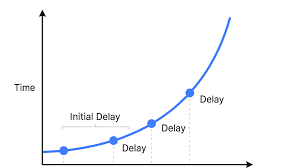
- How to retry failed API calls in a controlled manner
- Don’t flood the poor broken service
- Custom retry policies in AWS SDK clients
- Start at 100ms
- Backoff factor 2
- Max retry count of 3-5 attempts
- Jitter +- 100ms to prevent synchronized retries across clients
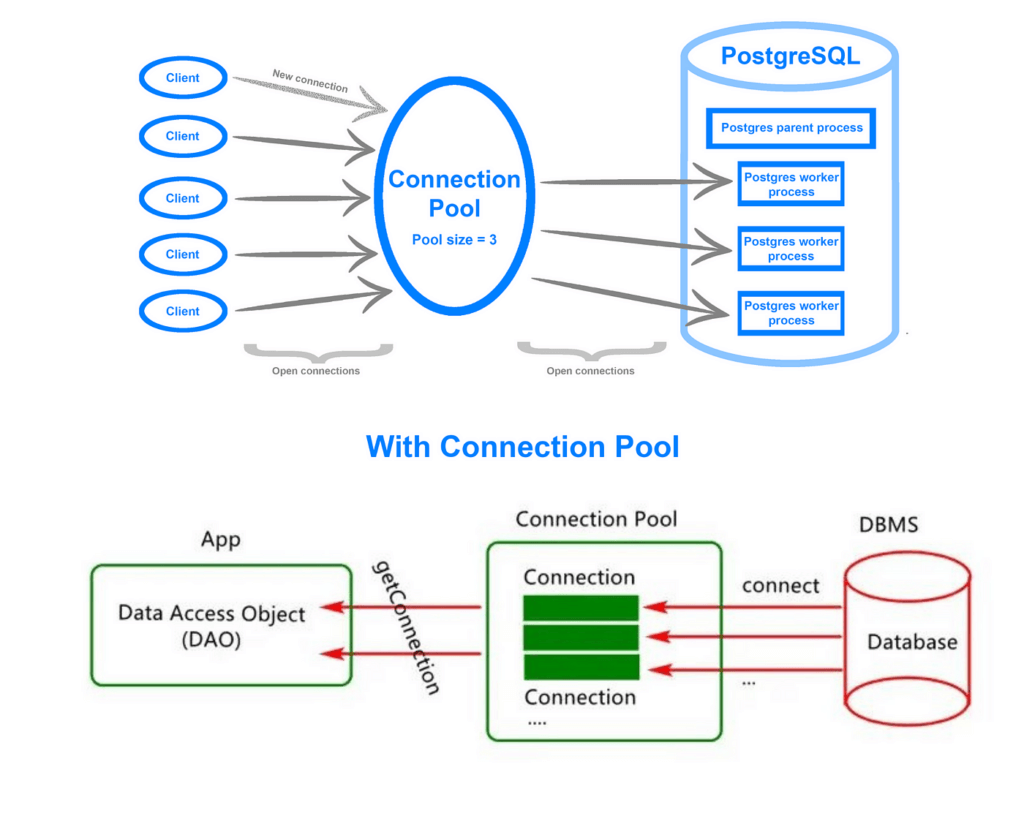
Connection Pooling
- For HTTP clients
- Instead of establishing a new connection for every request, maintain a pool of open connections that are used all the time.
- 10-20 connections per instance
- Connection TTL 60-300 seconds
- Balances resource utilization with connection re-use efficiency
Bedrock Cross-Region Inference
- Distrubue workloads across AWS regions during service interruptions
- or restrictions from quotas or peak usage in specific regions
- Things like Amazon Organizations SCP’s (service control policies) can block regions on you and prevent it from working :/
- Make sure SCP allows all regions you are enabling, or leave the region unspecified
- Inference profiles
- Specific geography: selects optimal region within your geography
- Useful if you have data residency requirements
- Standard pricing
- Global: selects optimal commercial AWS region
- Maximized throughput
- 10% cost savings
- Doesn’t work with provisioned throughput
- Pricing based on where you called it
- Data is encrypted in transit, and logged in CloudTrail
- Specific geography: selects optimal region within your geography
- With cross-Region inference, you can choose either a cross-Region inference profile tied to a specific geography (such as US or EU), or you can choose a global inference profile. When you choose an inference profile tied to a specific geography, Amazon Bedrock automatically selects the optimal commercial AWS Region within that geography to process your inference request. With global inference profiles, Amazon Bedrock automatically selects the optimal commercial AWS Region to process the request, which optimizes available resources and increases model throughput.
- Both types of cross-region inference operate using inference profiles. These profiles specify a foundation model (FM) and the AWS Regions where requests can be directed. When running model inference in on-demand mode, your requests may be subject to service quotas or may be affected during peak usage times. Cross-Region inference allows you to efficiently handle unexpected traffic surges by leveraging computing resources across different AWS Regions.
- Geographic cross-region inference keeps data processing within specified geographic boundaries (US, EU, APAC, etc.) while providing higher throughput than single-region inference. This option is ideal for organizations with data residency requirements and compliance regulations.
AWS Cloud Control API
- a uniform, service-agnostic API layer that provides standardized create, read, update, delete, and list (CRUD-L) operations for AWS resources across multiple services.
- It enables consistent resource modeling, predictable operations, and multi-service orchestration through a single interface rather than managing each AWS service API directly.
- Cloud Control API also supports features such as request batching, concurrency management, resource drift detection, and versioned handlers—capabilities that help maintain consistent performance during large-scale or repetitive resource operations.
- AWS Cloud Control API MCP Server
- extends this interface for Model Context Protocol–based tools, allowing LLM-driven systems, developer automations, and infrastructure analysis tools to programmatically inspect, visualize, and modify AWS resources in a standardized way.
- By exposing Cloud Control API capabilities through MCP, the MCP server becomes a critical dependency for toolchains that require real-time, structured AWS resource state. However, this also means that any delays, throttling, or inconsistent API responses directly impact tool responsiveness and overall developer experience.
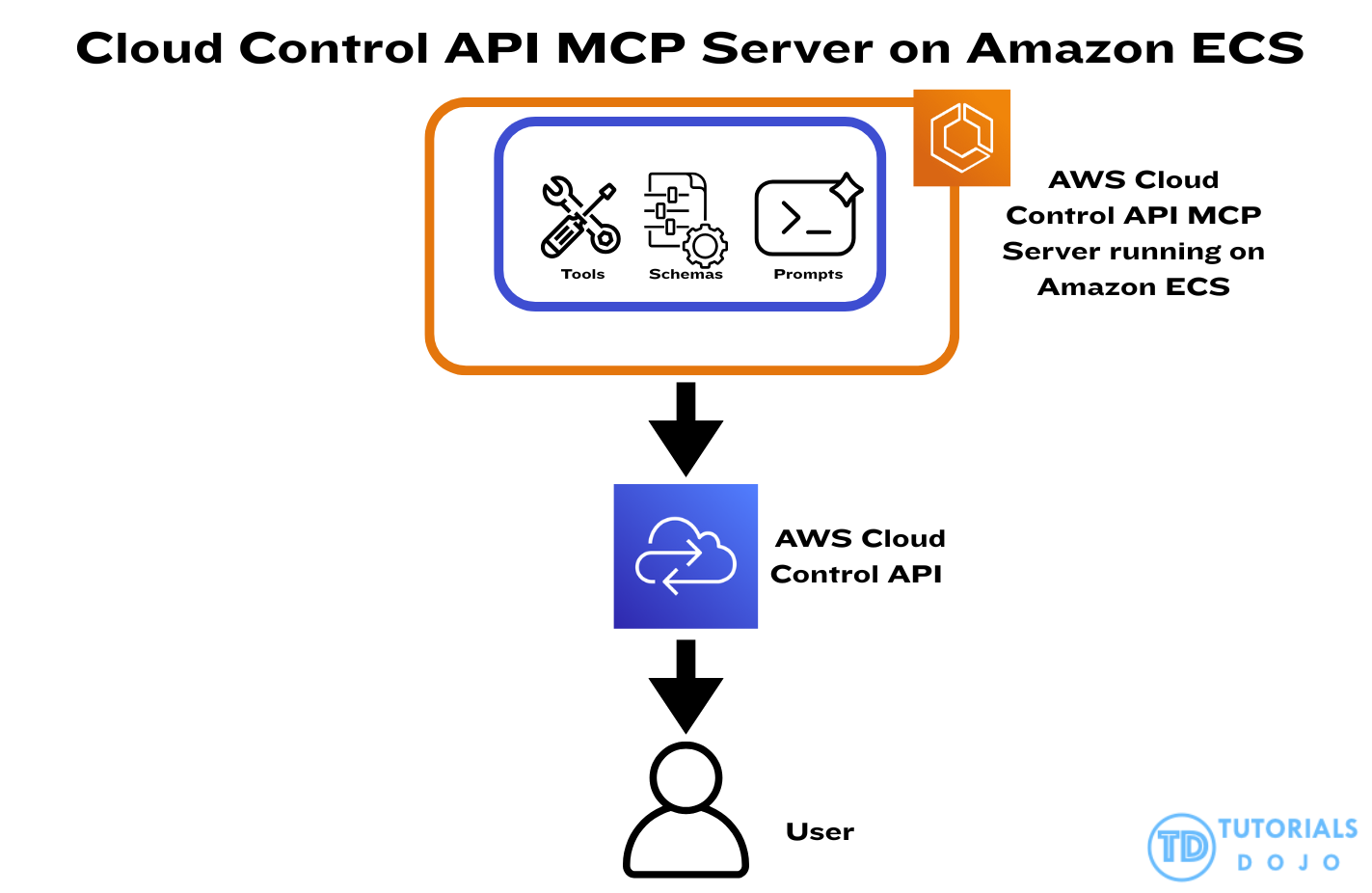
In scenarios involving large or multi-region resource inventories, Cloud Control API requests may experience increased latency, incomplete responses, or throttling when concurrency is not properly controlled. Developer platforms relying on MCP servers require low-latency, predictable responses to enable accurate code generation, configuration validation, and automated reasoning. When request volume spikes or multiple resource-intensive workflows execute simultaneously, the underlying compute layer must be capable of scaling quickly while enforcing stable batching and concurrency patterns for Cloud Control API interactions.
This is where Amazon Elastic Container Service (Amazon ECS) becomes essential. Amazon ECS provides a fully managed, scalable container orchestration platform that can automatically adjust compute capacity through Service Auto Scaling. By running MCP servers on an auto-scaled ECS service, workloads can expand during heavy Cloud Control API activity, ensuring sufficient compute resources to handle concurrent inventory queries and complex tool operations. ECS also works seamlessly with CloudWatch scaling policies, allowing the platform to react to CPU usage, memory pressure, or custom request-rate metrics. When combined with Cloud Control API batching, concurrency controls, and versioned handlers, ECS creates a stable and elastic execution layer that maintains consistent throughput and predictable performance even under high-volume, multi-Region operational loads.